If you have ever ended up spending hours trying to figure out why your audio is crackling, your games are lagging, or an external device refuses to show up, you already know the pain of outdated drivers.
We know that digging through random manufacturer websites to find the right version is a headache nobody wants. That is where a dedicated driver updater comes in handy, and Driver Booster’s latest release aims to fix all those annoying system glitches with zero effort.
Before we dive into the details, let us look at some core things you should know about this release.
Scanning Results and Interface
Whenever you first open the app, it gives you a clean, modern dark-mode interface that is super easy to navigate. Hitting the main scan button fires up a quick diagnostic check of your entire machine using Driver Booster to see what needs attention.
The reengineered scanning engine moves fast, checking your components against a massive database of over 23 million drivers. It sorts through everything from your graphics card to your motherboard chipset without making you wait around.
Managing and Updating Your Drivers

Once the scan wraps up completely, it will basically give you a very clear breakdown of everything that is out of date on your PC. You can see exact version numbers and release dates right next to each piece of hardware.
What’s really cool is that the actual new multi-version system is a lifesaver here because it lets you pick between the absolute latest high-performance build or a rock-solid stable release. You can review the list and update everything in one single click using the big red button at the top.
Game Boost for Better Performance
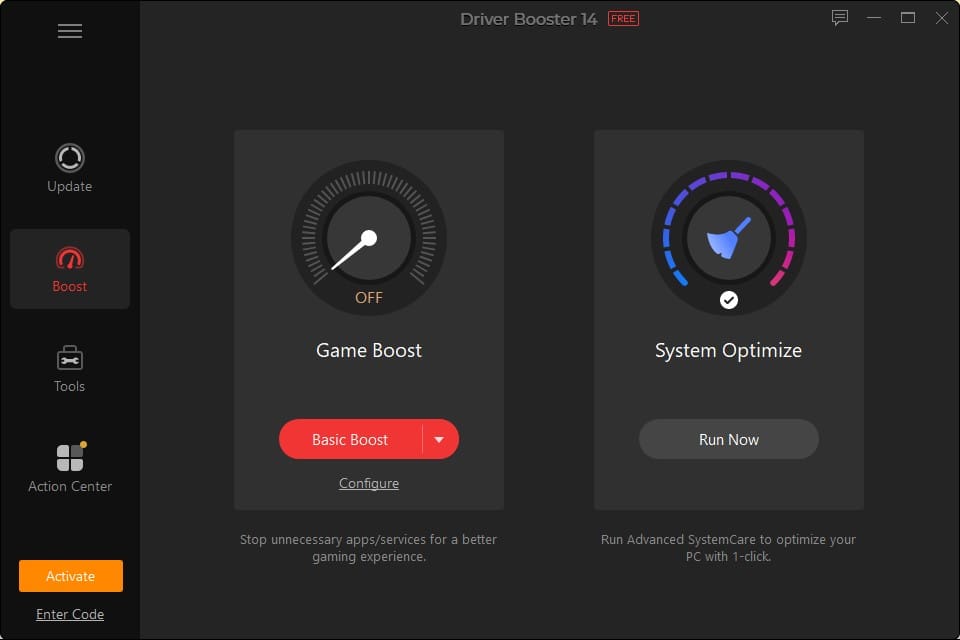
If you ever notice that your games have been stuttering or dropping frames out of nowhere, then the dedicated Game Boost tab is worth checking out. It gives you a quick visual toggle to shut down unnecessary background apps and Windows services that hog your system resources.
You can also customize the boost settings depending on what you are playing! What it does is that it frees up RAM and CPU cycles so your hardware can focus entirely on rendering your games smoothly.
Explore the Built-In Tools
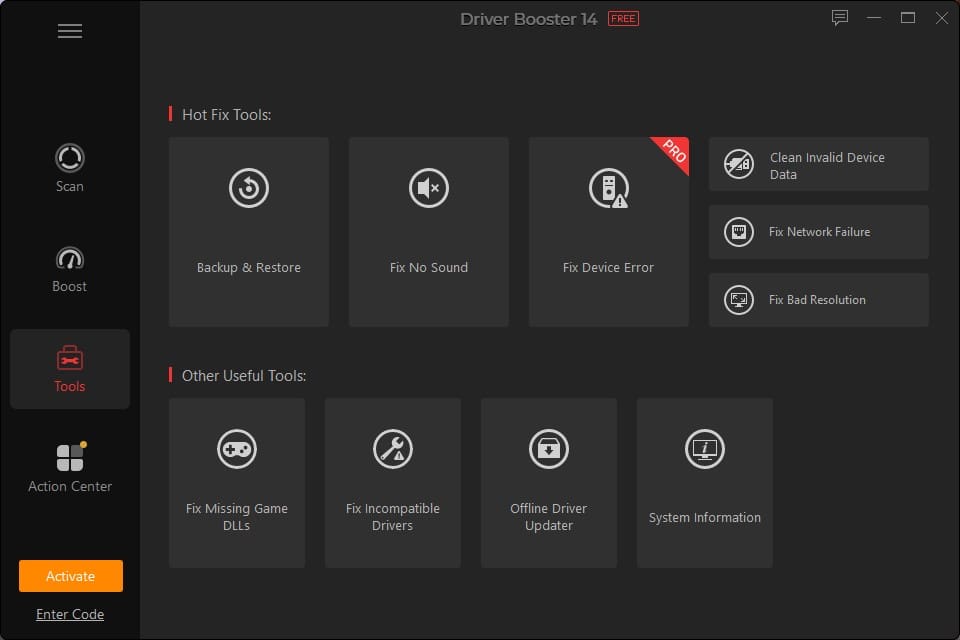
Beyond just updating drivers, the software also comes in handy with an entire toolbox dedicated to troubleshooting common Windows issues. Everything is neatly categorized under hot-fix tools and other useful utilities.
Fix Missing Game DLLs

In my opinion, perhaps one of the coolest additions in this version is the dedicated DLL repair utility. If you have ever tried launching a game only to get a sudden crash error about a missing file, you know how frustrating it is.
This tool scans your system for over 680 common DLLs and 60+ mainstream game components. What it also does is that it basically detects missing files in real time and lets you patch them instantly so your games actually boot up on the first try.
Backup and Restore Safety
Let’s be real, nobody wants an update to brick their system, which is why the safety features are so important. Before any changes are made, the software automatically creates a backup of your current drivers and sets a restore point.
If a new driver does cause any weird behavior or device conflicts, you can just hop into the restore tab and roll everything back to a stable state with a single click. It gives you complete peace of mind while tinkering.
Clean Invalid Device Data
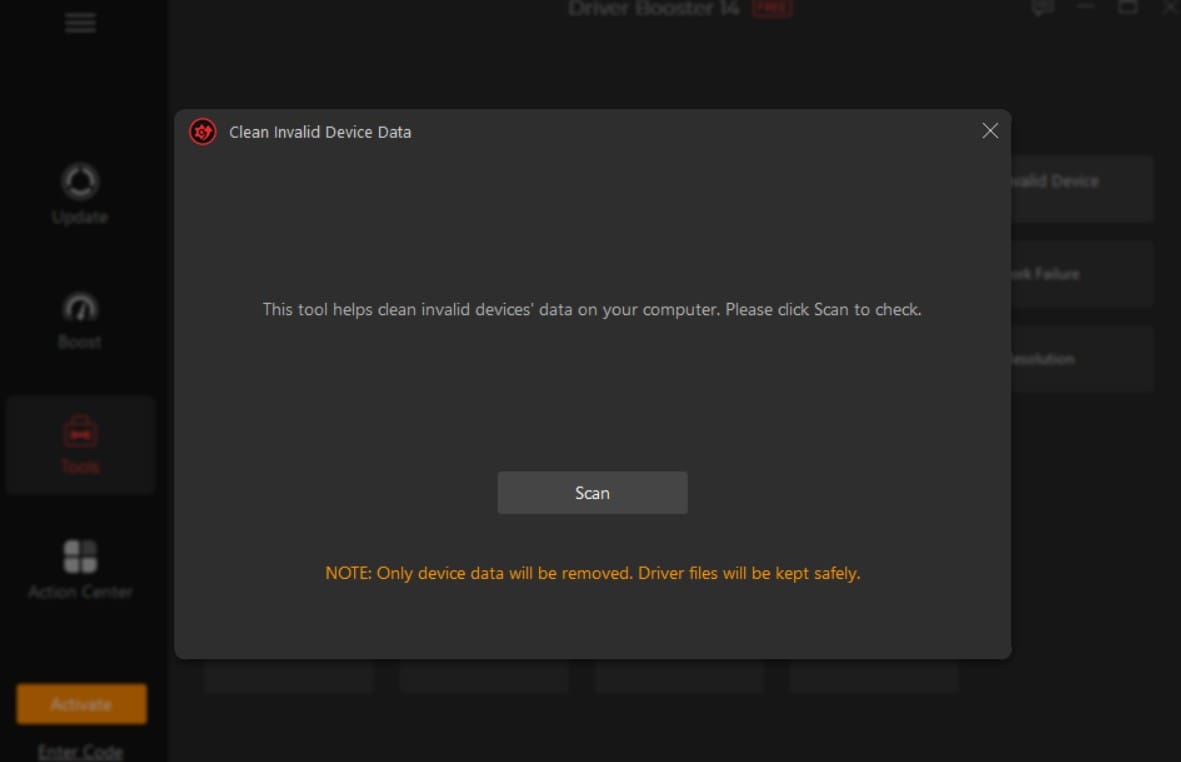
Over the months and years, your PC accumulates a ton of phantom hardware profiles from old USB drives, mice, and accessories you no longer use. These leftover registry entries just clutter things up.
The invalid device data cleaner scans your system for this hidden digital junk. Clearing it out helps keep your Device Manager tidy and ensures your system only tracks hardware that is actually plugged in.
Fix No Sound Issues
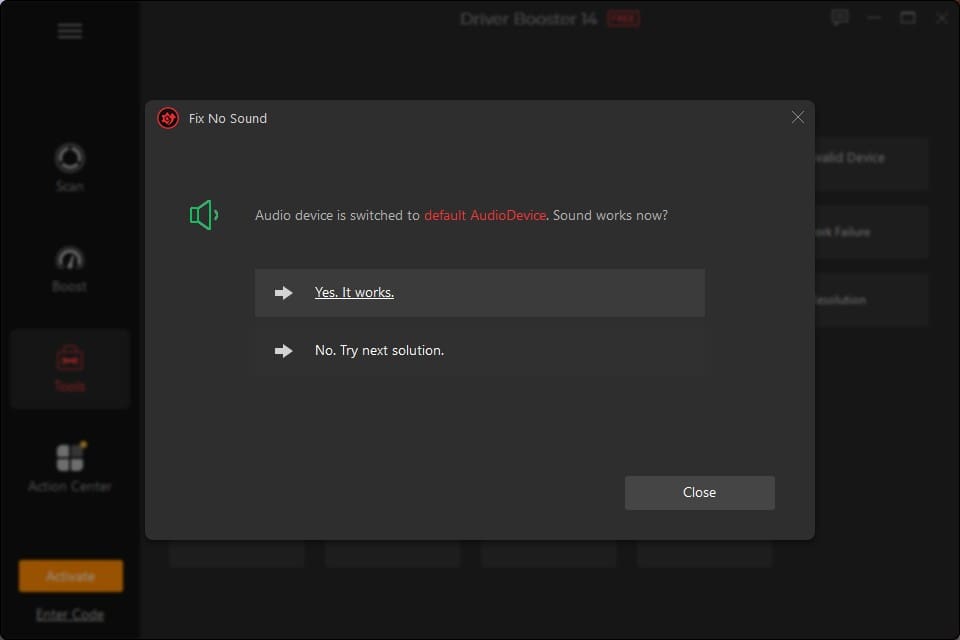
Audio failures are easily one of the most annoying bugs you can encounter on a Windows machine. When your speakers suddenly stop working out of nowhere, troubleshooting can feel like guesswork.
The dedicated sound repair tool cycles through audio endpoints, resets faulty services, and re-establishes your default output device. It guides you through a quick prompt to check if your sound is back online.
Offline Driver Updater

If you just reinstalled Windows or set up a fresh PC without an active internet connection, you usually end up stuck because your network card lacks a driver.
In this situation, the offline tool will let you export your hardware profile from the disconnected machine, move it to a PC with internet access to download the exact files needed, and then install them smoothly offline. It is an absolute lifesaver for fresh builds.
System Information at a Glance
Sometimes you just need a quick hardware rundown without installing a bulky third-party diagnostic app. The system info tool basically does that and pulls up all your core specs in one clean window.
It gives you a transparent look at your processor, memory modules, motherboard, and display adapters. It is great for double-checking your hardware details before downloading specific software or drivers.
Fixing Network Failures

Dropped connections, slow Wi-Fi speeds, and failing Ethernet adapters can really interrupt your workflow instantly. When network drivers get corrupted, your internet connectivity takes a direct hit.
The network failure repair utility targets your communication hardware specifically. It resets corrupt network stacks and pushes fresh drivers to get your connection stable again without needing a full system reinstall.
Silent Mode and Background Updates
If you hate pop-ups or notifications while you are working on a deadline or deep in a gaming session, Silent Mode has your back. It just lets the software run quietly in the background.
You can schedule automated scans or let it handle routine maintenance during your PC’s idle time. It does its job completely uninterrupted so you can stay focused on what you are doing.
Frequently Asked Questions
1) Is Driver Booster 14 free or not?
There is a fully functional free version available for everyday users. If you want access to advanced game optimization features and priority updates, you can upgrade to the PRO version.
2) Does Driver Booster 14 support Windows 10 and 11?
Yes, it is fully optimized and compatible with both Windows 10 and Windows 11 systems.
3) How to update Driver Booster?
Open Driver Booster, click the menu icon in the top-left corner, and select Check for Updates from the drop-down menu.
Final Thoughts
Keeping your Windows machine running smoothly does not have to feel like a chore. Between the massive driver database, handy game boost features, and practical repair utilities, Driver Booster handles the heavy lifting so you do not have to mess around with manual device management. If you want an easy way to keep your hardware updated and dodge annoying system glitches, it is definitely a handy utility to keep in your toolkit.
Was this helpful?
Last updated on 26 October, 2026
Read Next
 6 Ways to Fix Excel Not Scrolling Smoothly on Windows
Basic Fixes Restart PC: Restart your PC to eliminate temporary bugs and glitches.
6 Ways to Fix Excel Not Scrolling Smoothly on Windows
Basic Fixes Restart PC: Restart your PC to eliminate temporary bugs and glitches.
 7 Ways to Fix Microsoft Edge Running Slow on Windows 11
Basic Fixes Update or reinstall Microsoft Edge: Open the Microsoft Store, search Microsoft Edge browser, and click Update.
7 Ways to Fix Microsoft Edge Running Slow on Windows 11
Basic Fixes Update or reinstall Microsoft Edge: Open the Microsoft Store, search Microsoft Edge browser, and click Update.
 3 Ways to Fix “Steam Must be Running to Play This Game” Error
Basic Fixes: Ensure Steam is installed on your computer: If you play Steam games, ensure the client is installed on your computer.
3 Ways to Fix “Steam Must be Running to Play This Game” Error
Basic Fixes: Ensure Steam is installed on your computer: If you play Steam games, ensure the client is installed on your computer.
 3 Ways to Fix Microsoft Edge Keeps Running in Background Issue
Basic Fixes: Stop Edge using Task Manager: You can use Task Manager to check Edge's resource usage and stop it from running in the background if it is using too
3 Ways to Fix Microsoft Edge Keeps Running in Background Issue
Basic Fixes: Stop Edge using Task Manager: You can use Task Manager to check Edge's resource usage and stop it from running in the background if it is using too
 How to Fix “Wireless AutoConfig Service Not Running” Issue on Windows 11
Basic Fixes Reboot PC: Press the Windows + X shortcut to open the Power User Menu, select Shut down or sign out, and click Restart.
How to Fix “Wireless AutoConfig Service Not Running” Issue on Windows 11
Basic Fixes Reboot PC: Press the Windows + X shortcut to open the Power User Menu, select Shut down or sign out, and click Restart.
 How to Prevent Users From Running Certain Programs on Windows 11
Method 1: Prevent Users From Running Certain Programs via the Group Policy Editor The Local Group Policy Editor on Windows makes it easy to apply system-wide changes on a computer.
How to Prevent Users From Running Certain Programs on Windows 11
Method 1: Prevent Users From Running Certain Programs via the Group Policy Editor The Local Group Policy Editor on Windows makes it easy to apply system-wide changes on a computer.
 What Is Optional Diagnostic Data, and Do I Need It Running?
Windows 11 (as well as previous versions) has built-in reporting systems that send user information to Microsoft.
What Is Optional Diagnostic Data, and Do I Need It Running?
Windows 11 (as well as previous versions) has built-in reporting systems that send user information to Microsoft.
 What to Do When the iSCSI Service Is Not Running
When it comes to network storage and accessing virtual drives, the Microsoft iSCSI service is one of the most important services out there.
What to Do When the iSCSI Service Is Not Running
When it comes to network storage and accessing virtual drives, the Microsoft iSCSI service is one of the most important services out there.
The article above may contain affiliate links which help support Guiding Tech. The content remains unbiased and authentic and will never affect our editorial integrity.