


Method 1. Update Comment Preferences
Adobe Acrobat Commenting section allows you to use the logged-in user as the author’s name. It is useful when many people edit the document, and you want to ensure each is captured in the details.
Step 1: Open the PDF document in which you want to update the comment preferences or add a comment.
Step 2: After opening the PDF, click the Edit tab at the top left and select Preferences from the menu.

Step 3: From the Preferences window, click Commenting from the Categories menu.
Step 4: Under the Making Comments section, check the box for Always use Log-in Name for Author name option and save the changes.

Method 2. Update Comment Properties in Adobe Acrobat
You can update the comment properties to edit comments on a particular PDF document.
Step 1: Click the Comment icon from the Acrobat’s toolbar to the right on a PDF.
Step 2: Type a comment in a preferred section of your PDF and click Post.

Step 3: Click the three horizontal dots menu on the comment box and select Properties.

Step 4: Select the General tab of the Sticky Note Properties dialog box.
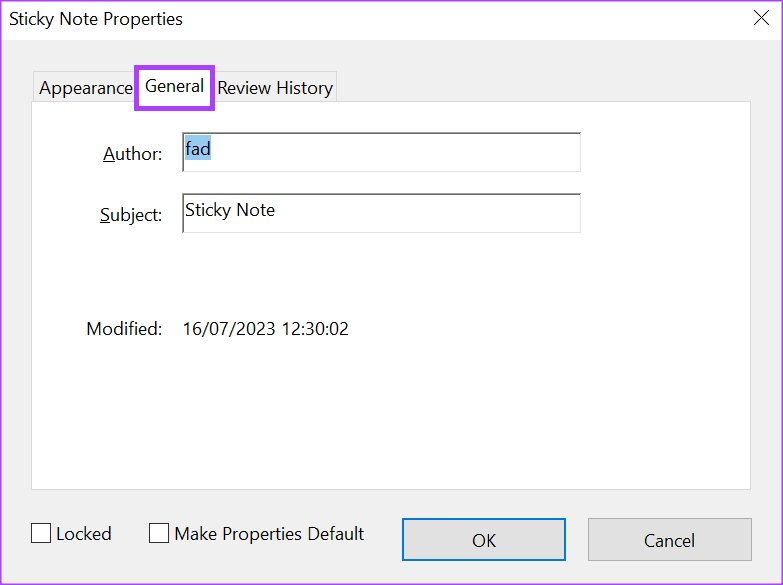
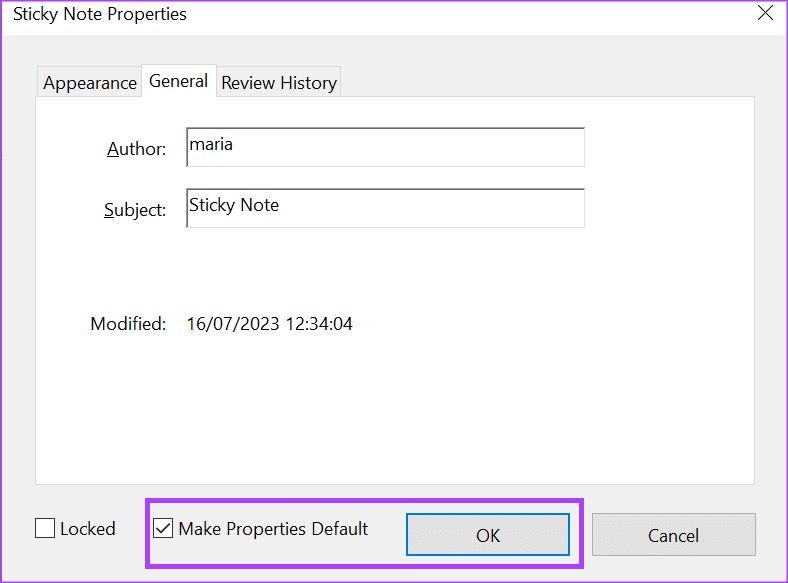
Step 5: In the Author field, enter a new name, tick the Make Properties Default box, and click OK to save your changes.
Method 3. Change the Author Name for Existing Comments in Adobe Acrobat
Step 1: Open the PDF. Click the Comment icon on the Adobe Acrobat toolbar at the right, which will show all comments on the file.

Step 2: Click the Sort icon and select Author.

Step 3: Select the first comment with the Author name you want to edit, then hold down the Shift button on your keyboard while you select the other comments by the same author.

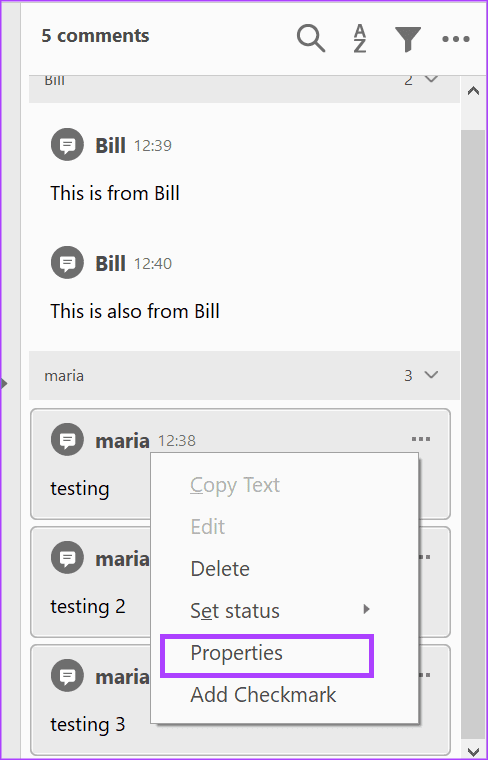
Step 4: On one of the selected comment boxes, right-click and select Properties.
Step 5: Select the General tab of the Sticky Note Properties dialog box.
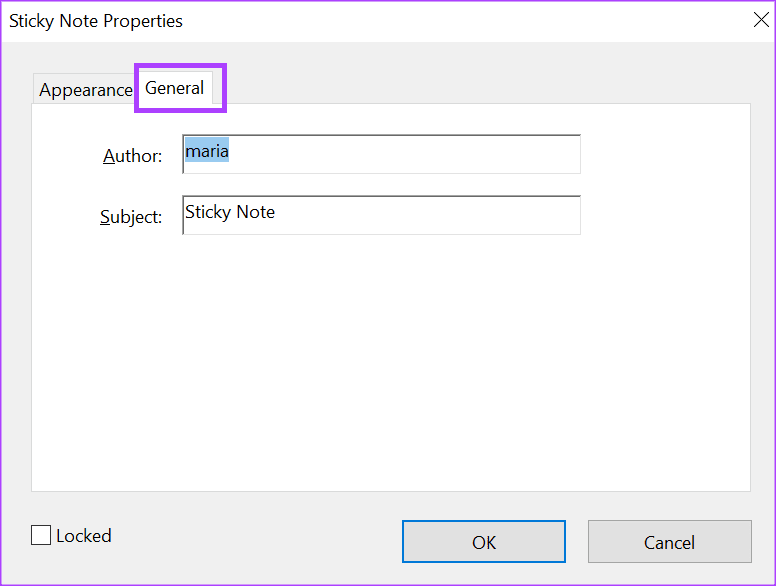
Step 6: In the Author field, enter a new name and click OK to save your changes.

Was this helpful?
Last updated on 03 September, 2024
1 Comment
Leave a Reply
Read Next
 How to Disable or Remove Recent Files in Adobe Reader and Acrobat DC
Remove Recent Files in Adobe Reader Desktop Step 1: On the Recent list, hover over the shortcut you want to delete.
How to Disable or Remove Recent Files in Adobe Reader and Acrobat DC
Remove Recent Files in Adobe Reader Desktop Step 1: On the Recent list, hover over the shortcut you want to delete.
 How to Insert a Word File into a PDF Using Adobe Acrobat
How to Insert Microsoft Word as an Attachment into a PDF using Adobe Acrobat To insert a Word document into a PDF, use the Tools tab on Adobe Acrobat.
How to Insert a Word File into a PDF Using Adobe Acrobat
How to Insert Microsoft Word as an Attachment into a PDF using Adobe Acrobat To insert a Word document into a PDF, use the Tools tab on Adobe Acrobat.
 How to Add or Remove PDF Background Using Adobe Acrobat
Change Background in a PDF File If you have an Adobe Acrobat Pro subscription, you can change the background color of your PDF using the Edit PDF tool.
How to Add or Remove PDF Background Using Adobe Acrobat
Change Background in a PDF File If you have an Adobe Acrobat Pro subscription, you can change the background color of your PDF using the Edit PDF tool.
 Looking for Adobe Acrobat Alternative? Check out This Great AI Powered UPDF Editor
When it comes to PDFs, Adobe Acrobat is one of the first tools that comes to mind.
Looking for Adobe Acrobat Alternative? Check out This Great AI Powered UPDF Editor
When it comes to PDFs, Adobe Acrobat is one of the first tools that comes to mind.
 How to Edit the Author Name in Microsoft Word
https://youtu.be/szJtvGVtXgA How to Add, Change, and Delete the Author Name in a New Word Document If you are creating a new document, you can change the author’s name before working
How to Edit the Author Name in Microsoft Word
https://youtu.be/szJtvGVtXgA How to Add, Change, and Delete the Author Name in a New Word Document If you are creating a new document, you can change the author’s name before working
 How to Enable Scrolling By Default in Adobe Acrobat DC and Reader DC
Switching to your preferred page mode in Adobe Acrobat DC and Acrobat Reader DC often disables continuous scrolling.
How to Enable Scrolling By Default in Adobe Acrobat DC and Reader DC
Switching to your preferred page mode in Adobe Acrobat DC and Acrobat Reader DC often disables continuous scrolling.
 How to Fit Full Page to Window By Default in Adobe Acrobat DC and Reader DC
Adobe Acrobat DC and Acrobat Reader DC prefer fitting pages by width.
How to Fit Full Page to Window By Default in Adobe Acrobat DC and Reader DC
Adobe Acrobat DC and Acrobat Reader DC prefer fitting pages by width.
 How to Open Files in Separate Windows on Adobe Acrobat Pro, Standard, and Reader DC
The tabbed-view in Adobe Acrobat Pro, Standard, and Reader DC is a mixed bag.
How to Open Files in Separate Windows on Adobe Acrobat Pro, Standard, and Reader DC
The tabbed-view in Adobe Acrobat Pro, Standard, and Reader DC is a mixed bag.
The article above may contain affiliate links which help support Guiding Tech. The content remains unbiased and authentic and will never affect our editorial integrity.


Somehow I have managed to lock some of the comments whose name I want to change, but not all of them, so I can’t do a global change. If I go one by one (there are over 200 of them…), I can change the ones that aren’t locked, but not the ones that are. How do I easily find the ones that are locked and unlock them? The “Make this setting default” box is not checked on any of them, so there’s nothing to uncheck.