The Sony PlayStation 5 is an excellent gaming console, although it is sensitive to power outages. That’s where a UPS (Uninterruptible Power Supply) comes into the picture, which provides backup power to your PS5 in the event of a power outage. Let’s take a look at the best UPS for PS5 you can buy right now.
Vertiv Liebert PST5-660MT120
- Power: 660VA | Max Output: 400W
- Total Outlets: 8 | USB Port: Yes
- Built-in Display: Yes

The Vertiv Liebert PST5-660MT120 is a small but powerful UPS. It is easy to set up and use, and it comes with several features that make it a great option for gamers. The UPS offers a peak output of 660VA/400W, and correspondingly, it should power your PS5 and a basic monitor with ease.
The PST5-660MT120 gets a total of eight outlets. Of the lot, four outlets get battery backup, while the other four come equipped with surge protection. It also has a USB port that you can use to plug in your DualSense controller’s charging cable. Additionally, the PST5-660MT120 UPS comes with a basic LCD display. You can use it to easily monitor estimated run time, load capacity, battery status, and input/output voltage and frequency.
APC BE600M1
- Power: 600VA | Max Output: 330W
- Total Outlets: 7 | USB Port: Yes
- Built-in Display: No
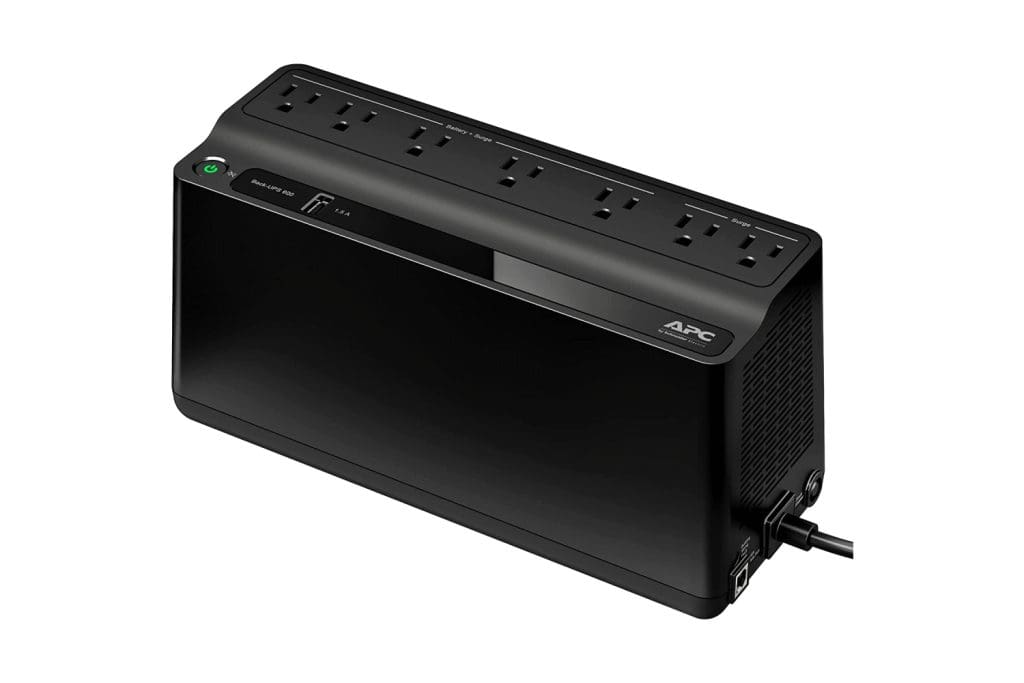
The APC BE600M1 is among the most recommended UPS on the market. While not as powerful as the Vertiv Liebert PST5-660MT120 – at 600VA/330W – it should still have enough power to keep your PS5 running.
The UPS ships with a total of seven power outlets. Off the lot, five outlets offer battery backup. The other two outlets get surge protection. You also get a USB port with a peak current of 1.5A. Note that the UPS can be connected to your Windows or macOS computer. You can then use the company’s PowerChute software to monitor your UPS usage and get detailed stats.
Amazon Basics Standby UPS
- Power: 600VA | Max Output: 360W
- Total Outlets: 8 | USB Port: No
- Built-in Display: No

If you need a basic backup UPS for your PS5 during power outages, consider opting for the Amazon Basics Standby UPS. The unit consists of a total of eight outlets, four of which are surge-protected/battery-backup outlets. The others are standard surge-protected outlets.
One thing to note here is that a couple of ports are stacked quite close to each other. As such, you might have issues plugging in wide plugs together. What’s more, the UPS doesn’t come with a USB port or a built-in display like other options on this list.
CyberPower EC850LCD
- Power: 850VA | Max Output: 510W
- Total Outlets: 12 | USB Port: No
- Built-in Display: Yes
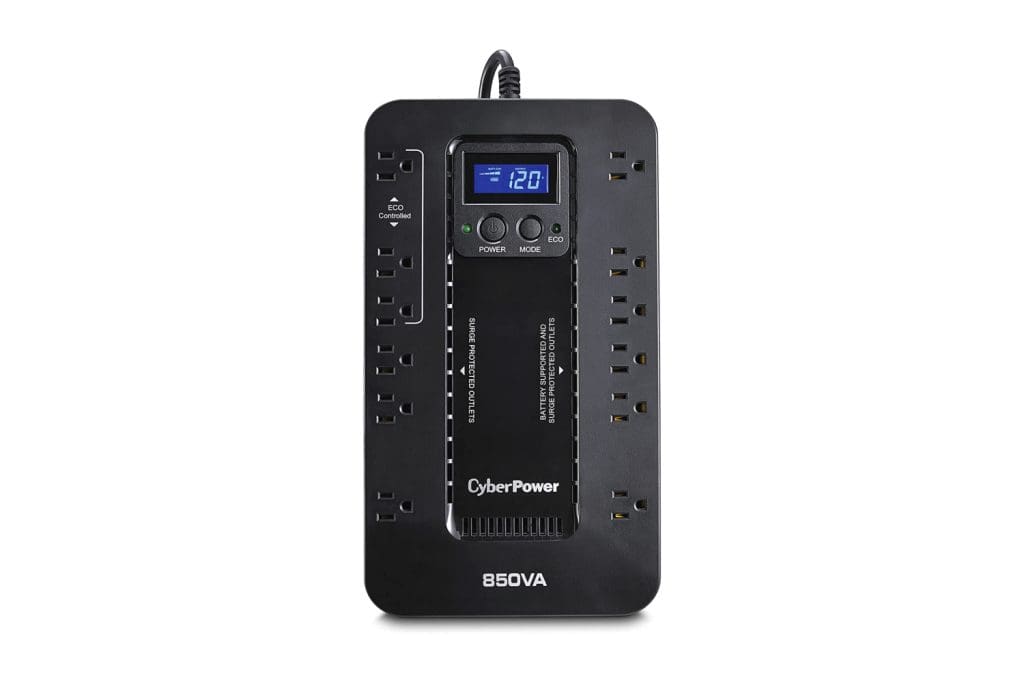
The CyberPower EC850LCD is one of the most affordable UPSes you can buy to power your PS5, TV, and a couple of other appliances simultaneously. The device has 12 power outlets, half of which support surge protection and battery backup. The EC850LCD also features a multifunctional LCD panel.
The display can provide basic stats about your battery and power consumption. For more advanced stats, you can hook up the UPS to your PC. Similar to APC, CyberPower’s PowerPanel software helps you check the status of your UPS and even schedule automatic shutdowns if need be. The EC850LCD UPS also comes with an ECO mode which is enabled automatically when the UPS detects that your connected computer or PS5 isn’t drawing power or is in rest mode.
APC BVK950M2
- Power: 950VA | Max Output: 480W
- Total Outlets: 6 | USB Port: Yes
- Built-in Display: No

The APC BVK950M2 offers a peak output of 480W, which is slightly lower than what you’d get with the CyberPower EC850LCD. However, it’s still enough to power up your PS5 and TV, along with a handful of other accessories and appliances. The APC BVK950M2 comes with a total of six outlets, each offering battery backup and surge protection.
Add to that, all the ports support Automatic Voltage Regulation (AVR) as well. As such, the UPS can safeguard your pricey gadgets seamlessly. In terms of ports, the UPS comes with a USB-A port and a more modern USB-C port. Speaking of which, you can connect the UPS to your computer via the USB connector on the BVK950M2’s rear. Doing so will allow you to tweak the device’s settings as well as monitor the UPS.
CyberPower CP1000AVRLCD
- Power: 1000VA | Max Output: 600W
- Total Outlets: 9 | USB Port: No
- Built-in Display: Yes

The CP1000AVRLCD should be at the top of your wishlist if you prioritize the best battery backup. With a peak output of 600W, the UPS can keep your PS5 and TV running without any hassles. Similar to the APC BVK950M2, the CyberPower CP1000AVRLCD comes with AVR support for five of its nine outlets.
These five outlets also come with support for both battery backup and surge protection. The CyberPower CP1000AVRLCD also has a multifunctional display that you can use for a lot of things. The panel displays detailed information on battery and power conditions, while also showcasing the estimated runtime. The company also offers a Connected Equipment Guarantee in case of any damage to the appliances connected to your UPS.
FAQs
AVR stands for Automatic Voltage Regulation. It essentially helps a UPS to regulate the input voltage. This can help to protect your UPS battery as well as the connected devices from damage caused by power fluctuations
According to Sony, while the PlayStation 5 is rated for 350W, the PS5 only draws about 220 watts of power at its peak.
A UPS is not required for a PS5, but it can be a good idea if you live in an area with frequent power outages or fluctuations. It will provide battery backup for your PS5 in the event of a power outage, so you can save your game and safely shut down your console.
For basic tasks, yes. A 600VA UPS can handle a peak load of around 330W. Considering the fact that the PS5 only uses 220W at its peak, a 600VA UPS should do the job. However, if you’re running multiple appliances off the UPS, such as your TV and router, you’d be better off investing in a bigger UPS that can handle the load while also giving you sufficient backup time to save your progress and turn off your system safely.
Was this helpful?
Last updated on 27 April, 2024
Read Next
 6 Best UPS for Wi-Fi Routers and Modems
A dedicated UPS can prevent internet downtime if your home experiences short power cuts or voltage surges.
6 Best UPS for Wi-Fi Routers and Modems
A dedicated UPS can prevent internet downtime if your home experiences short power cuts or voltage surges.
 6 Best UPS for Gaming PCs for Uninterrupted Gaming
A reliable UPS acts as your gaming PC's guardian angel, shielding it from power fluctuations, surges, and unexpected outages.
6 Best UPS for Gaming PCs for Uninterrupted Gaming
A reliable UPS acts as your gaming PC's guardian angel, shielding it from power fluctuations, surges, and unexpected outages.
 5 Best UPS for Synology NAS
Synology NAS (Network Attached Storage) is an excellent way to create a centralized location on the same network.
5 Best UPS for Synology NAS
Synology NAS (Network Attached Storage) is an excellent way to create a centralized location on the same network.
 How to Allow or Block Pop-ups in Chrome (Desktop and Mobile)
Enable or Disable Pop-up Blocker in Chrome for Desktop Enabling the pop-up blocker on Chrome ensures that Google screens every website you visit for pop-ups by default.
How to Allow or Block Pop-ups in Chrome (Desktop and Mobile)
Enable or Disable Pop-up Blocker in Chrome for Desktop Enabling the pop-up blocker on Chrome ensures that Google screens every website you visit for pop-ups by default.
 How to Block or Allow Pop-Ups on Microsoft Edge
How to Block Pop-Ups on Microsoft Edge Method 1: Block Pop Ups in Settings Step 1: Click on the three dots icon on the toolbar > select Settings.
How to Block or Allow Pop-Ups on Microsoft Edge
How to Block Pop-Ups on Microsoft Edge Method 1: Block Pop Ups in Settings Step 1: Click on the three dots icon on the toolbar > select Settings.
 How to Allow or Block Pop-ups and Redirects on Opera
How to Allow or Block Pop-Ups and Redirects on Opera By default, Opera does not require you to block ads and pop-ups as it protects you from these annoying contents.
How to Allow or Block Pop-ups and Redirects on Opera
How to Allow or Block Pop-Ups and Redirects on Opera By default, Opera does not require you to block ads and pop-ups as it protects you from these annoying contents.
 5 Best Charging Cables for PS5 DualSense Controller That You Can Buy
Unlike the Xbox controllers, the Sony PlayStation 5 DualSense controllers come with a rechargeable battery.
5 Best Charging Cables for PS5 DualSense Controller That You Can Buy
Unlike the Xbox controllers, the Sony PlayStation 5 DualSense controllers come with a rechargeable battery.
 How to Check DualSense Controller Battery on PS5 or PC
How to Check the DualSense Controller Battery on PS5 Checking the battery level of your DualSense controller on a PS5 is fairly straightforward, as you'd expect.
How to Check DualSense Controller Battery on PS5 or PC
How to Check the DualSense Controller Battery on PS5 Checking the battery level of your DualSense controller on a PS5 is fairly straightforward, as you'd expect.
The article above may contain affiliate links which help support Guiding Tech. The content remains unbiased and authentic and will never affect our editorial integrity.