Server racks are built for storing and mounting servers. When used correctly, they can also accommodate other networking equipment like routers, modems, load balancers, or satellites of mesh routers. Apart from providing a safe enclosure for all your equipment, network, and server racks also help to minimize chaos. Here are the best options to consider.
NavePoint 2U Low Profile Vertical Wall Mount
- Weight capacity: 46 Pounds
- Dimensions: 31 x 28 x 7-inches

The NavePoint 2U wall mount is the ideal buy if you want to enclose just a modem, router, or network switch. It’s a low-profile case and can be easily mounted on walls. It has vertical racks, which lend it a slim look. More importantly, the extra room inside the rack gives the equipment room to breathe.
Apart from the racks, there’s a space for a patch panel for cable management. However, the space-saving design means that the price tag is a little higher than conventional racks.
What We Like
What We Don’t Like
Kenuco 3U Steel Vertical Rack
- Weight capacity: 75 Pounds
- Dimension: 19-inch x 3U
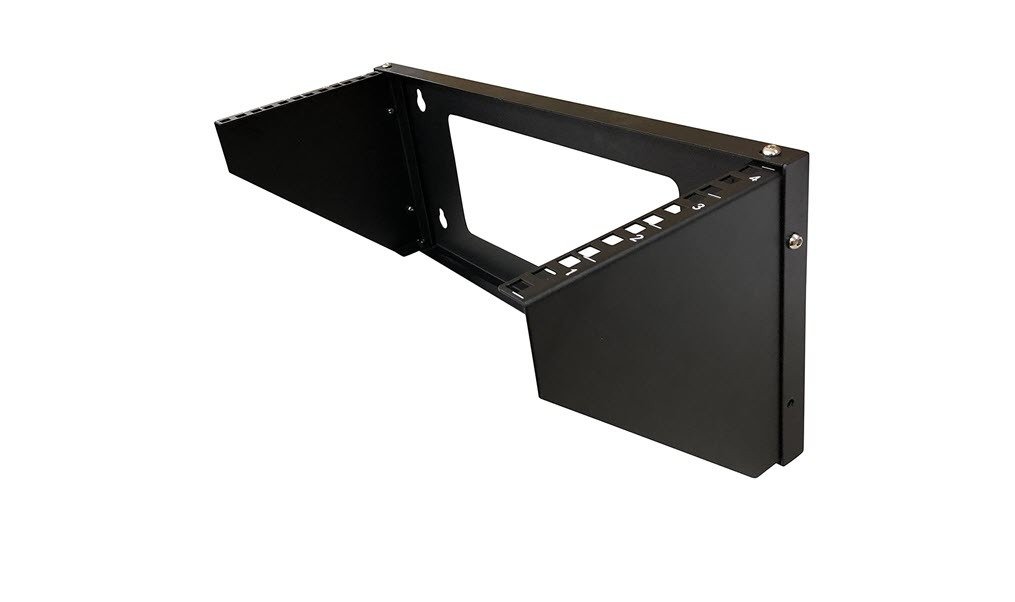
If you have a limited number of products, the Kenuco Steel Vertical Rack is a good pick, especially for home or home offices. It is a small and compact 3U rack, that is designed to hold a maximum of 3 compatible modems. This one is a vertical rack and can be easily mounted to walls.
It has a clever design wherein the sides are open, which paves the way for airflow. It’s built well and is sturdy and can hold the needed weight. For the record, the maximum weight limit is 75 lbs. Apart from the rack, the company also ships the screws and other parts needed for installation.
What We Like
What We Don’t Like
NavePoint 9U Wall Mount
- Weight capacity: 130 Pounds
- Dimension: 20 x 23.63 x 17.72-inch

If you are looking for a sturdy wall-mount server rack, then you can’t go wrong with the 9U wall mount by NavePoint. The highlight of this rack is the reversible door and the built-in fan. The built-in fan allows hot air to escape and keep the insides cool, as you may have guessed.
It’s a metal cabinet and has a solid design. More importantly, the instructions are clear, and the rack is easy to put together. Moreover, the company ships hardware like screws and bolts in clearly marked packages, which is a huge plus.
What We Like
What We Don’t Like
V7 RMWC6U-1N 6U Wall Mount Rack
- Weight capacity: 199.95 Pounds
- Dimensions: N/A

The V7 RMWC6U-1N is a 6U wall-mountable rack with vented sides. Though it doesn’t have a built-in fan, the vents help to keep the inside cool. This rack has a clever design, and when the need arises, you can open the side panels. The best part is that the door is reversible and can be opened on the side of your preference.
Though it’s a wall-mounted rack, you can utilize the included casters, should you want to keep it on the floor. Alternatively, you can have a look at the Tripp Lite 6U Wall Mount Rack Enclosure.
What We Like
What We Don’t Like
StarTech.com 12U Heavy Duty Rack

What sets the StarTech.com rack apart from the rest is its open design. It doesn’t have any walls or glass enclosures. Instead, it’s a simple triangular 12U rack with mounting rails on the sides. All you need to do is mount your modems and switch one after the other. Or, if you wish, you can gap them out.
Like some racks on this list, you can either screw the compatible equipment directly or attach a shelf to hold them in place. At the same time, it’s a floor rack. So if you want to spend more on your networking gadgets and care less about the looks, then this StarTech rack is a good pick. Do note that there’s no option to keep the rack under lock and key.
What We Like
What We Don’t Like
Was this helpful?
Last updated on 17 June, 2024
Read Next
 How to Use Google Drive as a FTP Server or Network Drive for Free
Calling Google Drive a simple cloud storage system, will be an understatement.
How to Use Google Drive as a FTP Server or Network Drive for Free
Calling Google Drive a simple cloud storage system, will be an understatement.
 How To Use FTP Server in Solid Explorer File Manager on Android
To use this feature, you must install the Solid Explorer File Manager app on your Android device and then follow these steps to manage it further.
How To Use FTP Server in Solid Explorer File Manager on Android
To use this feature, you must install the Solid Explorer File Manager app on your Android device and then follow these steps to manage it further.
 How To Access SMB Server on Solid Explorer
Solid Explorer isn’t just a simple file explorer.
How To Access SMB Server on Solid Explorer
Solid Explorer isn’t just a simple file explorer.
 4 Ways to Synchronize Windows 10 Time With Microsoft Server
The benefits of your Windows computer clock transcend way beyond just telling the time.
4 Ways to Synchronize Windows 10 Time With Microsoft Server
The benefits of your Windows computer clock transcend way beyond just telling the time.
 6 Ways to Fix Outlook Not Connecting to Server on Windows 10 and 11
Fix 1: Open Outlook in Safe Mode Opening Outlook in safe mode lets you run the app without add-ins or custom toolbar settings.
6 Ways to Fix Outlook Not Connecting to Server on Windows 10 and 11
Fix 1: Open Outlook in Safe Mode Opening Outlook in safe mode lets you run the app without add-ins or custom toolbar settings.
 How to Make Someone Server Admin or Owner on Discord
How to Make Someone Server Admin on Discord You can grant someone admin privileges on Discord via the PC or mobile app.
How to Make Someone Server Admin or Owner on Discord
How to Make Someone Server Admin on Discord You can grant someone admin privileges on Discord via the PC or mobile app.
 5 Ways to Fix YouTube Server Error 400 on Android and iPhone
Try Basic Fixes Check if YouTube is down: If there is an issue with YouTube's server, the app will continue to display the 400 error, and you won't be able
5 Ways to Fix YouTube Server Error 400 on Android and iPhone
Try Basic Fixes Check if YouTube is down: If there is an issue with YouTube's server, the app will continue to display the 400 error, and you won't be able
 6 Ways to Fix Multiple Connections to a Server or Shared Resource by the Same User
Network and file sharing issues can be frustrating, especially when encountering errors like 'Multiple Connections to a Server or Shared Resource by the Same User.' In this article, we'll delve
6 Ways to Fix Multiple Connections to a Server or Shared Resource by the Same User
Network and file sharing issues can be frustrating, especially when encountering errors like 'Multiple Connections to a Server or Shared Resource by the Same User.' In this article, we'll delve
The article above may contain affiliate links which help support Guiding Tech. The content remains unbiased and authentic and will never affect our editorial integrity.