Basic Fixes
- Turn off Silent mode: If your iPhone is not ringing but vibrating when the Facebook app is open, turn off the Silent mode, and it should do the trick.
- Check ringtone volume: This can also explain why your iPhone does not ring when the Facebook app is open.
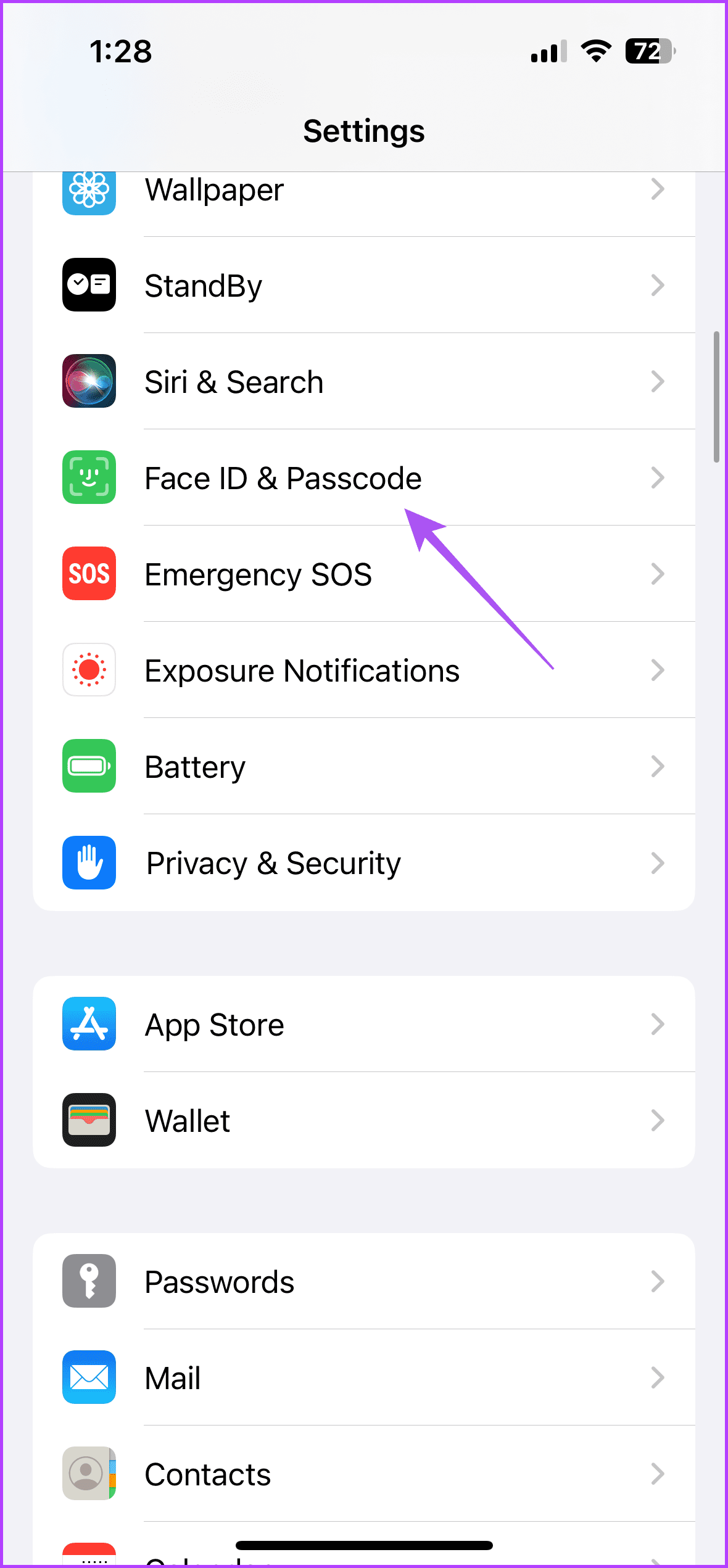
Fix 1: Turn off Attention-Aware Features
You must have noticed that a notification expands only when you unlock your iPhone with Face ID. For instance, the volume of ringtones reduces immediately when you pick up the iPhone to answer an incoming call. The Attention-Aware features do all this.
Step 1: Open the Settings app on your iPhone and select Face ID and Passcode.
Step 2: Enter your iPhone passcode to authenticate.
Step 3: Scroll down and disable the toggle for Attention-Aware Features.

Fix 2: Check the Focus Mode Settings
Focus Mode can prevent the call notification from appearing on the screen. Ensure that you have de-selected the Phone app from the current Focus Mode.
Step 1: Open the Settings app on your iPhone and tap on Focus.
Step 2: Select the Focus Profile you are using on your iPhone and tap on Apps in the profile menu.
Step 3: In the Focus Profile menu, remove the Phone app icon if you added it previously to silence incoming call sounds.
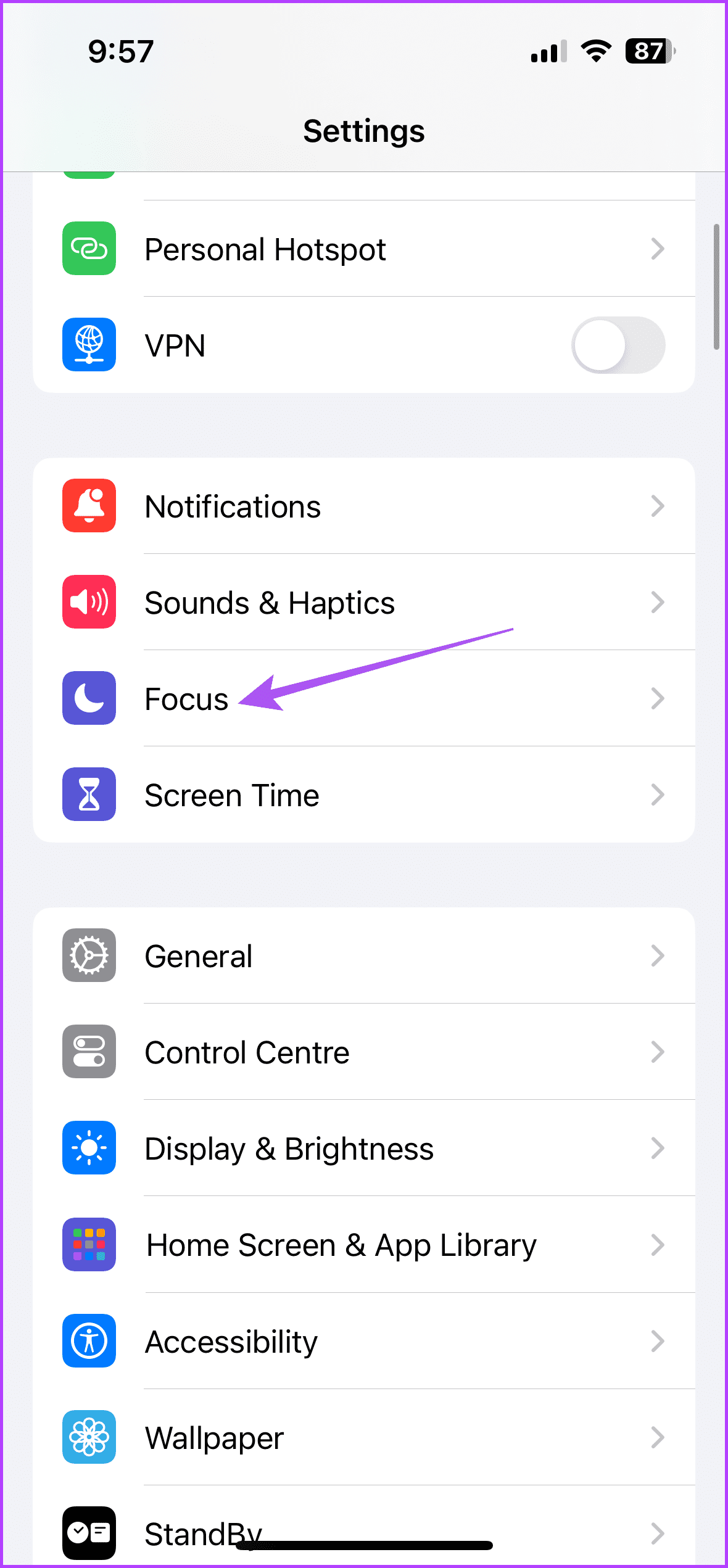

Step 4: Close the Settings app and see if the problem is solved.
Was this helpful?
Last updated on 11 June, 2024
Read Next
 6 Ways to Fix iPhone Not Ringing for Incoming Calls
Basic Fixes Disable silent mode: If the color beside the alert slider is orange, your iPhone is set to silent.
6 Ways to Fix iPhone Not Ringing for Incoming Calls
Basic Fixes Disable silent mode: If the color beside the alert slider is orange, your iPhone is set to silent.
 6 Ways to Fix Telegram Calls Not Ringing on iPhone
Basic Fixes: Allow anyone to call you: Telegram offers excellent privacy and security options.
6 Ways to Fix Telegram Calls Not Ringing on iPhone
Basic Fixes: Allow anyone to call you: Telegram offers excellent privacy and security options.
 3 Best Ways to Fix iPhone Calls Not Ringing on Mac
Basic Fixes Connect devices with the same Wi-Fi: Such features work only when your Apple devices are connected to the same Wi-Fi network.
3 Best Ways to Fix iPhone Calls Not Ringing on Mac
Basic Fixes Connect devices with the same Wi-Fi: Such features work only when your Apple devices are connected to the same Wi-Fi network.
 5 Ways to Fix Apple Watch Not Ringing for Incoming Calls
Basic Fixes Restart Apple Watch: Restarting your Apple Watch can get rid of any temporary bugs and glitches.
5 Ways to Fix Apple Watch Not Ringing for Incoming Calls
Basic Fixes Restart Apple Watch: Restarting your Apple Watch can get rid of any temporary bugs and glitches.
 4 Ways to Fix WhatsApp Calls Not Ringing When Phone is Locked
Basic Fixes Restart device: Restart your smartphone to fix any temporary bugs and glitches.
4 Ways to Fix WhatsApp Calls Not Ringing When Phone is Locked
Basic Fixes Restart device: Restart your smartphone to fix any temporary bugs and glitches.
 5 Ways to Fix Instagram Calls Not Ringing or Working
Try Basic Fixes Check your internet connection: A weak or unstable internet connection can cause Instagram to malfunction.
5 Ways to Fix Instagram Calls Not Ringing or Working
Try Basic Fixes Check your internet connection: A weak or unstable internet connection can cause Instagram to malfunction.
 4 Ways to Fix Android Phone Ringing But No Call
Basic Fixes Restart device: Restart your Android device to fix any temporary bugs and glitches.
4 Ways to Fix Android Phone Ringing But No Call
Basic Fixes Restart device: Restart your Android device to fix any temporary bugs and glitches.
 Top 9 Fixes for Facebook Notifications Not Working on iPhone and iPad
Imagine getting several comments and likes on your recent profile picture, and Facebook doesn't notify you about the same.
Top 9 Fixes for Facebook Notifications Not Working on iPhone and iPad
Imagine getting several comments and likes on your recent profile picture, and Facebook doesn't notify you about the same.
The article above may contain affiliate links which help support Guiding Tech. The content remains unbiased and authentic and will never affect our editorial integrity.