How to Hide Your Year of Birth (And Your Age) on Facebook
Step 1: Go to your Facebook.com Profile (This will open your profile page) and click on Edit profile.

Step 2: Scroll to the bottom and click Edit Your About Info.
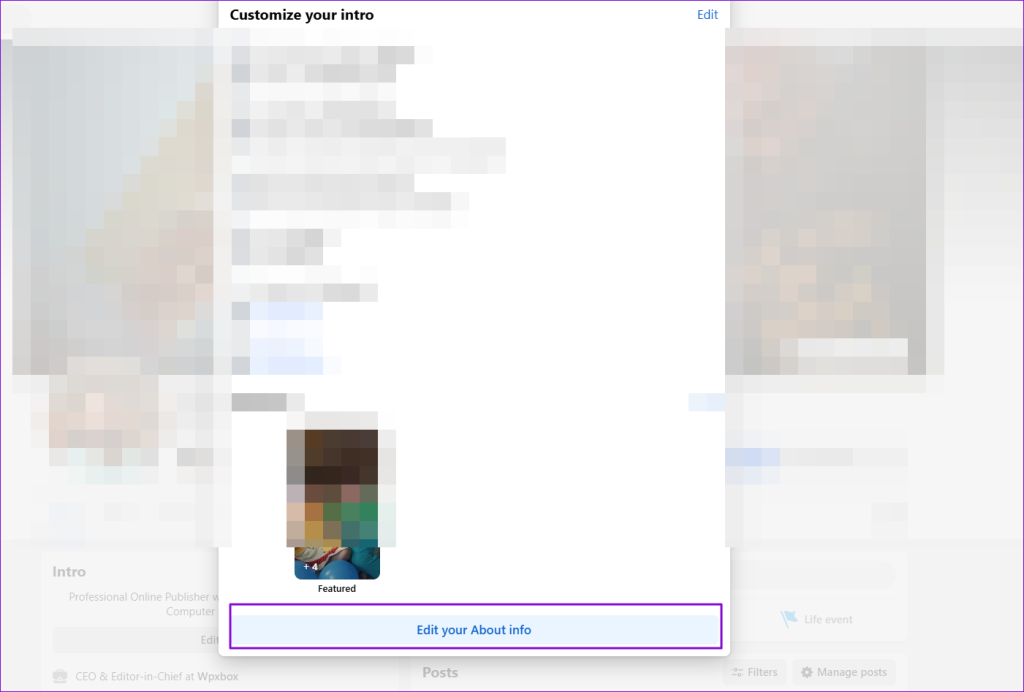
Step 3: Click on Contact and basic info from the sidebar. Scroll down to basic info. Next to the pencil icon, you should see a Globe, Group, or Friend icon. Click on it.

Step 4: It will open the Select audience window, which offers choices to control who can see your birthday. Select Only Me to hide your birthday on Facebook.

Why Should I Hide My Real Age on Facebook? 5 Reasons…
- The year of birth and, thus, the age is data. The data could be a potential target of identity theft by online stalkers, scamsters, and hackers.
- It is a filter on many people’s search engines. For online anonymity, you would want to remove it from Facebook.
- Creating an excellent virtual identity separate from your real one requires hiding as many details as possible. Your age is one of them.
- Headhunters use social media like Facebook to scan for profiles. If age is a barrier to earning a place on the interviewee’s chair, hide it.
- Age is just a number, but you want to keep it to yourself. Thank you, please!
FAQs
How Do I Hide Facebook Birthday Posts From Certain People?
You can hide your Facebook birthday posts from certain people by changing your birthday privacy settings. Change the privacy setting to custom and then add the people you want to share your birthday with or those with whom you don’t want to share your birthday.
How Do I Hide Myself on Facebook?
You cannot hide yourself on Facebook, but you can configure privacy settings to ensure you are challenging to find and that your data is secure. Keep most of the stuff visible to you or only to your close friends.
Was this helpful?
Last updated on 31 July, 2024
Read Next
 2 Ways to Change Your Age (and Birth Date) on Discord
Things to Know Before Changing Your Age on Discord 1. Discord's 'Terms of Service' clearly state that users must be at least 13 years old to use the platform.
2 Ways to Change Your Age (and Birth Date) on Discord
Things to Know Before Changing Your Age on Discord 1. Discord's 'Terms of Service' clearly state that users must be at least 13 years old to use the platform.
 What Happens When You Hide Comments on Facebook
How to Hide Comments on Facebook When you come across your comment or someone's comment on your update, select the three-dot menu next to the comment and pick the Hide
What Happens When You Hide Comments on Facebook
How to Hide Comments on Facebook When you come across your comment or someone's comment on your update, select the three-dot menu next to the comment and pick the Hide
 How to Hide Story From Someone on Facebook
Method 1.
How to Hide Story From Someone on Facebook
Method 1.
 How to Hide Reels on Facebook on Desktop or Mobile
How to Remove Reels on Facebook Note: For demonstration, we will go with a desktop.
How to Hide Reels on Facebook on Desktop or Mobile
How to Remove Reels on Facebook Note: For demonstration, we will go with a desktop.
 How to Hide Active Status From Someone on Facebook Messenger
Hide Active Status From a Particular Person on Messenger Although Facebook offers native Messenger apps on iOS, Android, Windows, and Mac, the ability to hide active status from one person
How to Hide Active Status From Someone on Facebook Messenger
Hide Active Status From a Particular Person on Messenger Although Facebook offers native Messenger apps on iOS, Android, Windows, and Mac, the ability to hide active status from one person
 Stop Facebook Friends from Seeing Your Activity and Hide It
How to Hide Your Friends List on Facebook On Desktop Step 1: Go to Facebook on your Windows or Mac computer and log in with your account credentials.
How to Hide All Posts on Facebook From Public or Friends
How to Hide Past Posts on Facebook The good news is that you can manage the visibility of previously posted content.
Stop Facebook Friends from Seeing Your Activity and Hide It
How to Hide Your Friends List on Facebook On Desktop Step 1: Go to Facebook on your Windows or Mac computer and log in with your account credentials.
How to Hide All Posts on Facebook From Public or Friends
How to Hide Past Posts on Facebook The good news is that you can manage the visibility of previously posted content.
 How to Hide Last Seen From Specific Contacts on WhatsApp
Thanks to WhatsApp’s new privacy tools, you no longer need to explain your latenight last seen to your friends or family members.
How to Hide Last Seen From Specific Contacts on WhatsApp
Thanks to WhatsApp’s new privacy tools, you no longer need to explain your latenight last seen to your friends or family members.
The article above may contain affiliate links which help support Guiding Tech. The content remains unbiased and authentic and will never affect our editorial integrity.