Steps to View Recently Opened Links on Instagram
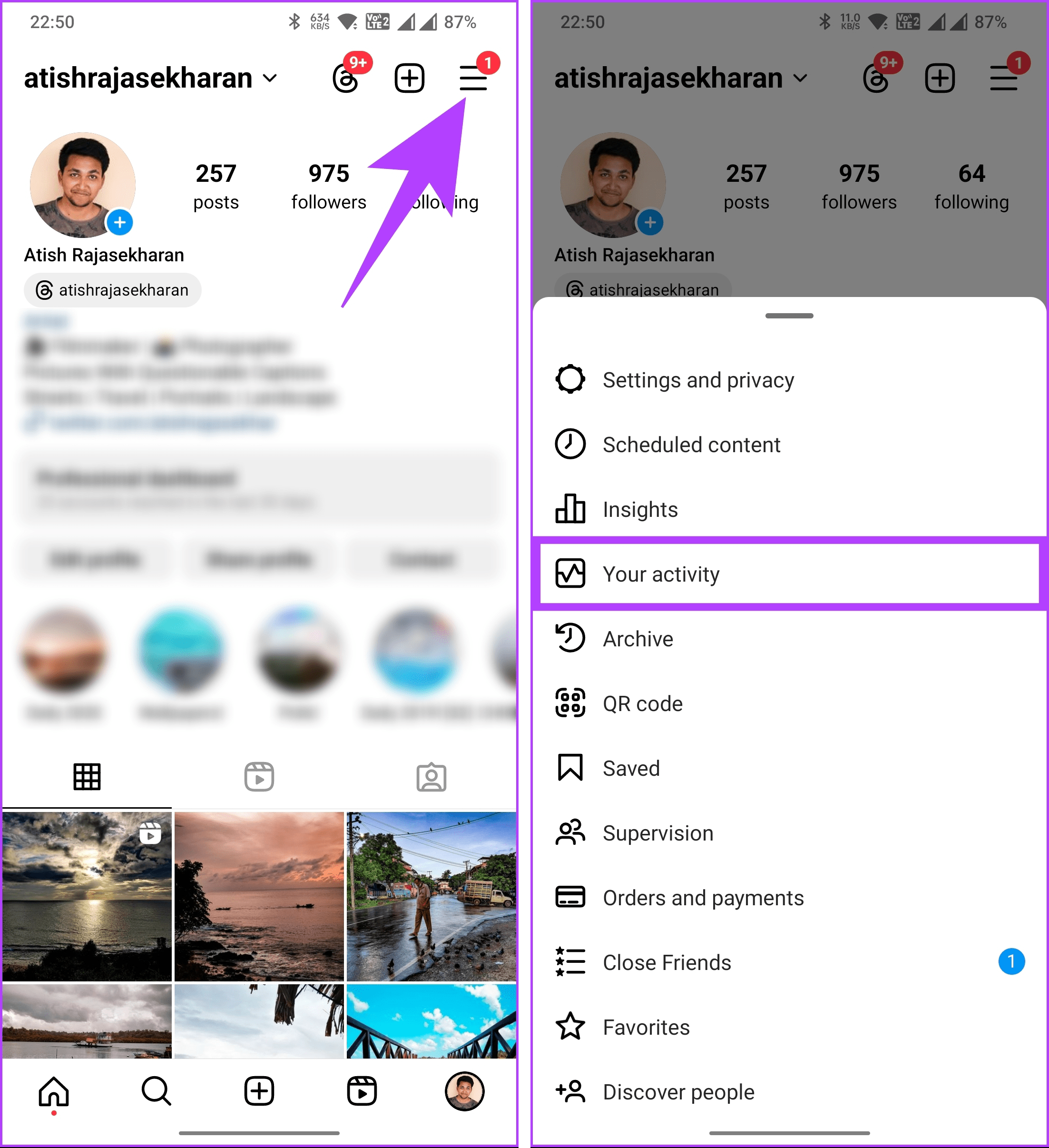
Step 1: Launch the Instagram app. Visit your profile by tapping on your profile picture at the bottom-right corner.
Step 2: Now, tap on the three horizontal lines icon at the top-right corner. Select Your activity.
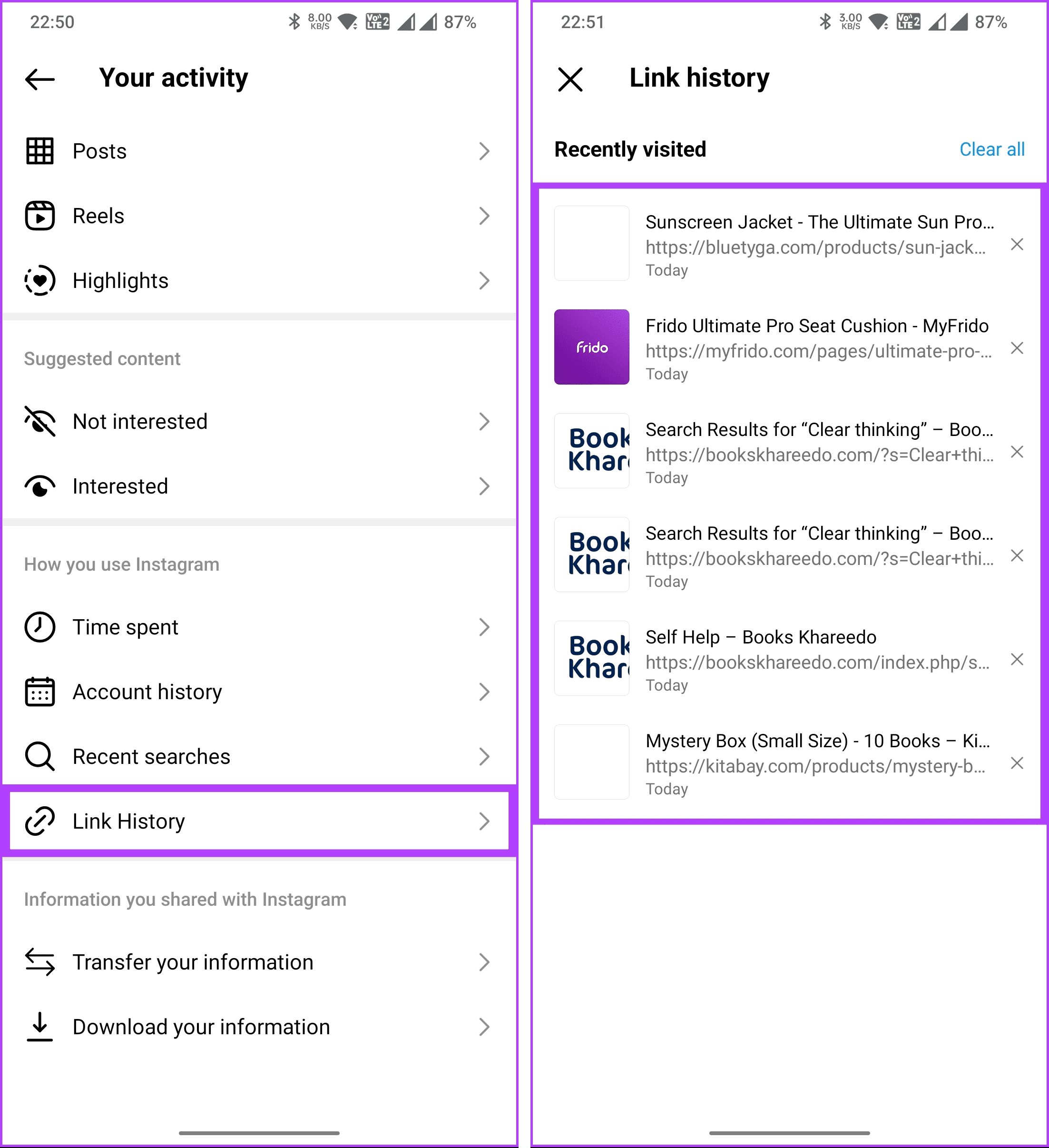
Step 3: Scroll down and tap on Link History. On the next screen, you will see all the links you have clicked and opened on Instagram.
How to Clear Recently Clicked Links on Instagram
Visit the Instagram Link History section using the steps above on your phone.
Step 1: Scroll through the links you want to remove and tap on the crossmark (x) next to them. In the pop-up, select Clear.
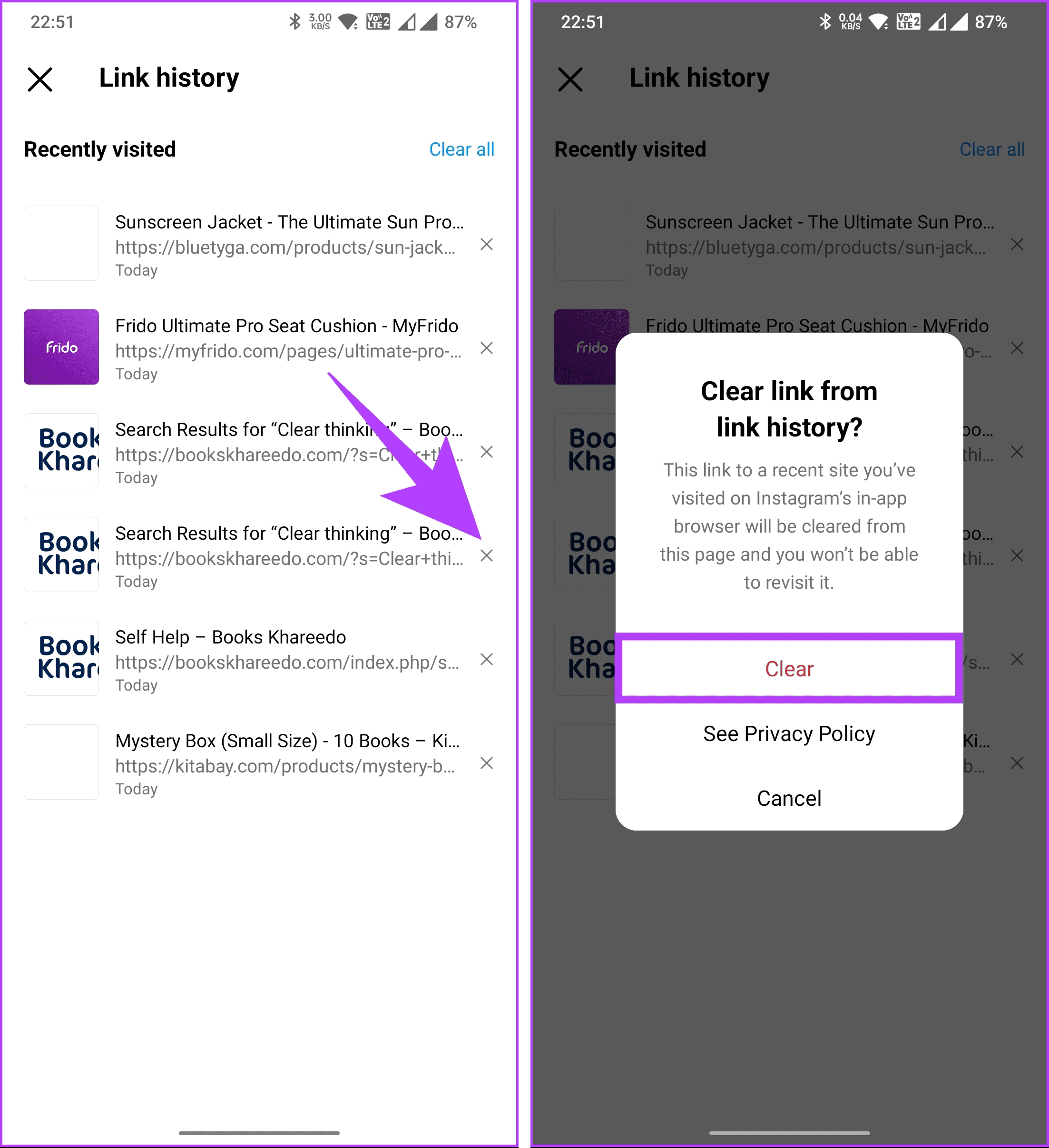
This was for individual websites. What if you want to clear all the links you have visited in the past 30 days?
Step 2: Tap on the Clear all option at the top-right corner. And, like removing a single link, select Clear in the pop-up.
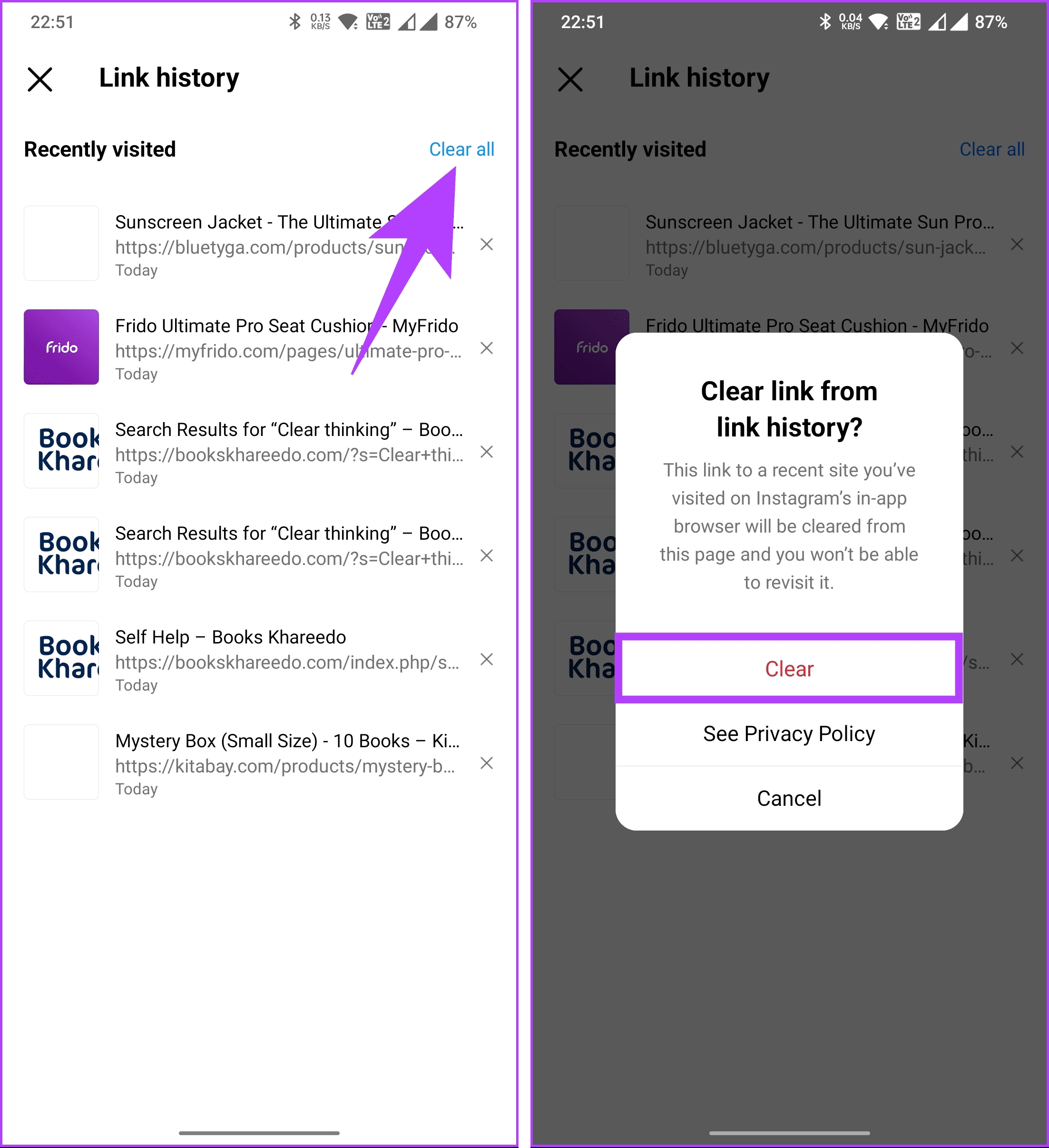
There you have it. You have successfully cleared all recently clicked links on Instagram. Additionally, you can go one step further and turn off the link history feature once and for all.
Also Read: How to unsend or delete messages on Instagram
FAQs
Unfortunately, no. There’s no search function within the Links tab. You have to scroll through the list manually.
No. While they disappear from your view, Instagram may still store them for data analysis according to their privacy policy.
While you can’t completely opt out of all advertising on Instagram, you can manage ad preferences and adjust the information used for personalized ads in the app settings.
Was this helpful?
Last updated on 10 May, 2024
Read Next
 4 Ways to View Recently Opened Files in Windows 11
Method 1: View Recently Opened Files in the Home Tab The Home tab in File Explorer maintains a list of recently opened files on Windows.
4 Ways to View Recently Opened Files in Windows 11
Method 1: View Recently Opened Files in the Home Tab The Home tab in File Explorer maintains a list of recently opened files on Windows.
 How to Clear or Disable Recently Used Documents List in Microsoft Word
Remove Specific or All Entries From Recent Documents List in Microsoft Word If you only want to remove a few documents from the Recent list, go to the Home tab
How to Clear or Disable Recently Used Documents List in Microsoft Word
Remove Specific or All Entries From Recent Documents List in Microsoft Word If you only want to remove a few documents from the Recent list, go to the Home tab
 How to Fix iPhone Recently Deleted Photos Won’t Delete
Fix 1: Use Alternate Method to Delete the Album Go to Settings > General > Storage > select Photos from the list > tap on Empty Recently Deleted album.
How to Fix iPhone Recently Deleted Photos Won’t Delete
Fix 1: Use Alternate Method to Delete the Album Go to Settings > General > Storage > select Photos from the list > tap on Empty Recently Deleted album.
 Fix: WhatsApp Not Showing Message Notifications Until Opened
Common Fixes Unmute the WhatsApp conversation: Long-tap the muted contact or group and select the Sound icon at the top right corner to unmute it.
Fix: WhatsApp Not Showing Message Notifications Until Opened
Common Fixes Unmute the WhatsApp conversation: Long-tap the muted contact or group and select the Sound icon at the top right corner to unmute it.
 6 Ways to Fix “The Set of Folders Cannot Be Opened” Error in Outlook for Windows
Fix 1: Reset the Navigation Pane Sometimes, Outlook may fail to load the navigation pane entirely and throw an error message that reads, "Cannot start Microsoft Outlook.
6 Ways to Fix “The Set of Folders Cannot Be Opened” Error in Outlook for Windows
Fix 1: Reset the Navigation Pane Sometimes, Outlook may fail to load the navigation pane entirely and throw an error message that reads, "Cannot start Microsoft Outlook.
 5 Ways to Fix Instagram Links Not Working on Android and iPhone
https://youtu.be/GiuTlMN5gsg Try Basic Fixes Turn Off VPN: At times, using a VPN connection may prevent Instagram links from opening since it routes your traffic through various servers.
5 Ways to Fix Instagram Links Not Working on Android and iPhone
https://youtu.be/GiuTlMN5gsg Try Basic Fixes Turn Off VPN: At times, using a VPN connection may prevent Instagram links from opening since it routes your traffic through various servers.
 Top 4 Ways to Open All Links in New Tabs in Chrome
Method 1: Scroll Wheel/Middle Mouse Button If you do not like the idea of having a Chrome extension, you can trust the mouse to handle this job for you.
Top 4 Ways to Open All Links in New Tabs in Chrome
Method 1: Scroll Wheel/Middle Mouse Button If you do not like the idea of having a Chrome extension, you can trust the mouse to handle this job for you.
 4 Ways to Fix X (Twitter) Links Not Opening in Chrome and Safari
Basic Fixes: Open page in Incognito Mode: Incognito mode allows you to load your browser without any extensions, cookies, or cache data.
4 Ways to Fix X (Twitter) Links Not Opening in Chrome and Safari
Basic Fixes: Open page in Incognito Mode: Incognito mode allows you to load your browser without any extensions, cookies, or cache data.
The article above may contain affiliate links which help support Guiding Tech. The content remains unbiased and authentic and will never affect our editorial integrity.