How to Unarchive Photos on Instagram
The steps to unarchive photos on Instagram differ from those to unarchive stories. We’ll go over both of them individually. If you only want to restore a deleted story on Instagram, skip to the subsequent section.
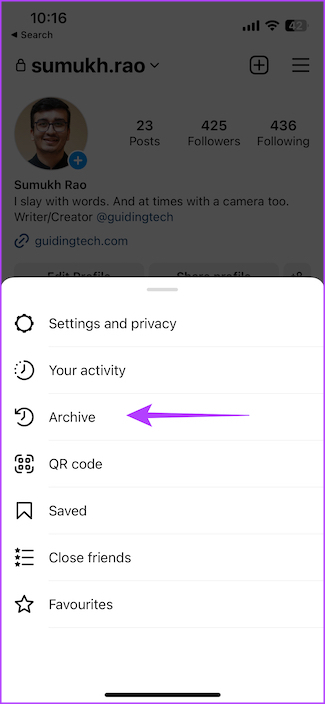
Step 1: Open the Instagram app and navigate to your profile. Tap the three horizontal lines in the top-right corner and choose Archive.

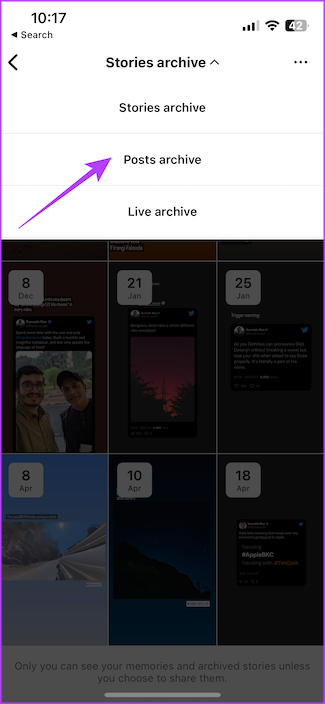
Step 2: Tap the drop-down menu at the top and select Posts archive.

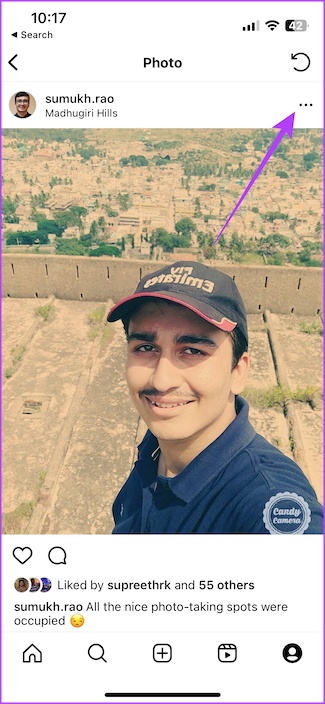
Step 3: Select the post you want to unarchive. Then, tap the three-dot menu in the top-right corner of the post and select Show on profile.

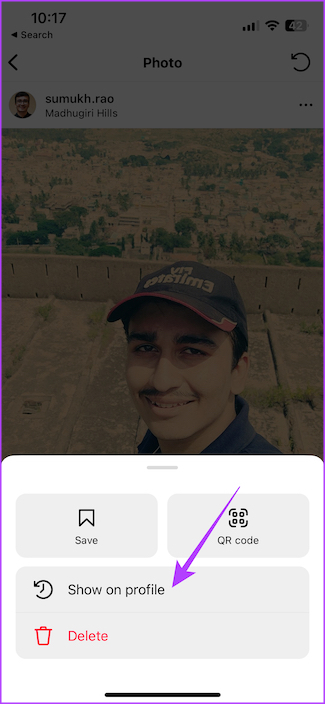
The selected post will now be back on your Instagram feed. If you’re archiving and unarchiving your posts to rearrange them, this method will not work. You can look at how to rearrange Instagram posts without deleting them.
How to Unarchive Stories on Instagram
Similarly, you can unarchive your Instagram stories as well. Since stories disappear after 24 hours, you can’t repost them, but you can add them as highlights on your Instagram profile.
Step 1: Head to your Instagram profile, tap the menu icon and select Archive.
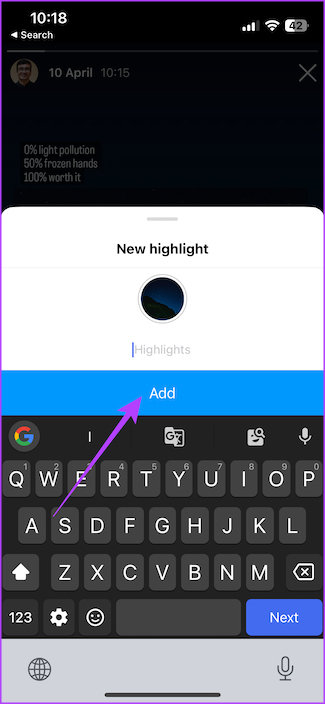
Step 2: Select the story you want to unarchive and tap the Highlight button. Enter a name or category of highlights you want to create and select Add.


Was this helpful?
Last updated on 04 September, 2024
Read Next
 How to Archive or Unarchive Emails in Gmail
What Does Archive in Gmail Mean?
How to Archive or Unarchive Emails in Gmail
What Does Archive in Gmail Mean?
 How to Archive or Unarchive Messages in Messenger
What Happens When You Archive a Chat in Messenger?
How to Archive or Unarchive Messages in Messenger
What Happens When You Archive a Chat in Messenger?
 How to Add a Link to Instagram Story and Posts
Are you looking for ways to drive more traffic to your website or promote your brand on Instagram?
How to Add a Link to Instagram Story and Posts
Are you looking for ways to drive more traffic to your website or promote your brand on Instagram?
 How to Collaborate on Instagram Posts With Your Friends
Note: Instagram Collaboration makes things easier as there’s no need to share the same post from two or more separate accounts while also allowing you to reach a wider audience.
How to Collaborate on Instagram Posts With Your Friends
Note: Instagram Collaboration makes things easier as there’s no need to share the same post from two or more separate accounts while also allowing you to reach a wider audience.
 How to View Instagram Posts and Stories Without an Account
How to See Instagram Stories Without an Account Unlike posts on Instagram (mentioned below), users can see who opened/viewed their Instagram Stories.
How to View Instagram Posts and Stories Without an Account
How to See Instagram Stories Without an Account Unlike posts on Instagram (mentioned below), users can see who opened/viewed their Instagram Stories.
 3 Easy Ways to Hide Posts From Someone on Instagram
Note: Changing settings on your desktop automatically syncs to your mobile device, so you don't have to follow the same methods on your mobile device as you would on your
3 Easy Ways to Hide Posts From Someone on Instagram
Note: Changing settings on your desktop automatically syncs to your mobile device, so you don't have to follow the same methods on your mobile device as you would on your
 How to Add Stickers to Instagram Posts and Stories
Add Stickers to Instagram Stories on Android and iPhone Step 1: Open the Instagram app on your iPhone and Android.
How to Add Stickers to Instagram Posts and Stories
Add Stickers to Instagram Stories on Android and iPhone Step 1: Open the Instagram app on your iPhone and Android.
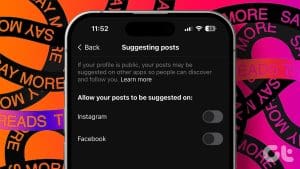 How to Stop Seeing Threads Posts and Notifications on Instagram
How to Hide Threads' Posts and Notifications Manually Instagram uses algorithms to suggest posts and accounts based on your interactions within the app.
How to Stop Seeing Threads Posts and Notifications on Instagram
How to Hide Threads' Posts and Notifications Manually Instagram uses algorithms to suggest posts and accounts based on your interactions within the app.
The article above may contain affiliate links which help support Guiding Tech. The content remains unbiased and authentic and will never affect our editorial integrity.