How to Send HD Photos and Videos on WhatsApp Mobile App
To send your photo or video without compromising image quality, use the sharing options available in the WhatsApp mobile app and select the relevant quality. Follow the below steps to do it.
Tip: You can also check our explainer to know more about sending original-size pictures on WhatsApp.
Step 1: Open the WhatsApp mobile app and tap on the relevant contact from the Chat window.
Step 2: Now, tap on the paper clip icon. iOS users can tap on the + icon in the bottom left corner.

Step 2: Tap on Gallery from the options. Or, if you’re using the WhatsApp iOS app, tap on Photo & Video Library.
Step 3: Here, select the relevant photos or videos.

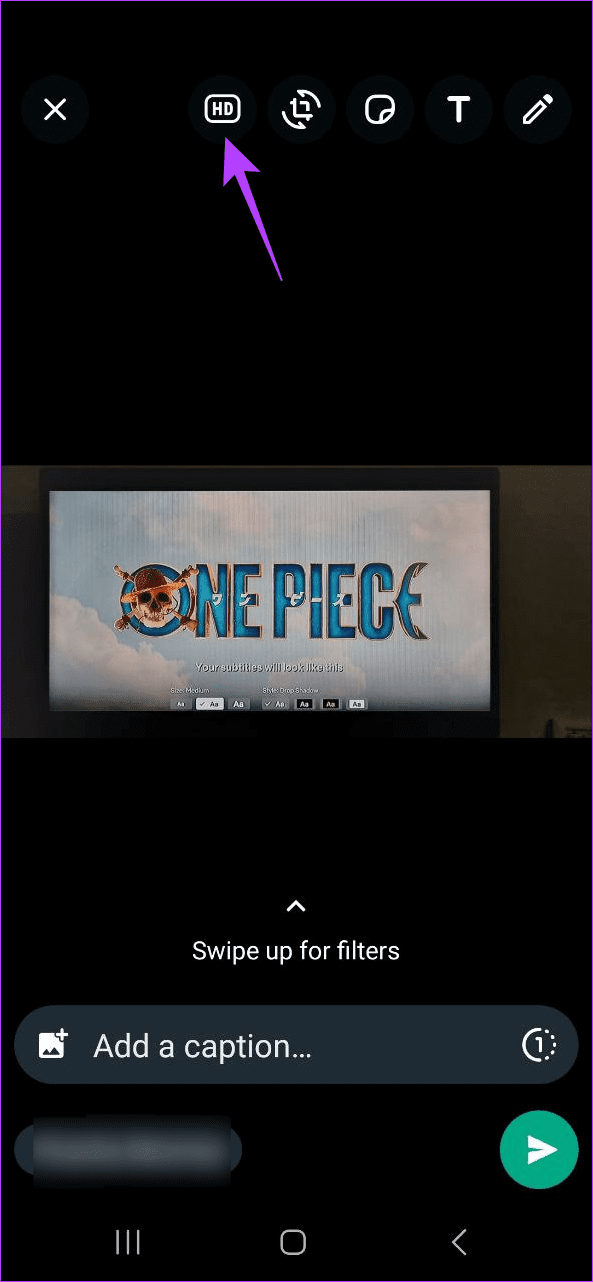
Step 4: From the menu options, tap on the HD icon. Then, select the HD quality option.
Step 5: Once done, tap on Send. This will send high-resolution photos and videos.


Also Read: How to send high-quality videos on WhatsApp
How to Use WhatsApp Web to Send HD Photos
Like WhatsApp on your mobile, you can also send HD photos via WhatsApp web. However, note that you might not be able to send HD videos at the moment as this option is currently unavailable. Here’s how to do it.
Step 1: Open WhatsApp web on any web browser and go to the relevant contact. Then, click on the + icon.

Step 2: From the options, select Photos & Videos.

Step 3: Click on the relevant photo and select Open.

Step 4: Click on HD at the top and select HD quality.

Step 5: Then, click on Send. This will send the photo in HD quality on WhatsApp.

You can locate high-quality photos or videos by checking for the HD icon in the chat window and then save the WhatsApp media to your device’s gallery accordingly.
Things to Know Before Sending High-Resolution Photos and Videos on WhatsApp
- This option is only available for photos and videos that were originally taken in high quality. So, if WhatsApp identifies that your image or video does not fit the criteria, this option will be greyed out.
- While you can send HD photos and videos, the maximum resolution currently available is 4032×3024 and vice versa for photos and 1280×720 and vice versa for videos.
- You can select multiple photos or videos at once. However, the file size limits will still apply to the media being sent in HD.
- Ensure your internet connection can support the upload or download as HD videos and photos will be bigger than normal WhatsApp media.
- Your device must have sufficient storage space to accommodate the heavier HD video or photo file.
- HD photos and videos will have an HD icon to make them stand out.
- Your image and video might still be compressed to meet the maximum resolution limit on WhatsApp.
- This option might not be available when using the WhatsApp desktop app. WhatsApp web users, however, may send HD photos if the feature is available for your location.
FAQs for Sending High-Quality Images on WhatsApp
If you’re looking to send HD media using the WhatsApp mobile app, you will get HD quality up to 3024×4032 or 4032×3024 for photos and 1280×720 or 720×1280 for videos. On WhatsApp web, however, you might get a slightly lower resolution option.
No, you must manually choose the photo quality while sending HD photos and videos on WhatsApp. For now, there is no option to permanently enable it.
Was this helpful?
Last updated on 15 May, 2024
Read Next
 How to Send High Quality Videos on WhatsApp (iPhone and Android)
Method 1.
How to Send High Quality Videos on WhatsApp (iPhone and Android)
Method 1.
 How to Send Live Photos as GIFs on WhatsApp
Method 1.
How to Send Live Photos as GIFs on WhatsApp
Method 1.
 How to Send Multiple Photos on WhatsApp for iPhone and Android
It’s sufficient to say that IM (instant messaging) platforms like WhatsApp and Messenger have become the preferred way to send or receive media files.
How to Send Multiple Photos on WhatsApp for iPhone and Android
It’s sufficient to say that IM (instant messaging) platforms like WhatsApp and Messenger have become the preferred way to send or receive media files.
 4 Ways to Send Photos as Documents on WhatsApp Using iPhone
If you have recently started using WhatsApp on your iPhone, sending photos as documents can seem slightly more challenging than on Android, but worry not.
4 Ways to Send Photos as Documents on WhatsApp Using iPhone
If you have recently started using WhatsApp on your iPhone, sending photos as documents can seem slightly more challenging than on Android, but worry not.
 How to Fix WhatsApp Photos and Videos Not Showing in Gallery
Why Are My Whatsapp Media Not Showing in Gallery on iPhone and Android?
How to Fix WhatsApp Photos and Videos Not Showing in Gallery
Why Are My Whatsapp Media Not Showing in Gallery on iPhone and Android?
 How to Stop Photos and Videos From Auto-Downloading on WhatsApp
Disable Media Auto-Download on WhatsApp By default, WhatsApp automatically downloads all photos, videos, and other files shared in a WhatsApp chat or group.
How to Stop Photos and Videos From Auto-Downloading on WhatsApp
Disable Media Auto-Download on WhatsApp By default, WhatsApp automatically downloads all photos, videos, and other files shared in a WhatsApp chat or group.
 4 Ways to Download WhatsApp Status Videos on Any Device
Method 1.
4 Ways to Download WhatsApp Status Videos on Any Device
Method 1.
 How to Save WhatsApp Photos or Videos to Gallery on Any Device
How to Save WhatsApp Media on iPhone Save a Single Photo or Video WhatsApp lets you save photos or videos one by one to the gallery on your iPhone.
How to Save WhatsApp Photos or Videos to Gallery on Any Device
How to Save WhatsApp Media on iPhone Save a Single Photo or Video WhatsApp lets you save photos or videos one by one to the gallery on your iPhone.
The article above may contain affiliate links which help support Guiding Tech. The content remains unbiased and authentic and will never affect our editorial integrity.