


Recover Deleted Passwords in Google Chrome
Step 1: Launch Google Chrome on the computer you have previously logged into your Google account.
Step 2: Type the link below in the address locator and hit Enter on your keyboard.
chrome://settings/syncSetup/advanced
Step 3: Click the Customize sync option and toggle off all the Sync data.
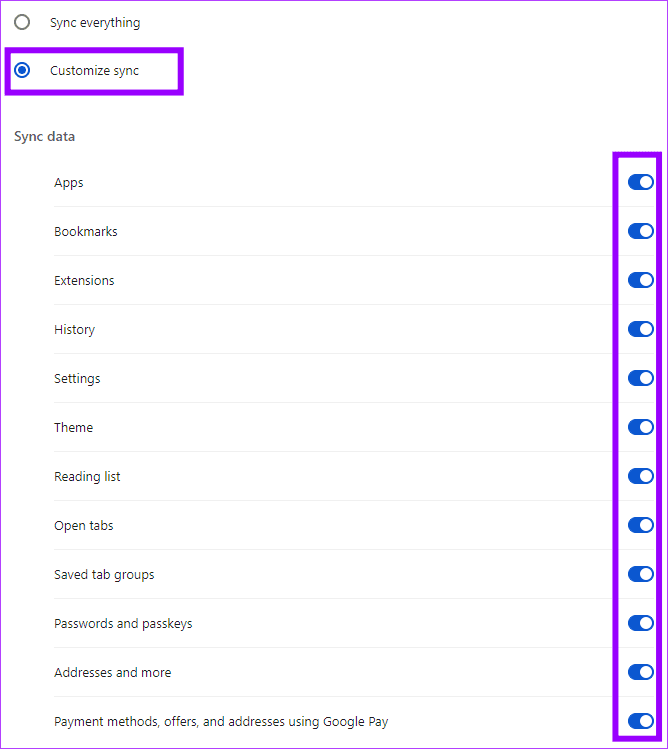
Step 4: Disconnect the computer from the internet so that when you restore your passwords, they do not get overwritten by the Google account. Now, close the browser.
Step 5: Press Windows + E on your keyboard to open the File Explorer, then type the path below in the address bar and hit Enter.
C:\Users\%USERNAME%\AppData\Local\Google\Chrome\
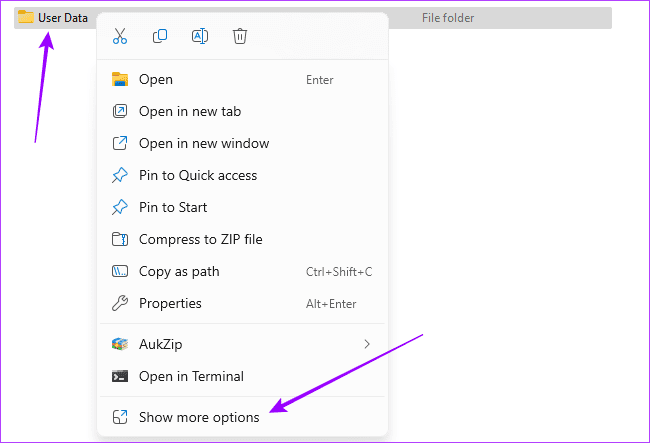
Step 6: Right-click User Data, select Show more options, and click Restore previous versions.
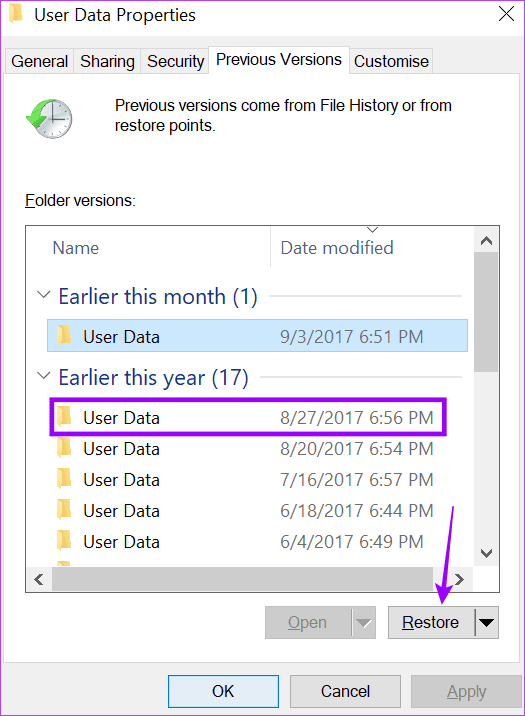
Step 7: Select the version before you lost or deleted your passwords, then click Restore and confirm your choice.
Step 8: Launch your browser, paste the path below in the address bar, and hit Enter.
chrome://settings/syncSetup/advanced
Step 9: Click the Customize sync option and toggle off all the Sync data.
Step 10: Launch your browser, paste the path below in the address bar, and hit Enter.
chrome://password-manager/passwords
Step 11: Make changes to your password list by deleting 1 or 2 passwords or adding 1 or 2 new passwords.
Step 12: Connect the computer back to the internet.
Step 13: Paste the path below in the address bar and hit Enter.
chrome://settings/syncSetup
Step 14: Click the Turn on sync button and log in with your Google credentials.
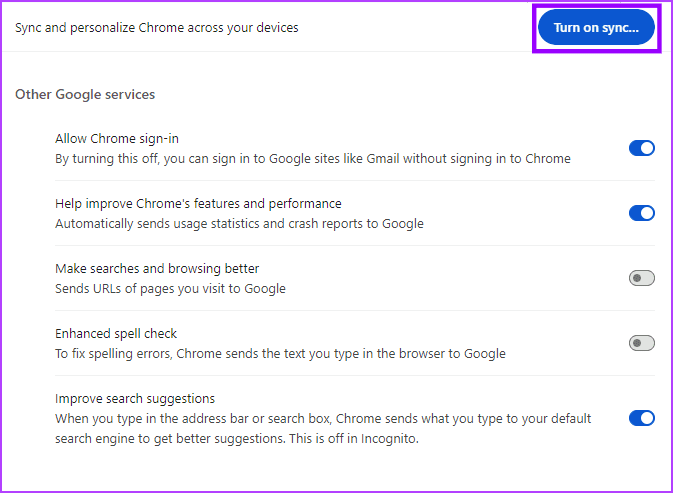
Step 15: Paste the path below in the address bar and hit Enter.
chrome://settings/syncSetup
Step 16: Click the Customize sync option and toggle on all the Sync data.
Was this helpful?
Last updated on 15 April, 2024
8 Comments
Leave a Reply
Read Next
 How to Recover Deleted Instagram Posts, Stories, Reels, and IGTV Videos
To save people from losing their Instagram data when their account gets hacked, Instagram launched the Recently Deleted feature.
How to Recover Deleted Instagram Posts, Stories, Reels, and IGTV Videos
To save people from losing their Instagram data when their account gets hacked, Instagram launched the Recently Deleted feature.
 3 Ways to Recover Deleted Snaps on iPhone and Android
Method 1: Recover Deleted Snaps Using Snapchat Memories With Memories, you can recover Snapchat pictures on iOS and Android devices without a computer.
3 Ways to Recover Deleted Snaps on iPhone and Android
Method 1: Recover Deleted Snaps Using Snapchat Memories With Memories, you can recover Snapchat pictures on iOS and Android devices without a computer.
 How to Recover a Deleted Item or Folder in Outlook
 Desktop If you have not cleared it from your deleted items or trash folder, you can recover it.
How to Recover a Deleted Item or Folder in Outlook
How to Recover a Deleted Item or Folder in Outlook Desktop If you have not cleared it from your deleted items or trash folder, you can recover it.
 6 Ways to Recover Deleted Sticky Notes in Windows 10
Microsoft improved Sticky Notes with Windows 10 while retaining the simplicity of taking notes that came with the classic version.
6 Ways to Recover Deleted Sticky Notes in Windows 10
Microsoft improved Sticky Notes with Windows 10 while retaining the simplicity of taking notes that came with the classic version.
 How to Recover Deleted Favorites in Microsoft Edge
Method 1.
How to Recover Deleted Favorites in Microsoft Edge
Method 1.
 How to Recover Deleted Apps and Games on Android
Method 1: Using Play Store Mobile The most common way to see your history of deleted apps is by using your smartphone.
How to Recover Deleted Apps and Games on Android
Method 1: Using Play Store Mobile The most common way to see your history of deleted apps is by using your smartphone.
 7 Methods to Find and Recover Deleted Videos on iPhone
A video can be an excellent way to relive a memory.
7 Methods to Find and Recover Deleted Videos on iPhone
A video can be an excellent way to relive a memory.
 How to Remove Saved Passwords From Google Chrome
Method 1: Use Google Chrome Desktop Step 1: Open Google Chrome, click the three-dot menu, and select Settings.
How to Remove Saved Passwords From Google Chrome
Method 1: Use Google Chrome Desktop Step 1: Open Google Chrome, click the three-dot menu, and select Settings.
The article above may contain affiliate links which help support Guiding Tech. The content remains unbiased and authentic and will never affect our editorial integrity.

Thank for the article
I back up my hard drive and I have access to the files from last week
How do I know if my data is saved on my drive?
Jack
How does this work for a Mac
Password Manager recovery
All Password Manager recovery
You are a life saver bless you
Hey,
i haven’t previous versions what i can do?
please help.
i have alot of passwords that i need.
thank you
or.
HELLO,
IN MY FOLDER OF USER DATA I HAVE NOT SAVE PREVIOS VERSIONS
WHAT CAN I DOING?
how about for phones?