The choice between Microsoft 365 (or Office 365) vs. Office 2024 usually comes down to price. However, there are a few other notable distinctions such as online syncing, collaboration, access to new features, and how many licenses you can get, which might sway you one way or another.
Office 365 vs. Office 2024: What You’re Paying For
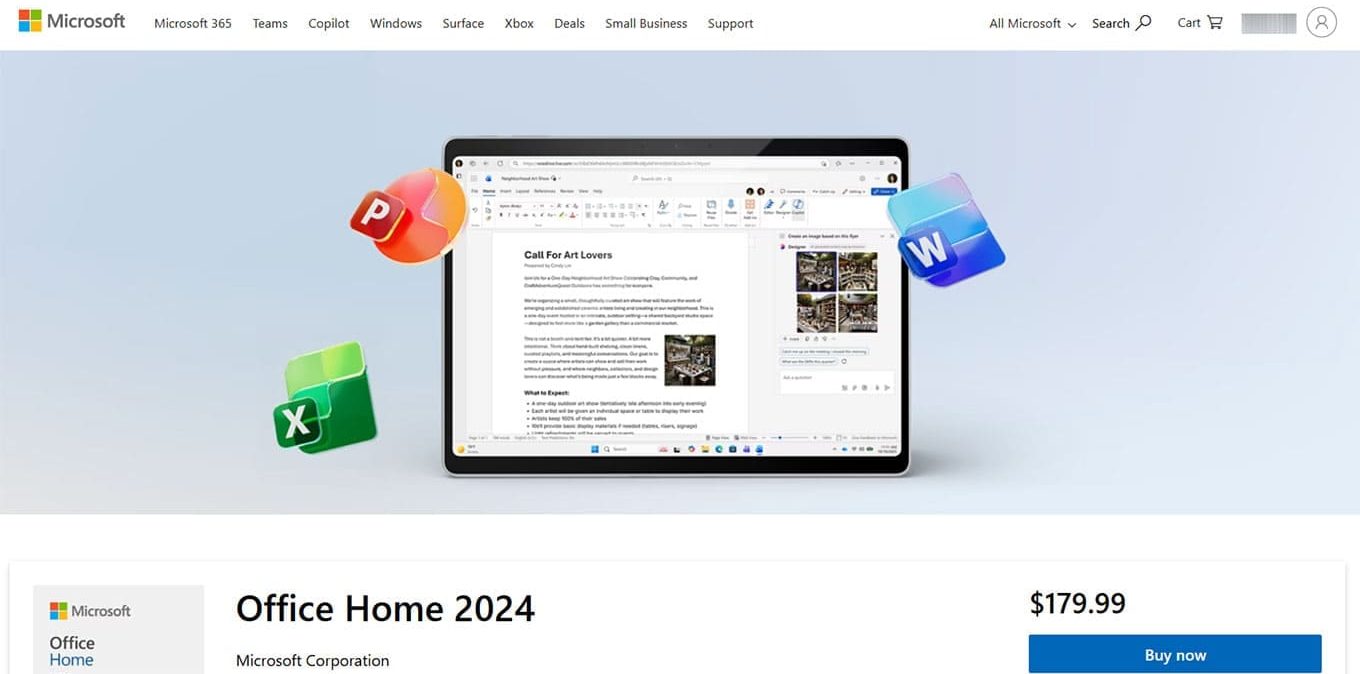
One of the biggest differences between the two suites is the payment structure. Office 2024 has a one-time purchase option, with “Home” costing $179.99 while “Home & Business” costs $249.99. Office 365 only has a subscription service (currently at $9.99 a month or $99.99 a year).
However, there’s a significant disparity in the apps you get access to here.
Office 2024 Home only has four apps: Word, Excel, PowerPoint, and OneNote. The “Business” version adds Outlook. These apps also won’t get updates or new features, so you will likely need to purchase the next version of offline Office when it comes out (which happens usually once every four to five years).
By contrast, Office 365 adds access to many other apps, including Teams, Forms, and Clipchamp, which gives you far more collaboration options. You will also get access to the likes of Designer and Editor, which allow you to process images and text with AI assistance.
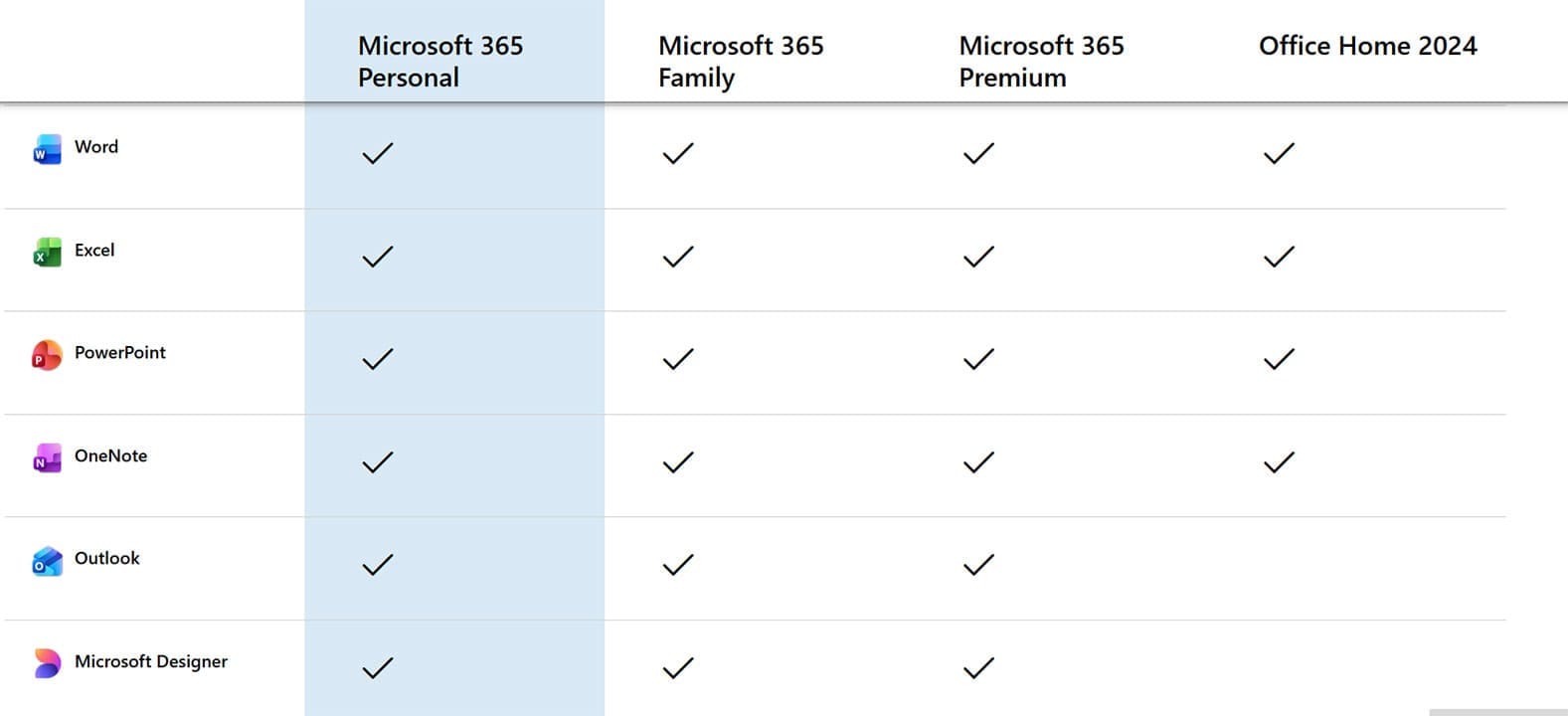
Additionally, Office 365 allows you to use Microsoft Copilot on all these apps, and it adds Microsoft Defender’s cybersecurity options to all these apps and collaboration tools.
Office 365 vs. Office 2024: Installation Options
While most people use Office on a dedicated PC, sometimes it might not be enough. Office 365 allows you to upgrade to the “Family” or “Premium” subscription, the former of which adds only about 30% to the Office 365 Personal subscription’s cost (at $129.99 a year).
Furthermore, if you want to use mobile versions of Office apps, you’re pretty much bound to using Office 365. While official mobile apps of Word, Excel, and even PowerPoint exist, they’re relatively barebones and difficult to navigate. Office 365 allows you to access these apps on your mobile device and provide an experience that more closely correlates to the PC version.
Office 365 vs. Office 2024: Online Access and Storage
One of the main benefits of using Office 365 is that it’s an online service by default while the apps themselves can be used offline. This allows you to sync your work between devices and even access files made by another PC. This can usually be achieved through the integrated OneDrive subscription which adds 1 TB of storage space that you can use for your files.
However, that also means Office 365 apps might stop working if they don’t detect an internet connection for long enough or don’t get updated.
By contrast, Office 2024 wins out when you need a stable app that only runs on the PC. After you go through the installation process and “punch in” the registration key, the apps will work perfectly fine without an internet connection. Furthermore, it can save the files both offline and on OneDrive.
Office 365: Copilot Features
One of the main reasons you might want to use Office 365 is if you want AI assistance or accessibility. What you might see with most AI features is that they’re either extremely limited or nonexistent on the “basic” Office 2024 apps.
An Office 365 subscription (especially a Premium one) drastically increases how much you can use Copilot features inside your apps. This also extends to the Windows 11 system as a whole, with a lot of AI features requiring an Office 365 subscription to work.
Is Office 365 or 2024 Better?
Ultimately, the answer here will depend on you and what you need (and expect to get) from the apps. If your work only requires Word, Excel, and/or PowerPoint, a traditional Office 2024 registration will be a more economical long-term solution.
However, if you want to have more AI features or heavily use Teams and other collaboration and creative tools, Office 365 is more dependable. Additionally, the subscription model means you’ll get all new features and upgrades as soon as they’re available.
Was this helpful?
Last updated on 29 March, 2026
Read Next
 Tired of the AI Assistance? Here’s How to Disable Copilot in Office 365
Copilot is an AI assistant that comes as standard in most Microsoft 365 subscriptions.
Tired of the AI Assistance? Here’s How to Disable Copilot in Office 365
Copilot is an AI assistant that comes as standard in most Microsoft 365 subscriptions.
 How to Fix Microsoft 365 Error 70003: Your Organization Has Deleted This Device
Microsoft 365 is an integral part of many businesses, enterprises, and education sections.
How to Fix Microsoft 365 Error 70003: Your Organization Has Deleted This Device
Microsoft 365 is an integral part of many businesses, enterprises, and education sections.
 How to Create and Manage Rules in Outlook 365 Webmail
Managing emails is an arduous task.
How to Create and Manage Rules in Outlook 365 Webmail
Managing emails is an arduous task.
 What to Do When You Encounter Error Code AADSTS50034 in Microsoft 365
If you’re trying to sign into your Microsoft 365 account or access a connected application, and suddenly see an error message, you might be perplexed.
What to Do When You Encounter Error Code AADSTS50034 in Microsoft 365
If you’re trying to sign into your Microsoft 365 account or access a connected application, and suddenly see an error message, you might be perplexed.
 Fix: Microsoft Office Stuck on Getting Things Ready on Windows 11
Basic Fix Close other programs: This may be necessary, especially since other running programs may interfere with installation.
Fix: Microsoft Office Stuck on Getting Things Ready on Windows 11
Basic Fix Close other programs: This may be necessary, especially since other running programs may interfere with installation.
 5 Best Copilot AI Alternatives for MS Office
Microsoft Copilot is the tech giant’s proprietary AI tool that works as both a chatbot and document editor.
5 Best Copilot AI Alternatives for MS Office
Microsoft Copilot is the tech giant’s proprietary AI tool that works as both a chatbot and document editor.
 Five Common Office API Error Codes and What They Mean
Office Add-ins allow you to extend your standard Microsoft Office solution into something more.
Five Common Office API Error Codes and What They Mean
Office Add-ins allow you to extend your standard Microsoft Office solution into something more.
 How to Turn Off the Office File Viewer in Microsoft Edge
Microsoft Edge might have some benefits over Chrome and Mozilla.
How to Turn Off the Office File Viewer in Microsoft Edge
Microsoft Edge might have some benefits over Chrome and Mozilla.
The article above may contain affiliate links which help support Guiding Tech. The content remains unbiased and authentic and will never affect our editorial integrity.