Add Multiple Photos From Android and Ios Devices
Step 1: Tap on Create Story on the home screen and tap on Select Multiple.


Step 2: Select all the photos you want to add to your story, tap Next, and tap on Photo Collage.
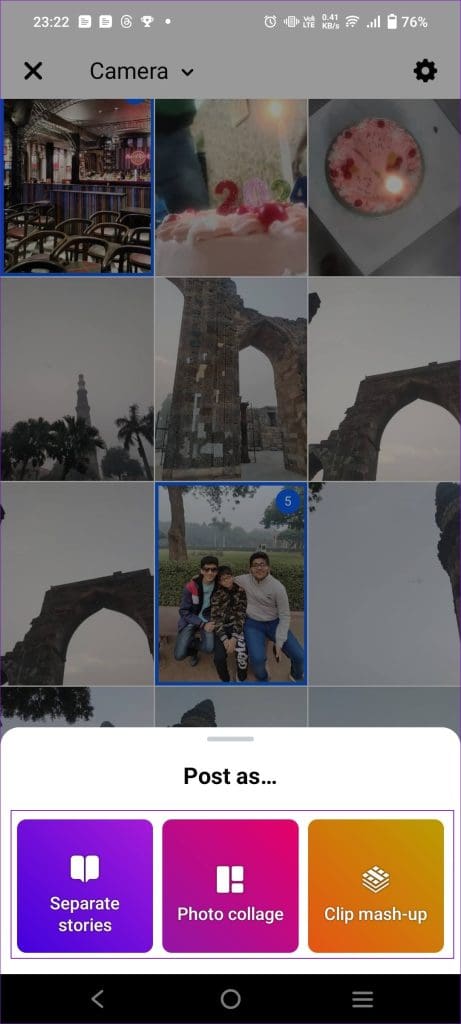

Step 4: You can now place the photos side by side or on each other, per your liking.
Step 5: Tap on Share to upload it on your Facebook Story.


Post Multiple Photos From Instagram to Facebook Story
Facebook and Instagram, when connected, can sync all your stories automatically on Facebook when you post on your Instagram story.
Using Layouts
Step 1: Tap Add Story or swipe left on the Instagram homepage.
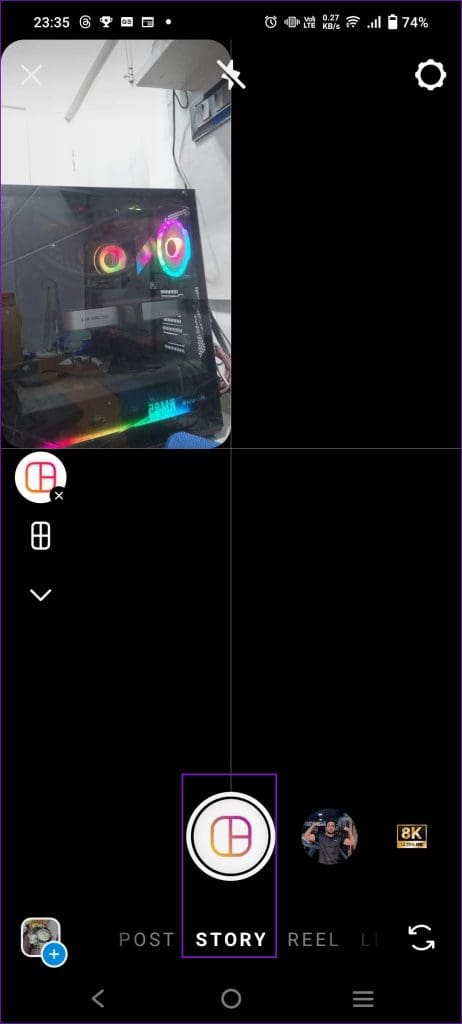
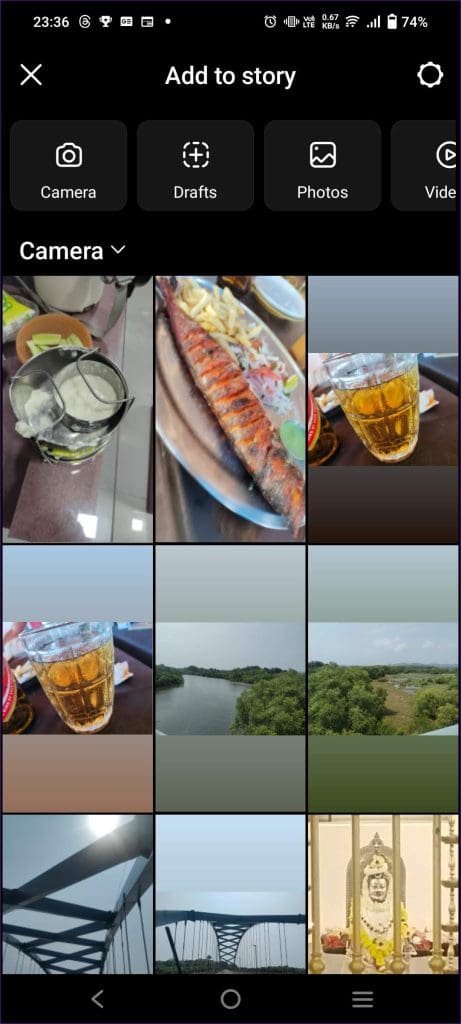
Step 2: Tap on Layout and swipe up to select images you want to add to your story.
Step 3: You can add images one by one based on the layout you selected. For example, if you have selected a layout of four images, you can add four images. Do note that you can post a maximum of six images at once.
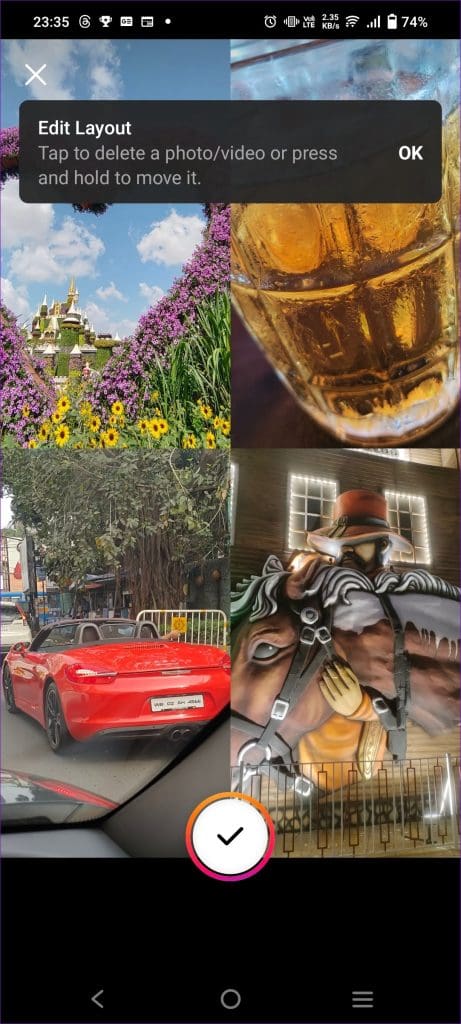
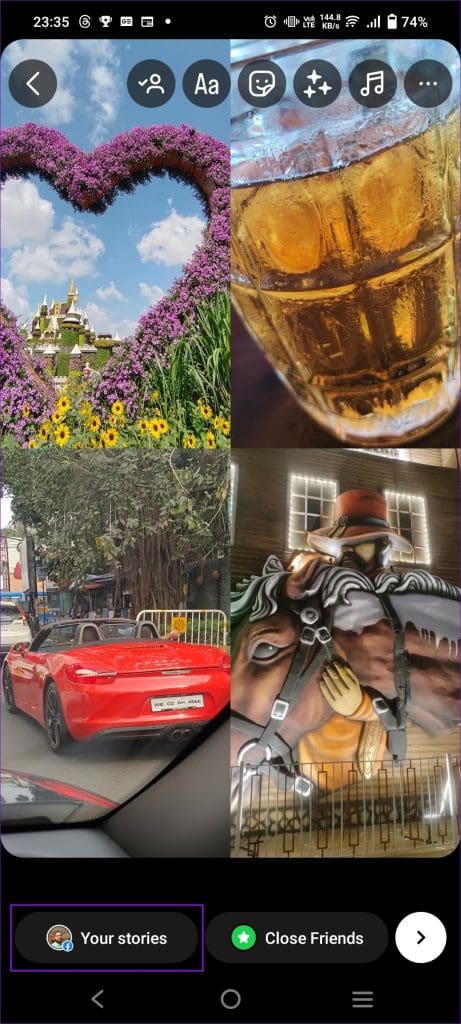
Step 4: Tap on Your Story to post the story to your Instagram.
Using Add Image Button:
Step 1: Tap on Add Story and select the image you want to upload to your story.
Step 2: If on the Post Story screen, tap on the Emoji icon to bring up the widgets section.


Step 3: Tap on Photo and select the image you want to add to your existing story.
Step 4: Continue the same steps to add as many images as you like. You can move the images around any corner, resize them, etc.


Step 5: Tap on Your Stories to post the story on your Instagram. If your Instagram and Facebook accounts are connected, it will also be posted there.
FAQs
Should I Use Facebook or Instagram to Post Multiple Photos to Stories?
Instagram lets you post photos using layouts and add them separately, like Facebook. Both features let you ultimately post multiple photos in a single story. However, layouts are more organized like a collage, whereas adding multiple images lets you play around and stack images on top of one another, resize them, etc.
Are Facebook and Messenger Stories Separate?
No, what you post on Facebook stories is also visible on Messenger. However, Messenger has no independent feature for posting a story; it syncs with what is posted on your Facebook story.
Was this helpful?
Last updated on 08 July, 2024
Read Next
 Facebook Story vs Messenger Story: Similarities and Differences
Key Differences and Similarities FeatureFacebook StoriesMessenger StoriesCross-PostingFacebook Stories are visible to Messenger contacts.Messenger Stories are visible to Facebook friends.AvailabilityAvailable on mobile apps and the Facebook website.Available only on the mobile
Facebook Story vs Messenger Story: Similarities and Differences
Key Differences and Similarities FeatureFacebook StoriesMessenger StoriesCross-PostingFacebook Stories are visible to Messenger contacts.Messenger Stories are visible to Facebook friends.AvailabilityAvailable on mobile apps and the Facebook website.Available only on the mobile
 How to Add Camera Roll Photos (Multiple) to Snapchat Story
How to Add Photos to Your Snapchat Story Before we get started on adding multiple pictures from your camera roll, let us quickly look at how to add a single
How to Add Camera Roll Photos (Multiple) to Snapchat Story
How to Add Photos to Your Snapchat Story Before we get started on adding multiple pictures from your camera roll, let us quickly look at how to add a single
 How to Fix Facebook Messenger Story Not Showing on iPhone and Android
Why Can't I See Stories on Facebook Messenger Several factors can affect your story experience in Facebook Messenger.
How to Fix Facebook Messenger Story Not Showing on iPhone and Android
Why Can't I See Stories on Facebook Messenger Several factors can affect your story experience in Facebook Messenger.
 What to Do if You Can’t Delete a Story on Facebook Messenger
Try Basic Fixes Wait for the story to post and try again.
What to Do if You Can’t Delete a Story on Facebook Messenger
Try Basic Fixes Wait for the story to post and try again.
 How to Delete Multiple (Or All) Photos on Facebook
Method 1: Remove All Your Pictures From Facebook Facebook allows users to delete up to 50 photos uploaded by them.
How to Delete Multiple (Or All) Photos on Facebook
Method 1: Remove All Your Pictures From Facebook Facebook allows users to delete up to 50 photos uploaded by them.
 How to Add Music to Facebook Profile and Story
How to Add Music to Your Facebook Profile You can add multiple songs to your Facebook profile.
How to Add Music to Facebook Profile and Story
How to Add Music to Your Facebook Profile You can add multiple songs to your Facebook profile.
 How to Add and Use Facebook Story Highlights: A Definitive Guide
What Are Facebook Story Highlights Highlights are like photo albums where you can sort stories in different folders according to their content.
How to Add and Use Facebook Story Highlights: A Definitive Guide
What Are Facebook Story Highlights Highlights are like photo albums where you can sort stories in different folders according to their content.
 How to See All the Photos Shared via Facebook Messenger
Check Shared Photos on the Web Messaging is an important part of our lives and each platform that is offering IM services is trying to one-up the other.
How to See All the Photos Shared via Facebook Messenger
Check Shared Photos on the Web Messaging is an important part of our lives and each platform that is offering IM services is trying to one-up the other.
The article above may contain affiliate links which help support Guiding Tech. The content remains unbiased and authentic and will never affect our editorial integrity.