


1. DrawPile – Free Cross-Platform Alternative
DrawPile is an open-source, free whiteboard app available on Windows, macOS, and Linux platforms. At its heart, It is a sketching tool with collaboration features. Inviting is a different story. You will need to share your external IP address and password for that. However, it is excellent if you need to host a collaborative session.

It has the unique ability to record your screen while you are collaborating with others on the whiteboard. This can help you understand the process and be used for reference later. You can save the recording as a video or a series of images.
Pros
- Free and open-source
- Offers real-time collaboration
- It is lightweight, efficient, and cross-platform
- Offers customizable brushes and tools
Cons
- Offers a limited set of features
- Does not offer cloud storage
Price: Free
2. Draw.Chat – Free Collaborative Drawing
One of the main features of Draw.Chat is the messaging feature that allows you to text other participants. You can also send audio and video messages, which are even cooler than verbose text explanations. Recently, the app’s developers added a video conferencing feature.

This service allows you to upload documents in several formats, including PDF, PNG, JPG, GIF, SVG, and WebP images. Large files are transferable in chats without restrictions.
Draw.Chat has many drawing tools that can be too much for Microsoft Whiteboard alternative seekers, but many will find these options useful. The best part is that no registration is required, and you get 10MB of cloud storage, where you can save whiteboards for up to 1 month before downloading them. There are plenty of keyboard shortcuts to make your life easy.
Two exciting features include the ability to draw/highlight on maps and annotate PDF files. The app is completely free, and you can create multiple whiteboards simultaneously.
Pros
- It offers a versatile canvas
- No registration required
- Allows large file sharing
- Offers cloud storage
Cons
- Cloud storage is limited
- Board sharing completely relies on links
Price: Free
3. Miro (Earlier RealtimeBoard) – Great for Mobile Devices
Miro is a platform-agnostic professional whiteboard app that works on desktops and smartphones. You can begin with a blank whiteboard or choose a template based on your needs. Miro’s UI is very polished, and there are many elements that you can add to a whiteboard.

You can drag and drop every element wherever you want. You can also zoom and pan around the board. Team members can chat with each other using text, audio, and video or just share a screen inside Miro.
You can also connect third-party apps like Slack, Drive, Teams, and Trello. The Miro Marketplace offers all sorts of plugins for extra functionality. Enterprise users will be happy to know that there are administrative controls for users with permission to control the workflow.
Miro has a free plan for up to 3 whiteboards and some basic stuff to try out. Meanwhile, the paid version, at $8/month, unlocks several features such as larger team support, collaboration, private whiteboards, and more.
Pros
- Offers a wide range of tools
- Has real-time collaboration
- Visually appealing interface
- Large template library
Cons
- Slight learning curve for first-time users
- Limited offline functionality
Price: Free plan, Paid plans start from $8/month per member
4. Explain Everything – Robust Reat-time Collaboration
Explain Everything works like the whiteboard option in Zoom or Meet, where you create a whiteboard, send an invite code to others, and enjoy other functionalities. There are no desktop apps, but it works on any browser and has dedicated mobile apps. It also supports audio and video recording.

You can share the finished video with anyone so those who couldn’t attend the whiteboard-sharing session can watch it instead. The video can be created using a mix of media file types, such as PDF files, audio or video messages, and, of course, all the elements that you will use on the whiteboard itself.
You can save the whiteboard in PDF or some popular image formats besides the video format. Like Miro, this Microsoft Whiteboard alternative integrates with many cloud storage apps. It is free for up to 3 projects, and pricing begins at $7.49 monthly.
Pros
- Offers several annotation tools
- Cloud storage for whiteboards
- Multi-format Support
- Offers offline functionality
Cons
- Offers limited export options
- Pricey paid plans, especially for unlimited cloud storage
Price: Free plan, Paid plans start from $7.49/month
5. Conceptboard – Great for Teamwork
Conceptboard is an online whiteboard designed to supercharge teamwork. It allows you to brainstorm ideas, collaborate on projects, and centralize documentation.
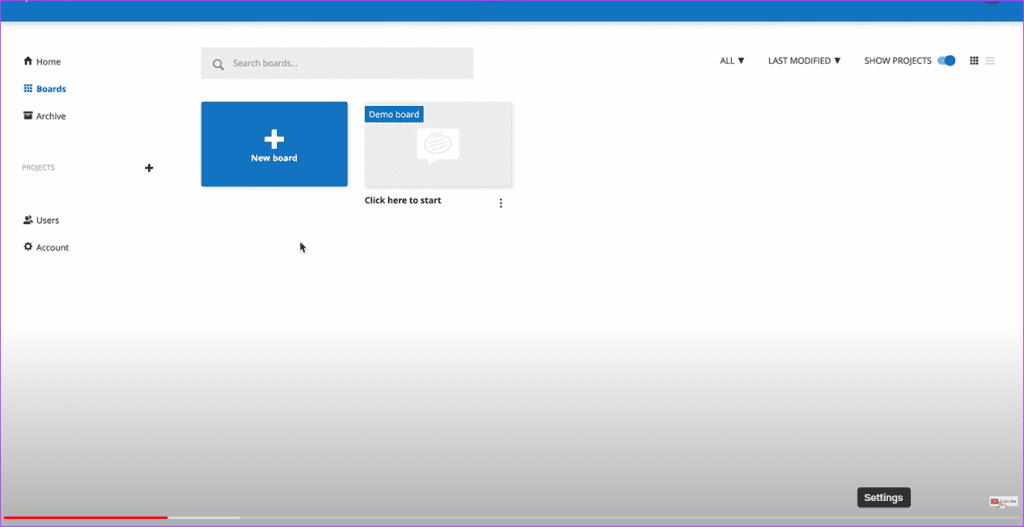
You can see everyone’s edits and movements in real-time with live cursors. This is great for fostering a sense of presence and shared purpose. It offers an infinite canvas that ensures you never run out of space, allowing you to zoom out for the big picture or zoom in for detail work.
This service also ensures that you can upload and annotate a wide range of multimedia files—images, PDFs, videos—directly on the board, keeping everything centralized and accessible.
Pros
- Allows seamless communication
- Offers effortless sharing
- Several permission levels for collaborators
- Integration with MS Teams, Google Drive, and Dropbox
Cons
- Limited free plan
- Limited offline functionality
Price: Free trial, Paid plans start from $6 per user/month
Was this helpful?
Last updated on 23 July, 2024
Read Next
 9 Best Microsoft Whiteboard Keyboard Shortcuts to Boost Productivity
Whiteboards are super useful to brainstorm with your team, collect ideas, or draw a plan.
9 Best Microsoft Whiteboard Keyboard Shortcuts to Boost Productivity
Whiteboards are super useful to brainstorm with your team, collect ideas, or draw a plan.
 Microsoft Whiteboard vs OneNote: Which One to Use for Note Taking
Availability First, both platforms require a Microsoft account to function regardless of the platform you use.
Microsoft Whiteboard vs OneNote: Which One to Use for Note Taking
Availability First, both platforms require a Microsoft account to function regardless of the platform you use.
 Top 29 Microsoft Whiteboard Tips & Tricks to Use It Like a Pro
With the recent Windows update, Microsoft has given a special place to its Whiteboard app.
Top 29 Microsoft Whiteboard Tips & Tricks to Use It Like a Pro
With the recent Windows update, Microsoft has given a special place to its Whiteboard app.
 5 Best Roblox Alternatives for PC and Mobile
Roblox offers a range of games within the application.
5 Best Roblox Alternatives for PC and Mobile
Roblox offers a range of games within the application.
 Spotify to Cost More in the US Soon – Check These 4 Cheaper Alternatives
Spotify Prices to Increase Again Spotify has adjusted its pricing structure in the US market once again.
Spotify to Cost More in the US Soon – Check These 4 Cheaper Alternatives
Spotify Prices to Increase Again Spotify has adjusted its pricing structure in the US market once again.
 The Best Windows Calculator Alternatives, Tips and Extensions
Not a fan of the built in Windows 10 calculator?If the flat UI design of Windows 10 apps isn't your preference, or you're after a little extra functionality, there's replacement
The Best Windows Calculator Alternatives, Tips and Extensions
Not a fan of the built in Windows 10 calculator?If the flat UI design of Windows 10 apps isn't your preference, or you're after a little extra functionality, there's replacement
 5 Best AirTag Alternatives for Android Users
If you're an Android user and are looking for some functional Apple AirTag alternatives, you've come to the right place.
5 Best AirTag Alternatives for Android Users
If you're an Android user and are looking for some functional Apple AirTag alternatives, you've come to the right place.
 6 Best Apple Magic Keyboard Alternatives
The Apple Magic Keyboard is one of the best accessories for your macOS device.
6 Best Apple Magic Keyboard Alternatives
The Apple Magic Keyboard is one of the best accessories for your macOS device.
The article above may contain affiliate links which help support Guiding Tech. The content remains unbiased and authentic and will never affect our editorial integrity.

