Basic Fixes
- Reset network settings: Sometimes, your phone may face issues with connectivity all of a sudden. Resetting network preferences is a good solution in such a situation.
- Delete the contact and re-add it: It’s possible that you may have blocked a contact by mistake. If unblocking them doesn’t help, delete the contact and then re-add it to be able to send a message.
- Ask the Person to Check Their Block List: If someone has blocked you, they won’t be able to receive messages from you, although you may think your texts are getting delivered. So, ask them to check their block list and unblock you if you’ve been blocked by mistake.
- Try using an alternate SMS app: If all fails, it’s time to switch from Google’s Messages app to an alternative like Microsoft SMS Organizer.
Fix 1: Enable the Only Send as Text Setting
If RCS is enabled on your Android phone, you might face issues while texting iPhone users or even other Android users. You should try disabling the RCS feature for those particular contacts. To do so, follow these steps:
Step 1: Open the Messages app and head to the relevant conversation. Select the three-dot icon located at the upper-right portion of the screen and tap on Details.
Step 2: Enable the Only send as text (SMS/MMS) toggle.

Fix 2: Turn Off RCS Completely
If simply turning off the RCS feature for one contact didn’t help, you should try disabling it completely. For that, follow these steps:
Step 1: Open the Google Messages app. Tap the profile picture icon at the top and go to Messages settings.
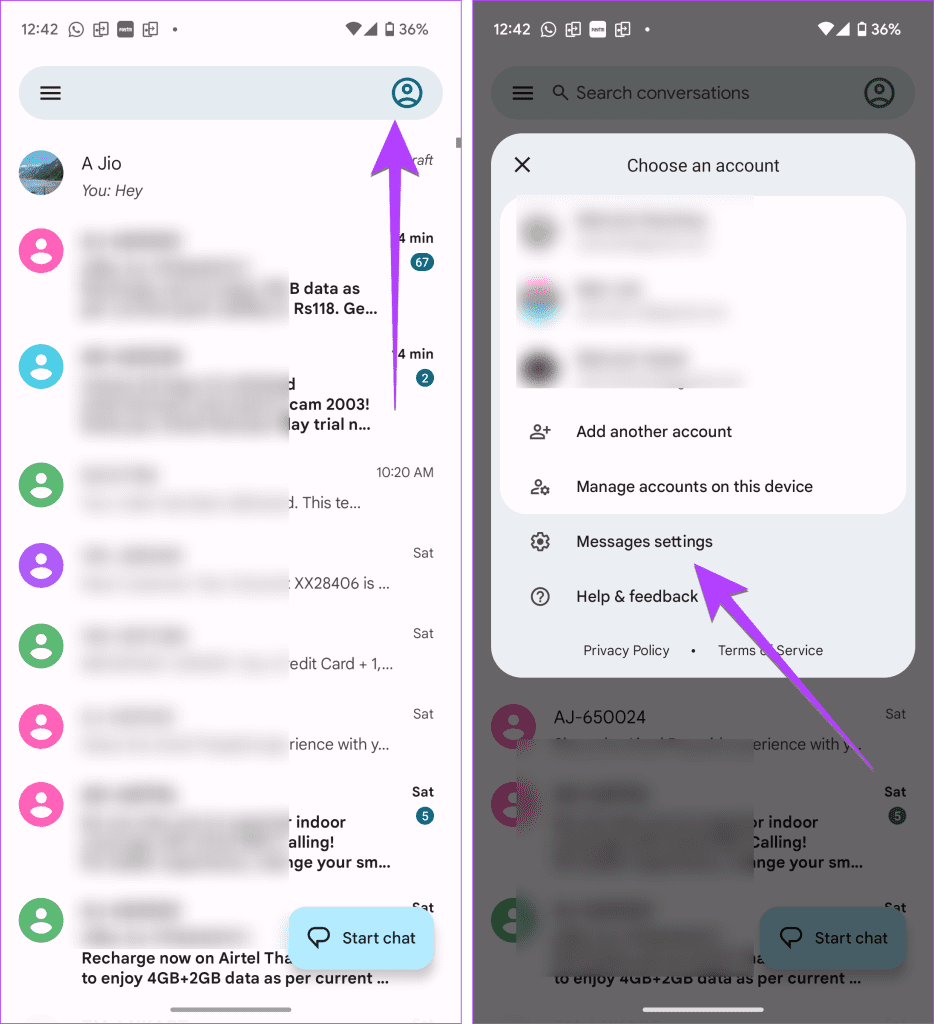
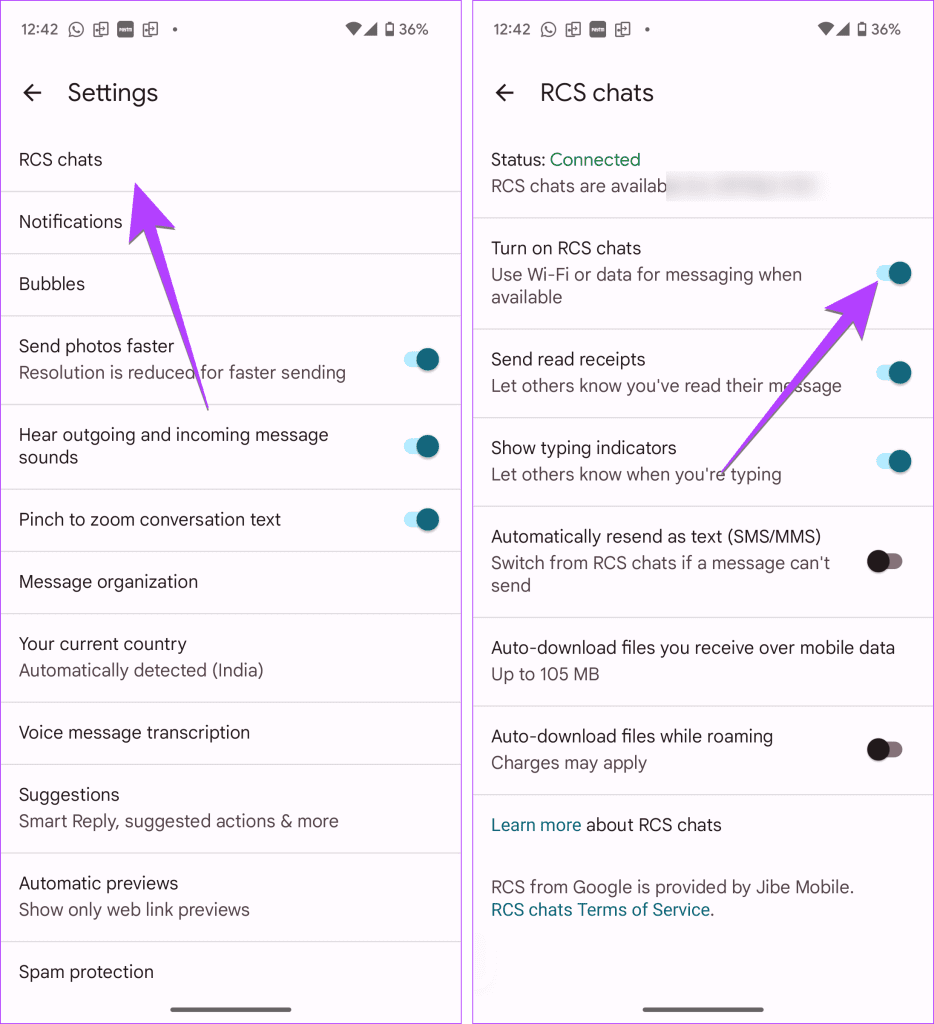
Step 2: Tap on RCS chats and turn off the toggle next to Turn on RCS chats.
Tip: On Samsung Galaxy phones, tap on the three-dot icon in the Messages app and select Settings. Tap on Chat settings and turn off Chat features. Check out other ways to disable RCS on Android phones.
Fix 3: Disable iMessage
If you or the recipient was an iPhone user earlier, iMessage should be deactivated before switching to Android. Otherwise, the messages will not be delivered. If you or the recipient still has access to the iPhone, go to iPhone Settings > Messages and disable the toggle next to iMessage.
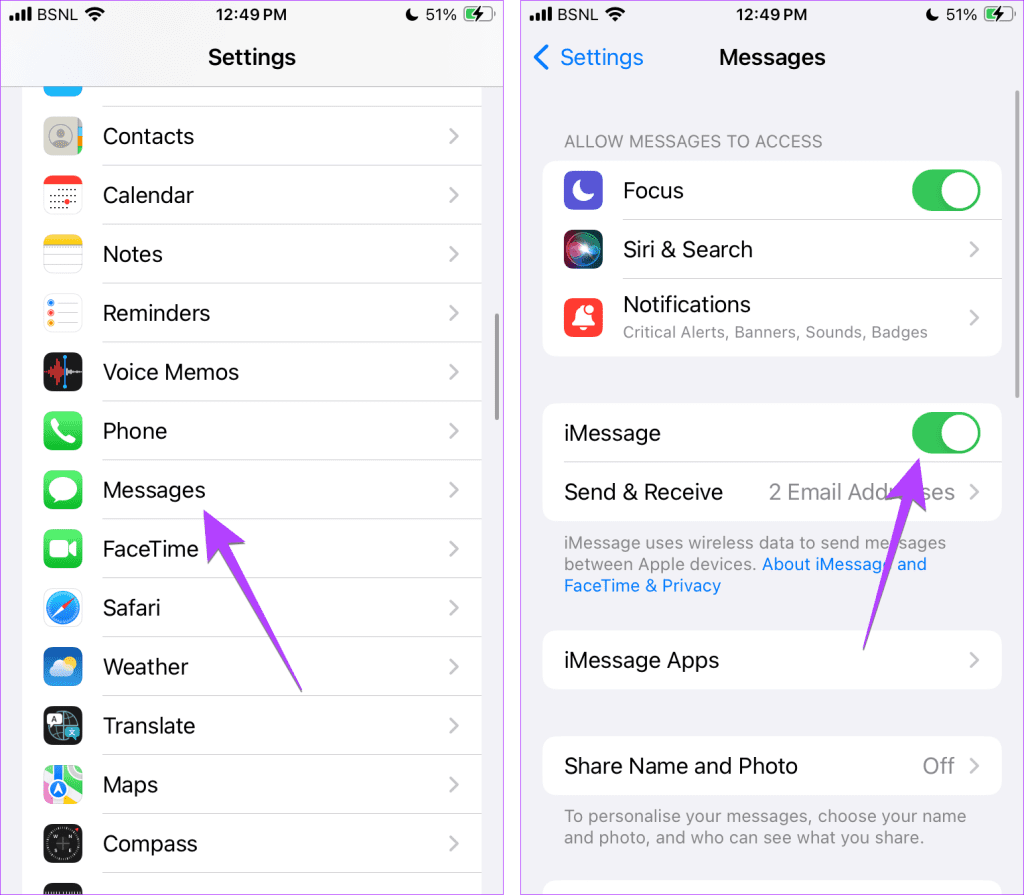
In case the person no longer has access to iMessage, they can deregister iMessage from the Apple website as well.
Fix 4: Clear the Cache of the Messages App
For many Android users, simply clearing the cache of the Messages app has fixed the issue for them. To clear the cache of the Messages app, follow these steps:
Step 1: Open Settings and go to Apps > Messages.

Step 2: Tap on Storage, followed by the Clear cache button.

Step 3: Restart the phone.
Was this helpful?
Last updated on 01 August, 2024
Read Next
 5 Ways to Fix Text Messages Not Sending on Android
Basic Fixes Check network plan: Ensure your plan supports sending SMS messages, check your account balance, and ensure sufficient funds to cover the SMS cost.
5 Ways to Fix Text Messages Not Sending on Android
Basic Fixes Check network plan: Ensure your plan supports sending SMS messages, check your account balance, and ensure sufficient funds to cover the SMS cost.
 3 Ways to Fix Telegram Not Sending Messages on Android and iPhone
Try Basic Fixes The contact may have blocked you: If the message not sending issue is limited to one or two people, the other person may have blocked you.
3 Ways to Fix Telegram Not Sending Messages on Android and iPhone
Try Basic Fixes The contact may have blocked you: If the message not sending issue is limited to one or two people, the other person may have blocked you.
 3 Ways to Fix Android Not Sending Video Messages
Basic Fixes: Check your mobile plan: Most mobile operators charge a certain amount to send MMS to the recipient(s).
3 Ways to Fix Android Not Sending Video Messages
Basic Fixes: Check your mobile plan: Most mobile operators charge a certain amount to send MMS to the recipient(s).
 7 Best Ways to Fix Samsung Messages Not Sending Error
Many Samsung smartphone users end up using the Samsung Messages app to send and receive messages.
7 Best Ways to Fix Samsung Messages Not Sending Error
Many Samsung smartphone users end up using the Samsung Messages app to send and receive messages.
 How to Fix WhatsApp Messages Not Sending on iPhone and Android
Why Doesn't WhatsApp Send My Messages Here are some of the reasons behind WhatsApp's sketchy behavior on your phone.
How to Fix WhatsApp Messages Not Sending on iPhone and Android
Why Doesn't WhatsApp Send My Messages Here are some of the reasons behind WhatsApp's sketchy behavior on your phone.
 5 Ways to Fix Instagram Messages Not Sending
Basic Fixes Check if Instagram is down: Check if Instagram is facing downtime.
5 Ways to Fix Instagram Messages Not Sending
Basic Fixes Check if Instagram is down: Check if Instagram is facing downtime.
 3 Ways to Fix LinkedIn Not Sending Messages
Fix 1: Clear Your Browser Cache and Cookies Your browser's cache and cookies could interfere with LinkedIn’s messaging scripts, which might block your messages.
3 Ways to Fix LinkedIn Not Sending Messages
Fix 1: Clear Your Browser Cache and Cookies Your browser's cache and cookies could interfere with LinkedIn’s messaging scripts, which might block your messages.
 6 Fixes for Facebook Messenger Not Sending Messages (iPhone and Android)
Preliminary Fixes Enable and Disable Airplane Mode: Network glitches can prevent Facebook Messenger from sending messages.
6 Fixes for Facebook Messenger Not Sending Messages (iPhone and Android)
Preliminary Fixes Enable and Disable Airplane Mode: Network glitches can prevent Facebook Messenger from sending messages.
The article above may contain affiliate links which help support Guiding Tech. The content remains unbiased and authentic and will never affect our editorial integrity.