Charging on Hold Due to iPhone Temperature: A Much-Needed Feature
High battery temperatures are the prime reason for the depletion of battery health on your iPhone. When your iPhone is heating above a certain temperature limit when plugged in, the charging will be kept on hold to prevent a further increase of heat.
This helps safeguard the internal components and also protects the battery health of your iPhone.
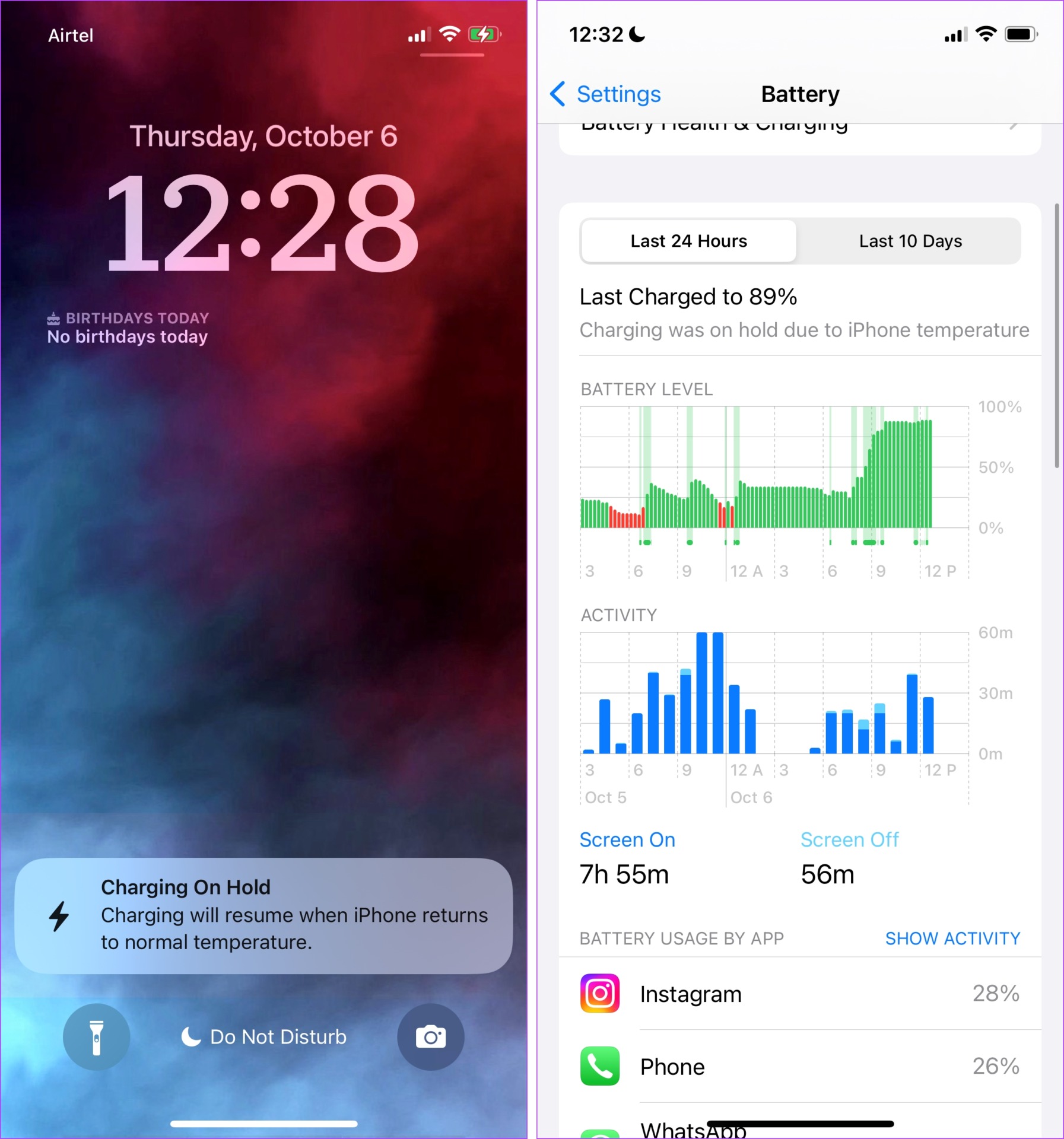
iPhone Charging on Hold Error Message: What to Do
Here are some ways to ensure your iPhone cools down to the appropriate temperature so you can resume charging it.
Fix 1: Remove Your iPhone Case
If you are using a thick back cover for your iPhone, it might help trap heat. So, if you feel your device is getting hot, remove your case during charging. This will ensure better ventilation for your iPhone and will not trap heat.
Fix 2: Move to a Less Hot Surrounding
Apple recommends using your iPhone in temperatures under 45° C (113° F). So, if you are charging your device under the hot sun using a power bank, try to get indoors and charge your iPhone.
Fix 3: Avoid Charging in the Car
While it is convenient to put your device on the wireless charging pad of your car, be careful of the hot sun, which can easily heat your car and, consequently, your iPhone. This can also heat the battery. So, charge your device in the car only when necessary.
Fix 4: Unplug Your iPhone
If you notice your iPhone getting hot while charging, unplug it from the power source and let it cool down for a bit. Plug it back in once again, and check if the temperature is normal. If it gets back hot quickly, check the authenticity of your accessories or contact Apple Support.
Fix 5: Use MFi-Certified Accessories Only
Do you see a low-priced iPhone power adapter and a lightning cable? If you are tempted to buy one of those, we advise you to avoid it. You need to check for MFi—Made for iPhone/iPad certification, and then make the purchase.
Here’s a list of MFi-authorized manufacturers, as listed by Apple. (Make sure you agree to the terms to view the list.) These manufacturers make accessories that have passed all the quality checks for your iPhone and will not harm or affect your device when you use them.
Fix 6: Opt for Slower Charging
Fast charging speeds up chemical reactions and generates more heat. So, if your device is heating up while charging, use a power adapter with a lower rating for a while until it cools down.
Lastly, try powering off the device and waiting for the iPhone to cool down. Once it is back to normal temperature, you can restart.
Was this helpful?
Last updated on 04 September, 2024
Read Next
 7 Best Multi-Charging Cables for Charging Multiple Devices
Most of us nowadays have multiple devices to charge.
7 Best Multi-Charging Cables for Charging Multiple Devices
Most of us nowadays have multiple devices to charge.
 10 Ways to Fix Moisture Detected in Charging Port Error on Samsung Galaxy Phones
Most Samsung Galaxy devices these days come with an IP rating.
10 Ways to Fix Moisture Detected in Charging Port Error on Samsung Galaxy Phones
Most Samsung Galaxy devices these days come with an IP rating.
 4 Ways to Fix Optimised Battery Charging Not Working on iPhone
Basic Fixes Force restart your iPhone: Press and quickly release the Volume Up button followed by Volume Down.
4 Ways to Fix Optimised Battery Charging Not Working on iPhone
Basic Fixes Force restart your iPhone: Press and quickly release the Volume Up button followed by Volume Down.
 6 Ways to Fix iPhone Battery Draining While Charging
https://youtu.be/Eotj1OWfuME Fix 1: Use MFi-Certified Cables and Adapters It’s advisable to use Apple’s original accessories that ship with the phone.
6 Ways to Fix iPhone Battery Draining While Charging
https://youtu.be/Eotj1OWfuME Fix 1: Use MFi-Certified Cables and Adapters It’s advisable to use Apple’s original accessories that ship with the phone.
 11 Easy Ways to Fix iPhone Charging Slowly
You have thirty minutes to leave for work and plug your iPhone to charge.
11 Easy Ways to Fix iPhone Charging Slowly
You have thirty minutes to leave for work and plug your iPhone to charge.
 3 Ways to Fix Apple Watch Not Charging
Basic Fixes: Clean the rear surface of the Watch and charging puck: Dust and sweat can accumulate on your Apple Watch if worn daily.
3 Ways to Fix Apple Watch Not Charging
Basic Fixes: Clean the rear surface of the Watch and charging puck: Dust and sweat can accumulate on your Apple Watch if worn daily.
 Top 8 Ways to Fix Apple iPad Not Charging
Apple’s iPad is ideal for consuming media, getting some work done, and taking Google Meet/Zoom calls on the go.
Top 8 Ways to Fix Apple iPad Not Charging
Apple’s iPad is ideal for consuming media, getting some work done, and taking Google Meet/Zoom calls on the go.
 4 Ways to Fix Wireless Charging Not Working With Phone
Fix 1: Try a Different Cable The cable you use to attach the charging brick to the wireless charger plays an important role.
4 Ways to Fix Wireless Charging Not Working With Phone
Fix 1: Try a Different Cable The cable you use to attach the charging brick to the wireless charger plays an important role.
The article above may contain affiliate links which help support Guiding Tech. The content remains unbiased and authentic and will never affect our editorial integrity.