


What Happens When You Hide Someone From Suggested
- You see less of your contact. You won’t see the person suggested with your other contacts or their notes.
- You can still search for the person manually and start a conversation with them.
Remove Someone From Suggested on Messenger
On Android
Step 1: Open Facebook Messenger and tap the hamburger menu at the top-left corner.
Step 2: Select the Settings gear.
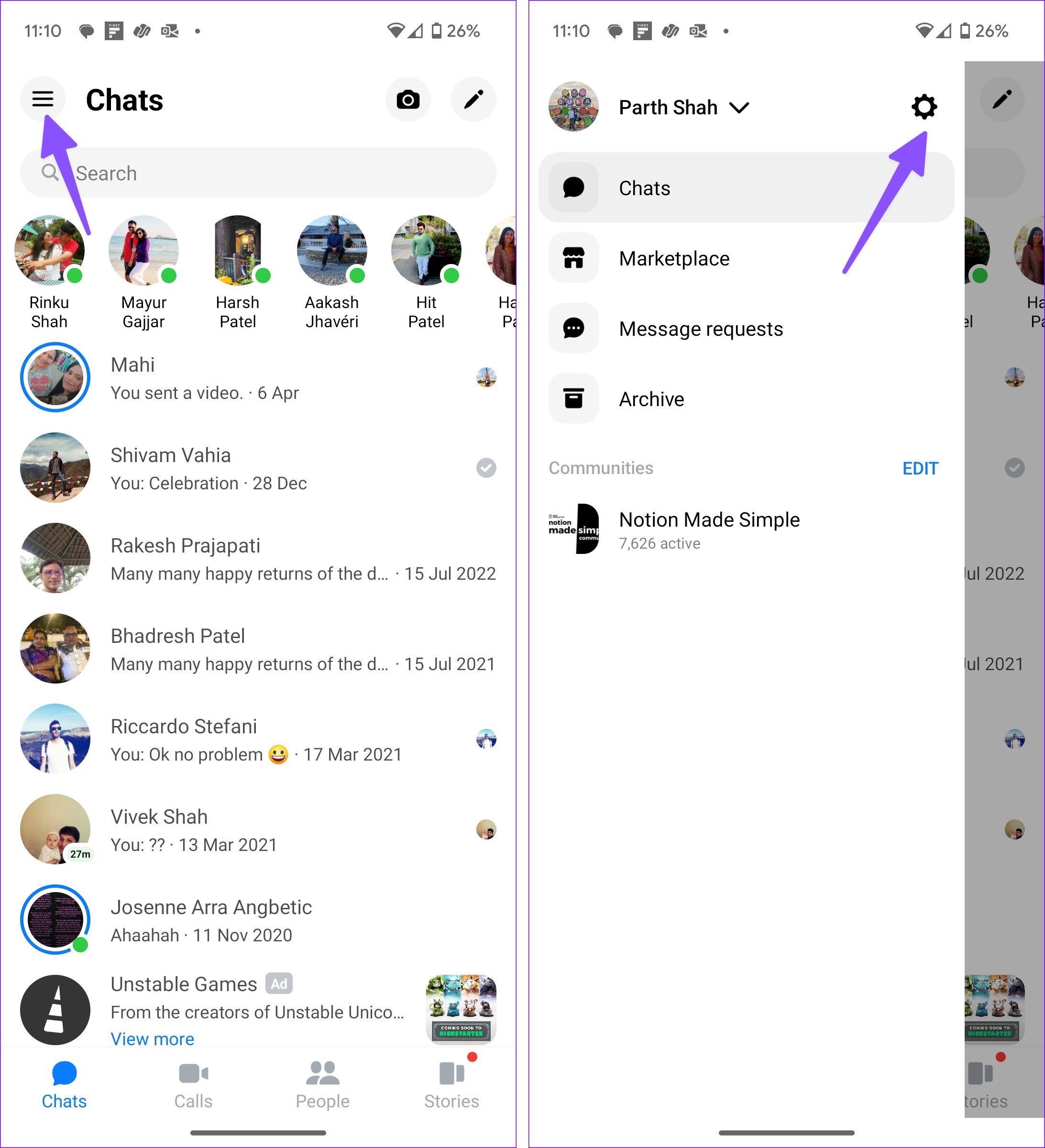
Step 3: Tap Privacy & safety.
Step 4: Tap Hidden contacts.

Step 5: Select the contact menu at the top-right corner.
Step 6: Search for contacts and hide them from the following menu.

Repeat the same for all the irrelevant contacts and stop them from appearing in search suggestions.
On iPhone
Step 1: Launch Messenger. Then, tap the hamburger menu in the top-left corner and open Settings.

Step 2: Open Privacy & safety and tap Hidden contacts.

Step 3: Tap Add at the top and select the contact you want to hide from the Suggested list.

You can’t multi-select several contacts at once and remove them from the Suggested list. You need to select each contact individually.
How to Unhide Someone From Suggested on Messenger
If you want to see the person in the Suggested list, unhide them from Messenger settings. The steps are identical for both the iOS and Android apps. We will use Facebook Messenger for Android here.
Step 1: Open Messenger and go to Settings (check the steps above).
Step 2: Select Privacy & safety.

Step 3: Select Hidden contacts and tap Unhide beside contacts.
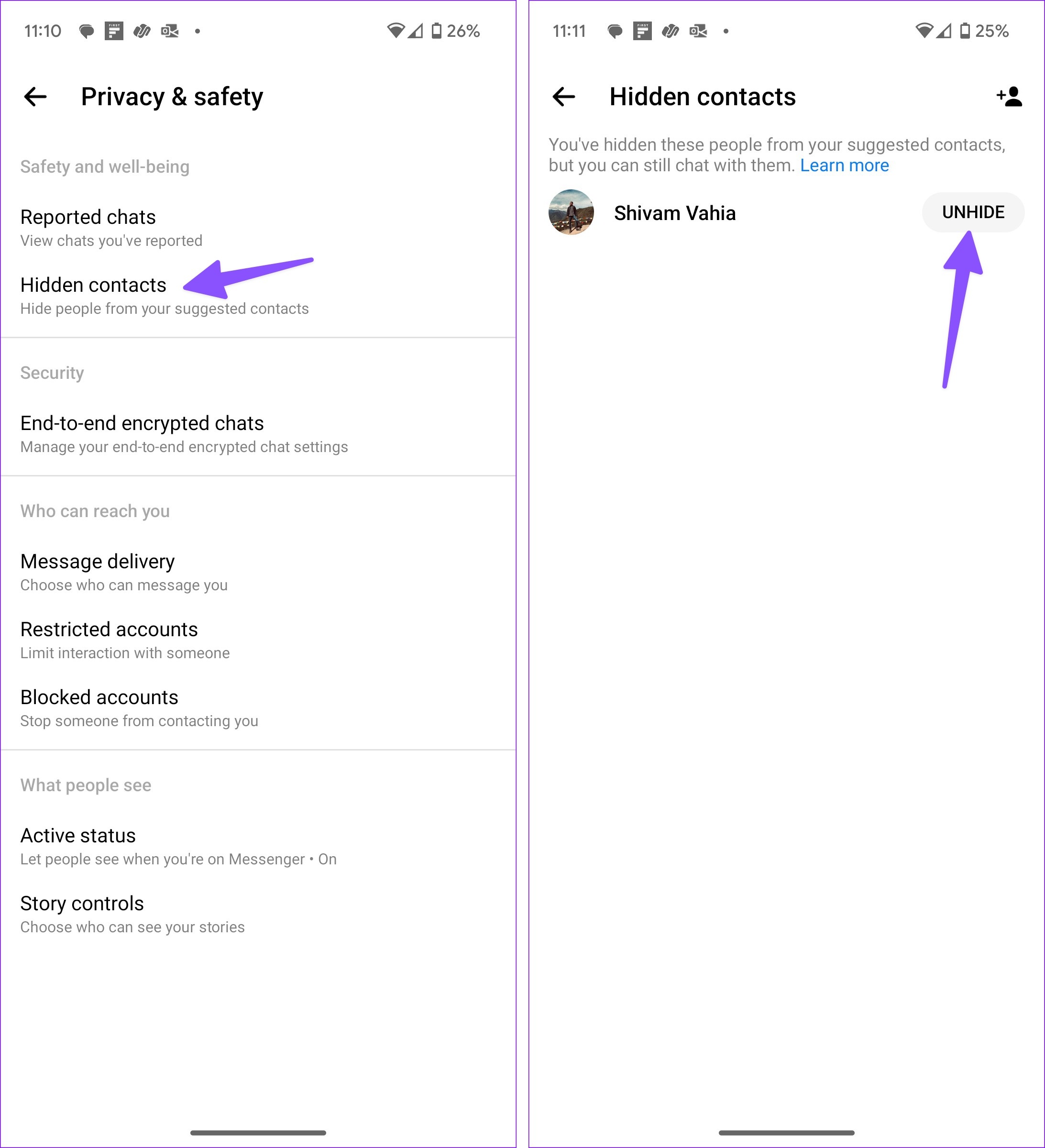
It may take a while before the contacts appear in the Suggested list.
FAQs on Removing Someone From Suggested on Messenger
When you hide someone from Suggested on Facebook Messenger, the social media service doesn’t notify the person. After all, it’s a privacy feature, and it’s Facebook’s job to keep you anonymous.
Yes, the person remains in your friends list on Facebook. Meaning the person can see your posts, comments, and likes and start a conversation. If you want to hide such information, unfriend or restrict the person on Facebook.
When you mute someone on Messenger, the app disables messages and calls notifications for the person. You will receive messages, but the system won’t notify you. You’ll need to open the chat to check their new messages. In contrast, when the hidden person sends you a message, Messenger alerts you as usual.
Messenger suggesting your ex or unnecessary contacts can sometimes get you in trouble. You can use the steps above and hide such people from Facebook.
Was this helpful?
Last updated on 24 July, 2024
Read Next
 How to Disable “Suggested for You” Posts on Facebook
What Are Suggested For You Posts on Facebook Facebook does everything it can to keep you doom-scrolling, from search suggestions to suggesting posts.
How to Disable “Suggested for You” Posts on Facebook
What Are Suggested For You Posts on Facebook Facebook does everything it can to keep you doom-scrolling, from search suggestions to suggesting posts.
 What Happens When You Block Someone on Facebook Messenger
What Happens When You Block Someone On Messenger Action Blocked PersonYouSend MessagesNoNoMessage in groupsYesYesCall on MessengerNo NoDelete chat historyNo NoSee old messages YesYesReact to old messages No NoSee online status
What Happens When You Block Someone on Facebook Messenger
What Happens When You Block Someone On Messenger Action Blocked PersonYouSend MessagesNoNoMessage in groupsYesYesCall on MessengerNo NoDelete chat historyNo NoSee old messages YesYesReact to old messages No NoSee online status
 What Happens When You Restrict Someone on Facebook Messenger?
What Does Restrict Mean on Messenger?
What Happens When You Restrict Someone on Facebook Messenger?
What Does Restrict Mean on Messenger?
 What Happens When You Report Someone on Facebook Messenger
Being the largest social media platform worldwide, Facebook comes with several privacy tools to report harassment, restrict the recipient, and prevent others from peeking at your account.
What Happens When You Report Someone on Facebook Messenger
Being the largest social media platform worldwide, Facebook comes with several privacy tools to report harassment, restrict the recipient, and prevent others from peeking at your account.
 How to Hide Active Status From Someone on Facebook Messenger
Hide Active Status From a Particular Person on Messenger Although Facebook offers native Messenger apps on iOS, Android, Windows, and Mac, the ability to hide active status from one person
How to Hide Active Status From Someone on Facebook Messenger
Hide Active Status From a Particular Person on Messenger Although Facebook offers native Messenger apps on iOS, Android, Windows, and Mac, the ability to hide active status from one person
 Can You Block Someone on Facebook but Not Messenger
1.
Can You Block Someone on Facebook but Not Messenger
1.
 How to Know if Someone Restricted You on Facebook Messenger
What Does Restrict Mean on Facebook Messenger?
How to Know if Someone Restricted You on Facebook Messenger
What Does Restrict Mean on Facebook Messenger?
 How to Change or Remove Themes in Facebook Messenger
Things to Know About Messenger Chat Themes Any participant in the chat can change the Messenger theme.
How to Change or Remove Themes in Facebook Messenger
Things to Know About Messenger Chat Themes Any participant in the chat can change the Messenger theme.
The article above may contain affiliate links which help support Guiding Tech. The content remains unbiased and authentic and will never affect our editorial integrity.

