Login Into Facebook Using Instagram on Mobile
After Meta took charge of running Instagram, linking and accessing your Facebook account has become easy. Mostly, both your Facebook and Instagram profiles get linked automatically when used on the same device. Here’s how you can regain access to Facebook using Instagram. The steps below remain the same for iPhone and Android users.
Open Instagram > Settings and privacy > Accounts Center > Profiles > Logging in with accounts > Advanced > Choose Instagram account name > Enable Facebook account > Close the app and then open Facebook.


You can now log in using your Instagram account name and password to regain access.
Login Into Facebook Using Instagram on Desktop
Instagram lets you access your profile from your PC as well. And with that, you do get the option of enabling Facebook sign-in using Instagram credentials. Once you do this, you can log in to Facebook both on desktop and mobile through Instagram. Here’s how you can enable the same.
Step 1: Open the web browser and log in to your Instagram account.
Step 2: Click on your profile icon at the bottom-left corner.
Step 3: Click the Settings icon at the top right side.
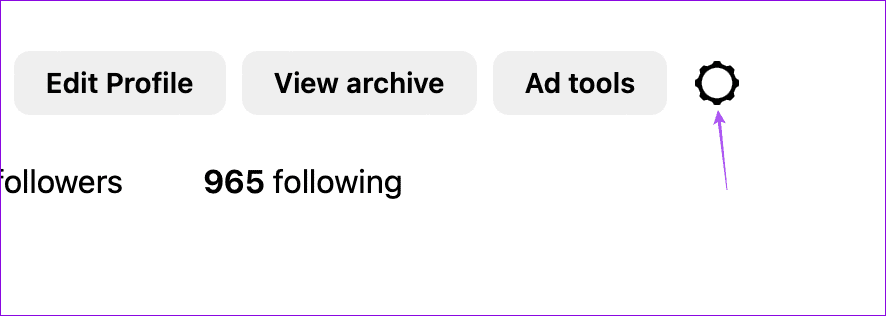
Step 4: Select Settings and Privacy > See more in Accounts Center > Connected Experiences > Logging in with accounts.
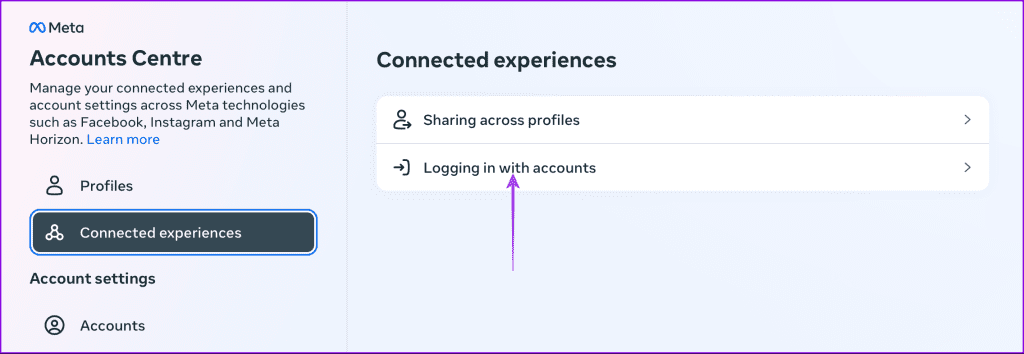
Step 5: Click on Advanced. Then click on your Instagram account name by selecting Choose which accounts can log in to other accounts.

Step 6: Select your Instagram account name.
Step 7: Enable your Facebook account so that you can log in to it using Instagram credentials.
Was this helpful?
Last updated on 21 August, 2024
Read Next
 How to Remove Email or Accounts From Facebook Login Screen
Remove Remembered Info in Facebook Login on Desktop You can remove the login info from the Facebook webpage or by removing the autofill password for your Facebook account using browser
How to Remove Email or Accounts From Facebook Login Screen
Remove Remembered Info in Facebook Login on Desktop You can remove the login info from the Facebook webpage or by removing the autofill password for your Facebook account using browser
 Top 8 Ways to Fix Wi-Fi Login Page Not Showing on iPhone
Public Wi-Fi networks have become ubiquitous.
Top 8 Ways to Fix Wi-Fi Login Page Not Showing on iPhone
Public Wi-Fi networks have become ubiquitous.
 7 Fixes for Wi-Fi Login Page Not Showing Up on Mac and Windows
https://youtu.be/ZVvbLZKKXKk Fix 1: Forget the Network and Reconnect to It Try forgetting the network so you can reconnect to it.
7 Fixes for Wi-Fi Login Page Not Showing Up on Mac and Windows
https://youtu.be/ZVvbLZKKXKk Fix 1: Forget the Network and Reconnect to It Try forgetting the network so you can reconnect to it.
 3 Ways to Fix ChatGPT Login Not Working
Why ChatGPT Login Isn’t Working ChatGPT may fail to log you in due to one of the following reasons: You're connected to an unstable or slow internet.
3 Ways to Fix ChatGPT Login Not Working
Why ChatGPT Login Isn’t Working ChatGPT may fail to log you in due to one of the following reasons: You're connected to an unstable or slow internet.
 How to Delete ChatGPT Account (With or Without Login)
Things to Know Before Deleting Your ChatGPT Account You need to know some significant points before deleting your ChatGPT account because there is no going back after your account has
How to Delete ChatGPT Account (With or Without Login)
Things to Know Before Deleting Your ChatGPT Account You need to know some significant points before deleting your ChatGPT account because there is no going back after your account has
 What’s the Difference Between PIN and Password for Login in Windows 10
We carry almost our entire digital life in laptops, and if security is compromised, anyone can access our both professional and personal life.
What’s the Difference Between PIN and Password for Login in Windows 10
We carry almost our entire digital life in laptops, and if security is compromised, anyone can access our both professional and personal life.
 4 Ways to Disable Login Screen After Sleep on Windows 11
Method 1: Disable Login After Sleep From Settings The easiest way to skip the login screen after sleep mode is by modifying the sign-in options in the Settings app.
4 Ways to Disable Login Screen After Sleep on Windows 11
Method 1: Disable Login After Sleep From Settings The easiest way to skip the login screen after sleep mode is by modifying the sign-in options in the Settings app.
 3 Ways to Fix Wi-Fi Login Page Not Showing on Android
https://youtu.be/PI8mmzRDJ0c Try Basic Fixes Disable and re-enable Wi-Fi: Temporary issues with your Android's Wi-Fi may prevent it from communicating with the network and loading the login page.
3 Ways to Fix Wi-Fi Login Page Not Showing on Android
https://youtu.be/PI8mmzRDJ0c Try Basic Fixes Disable and re-enable Wi-Fi: Temporary issues with your Android's Wi-Fi may prevent it from communicating with the network and loading the login page.
The article above may contain affiliate links which help support Guiding Tech. The content remains unbiased and authentic and will never affect our editorial integrity.