Updates are painful. Updates that fail are even more upsetting. Thankfully, Windows does provide error codes to better pinpoint the issue. If you’ve encountered error code 0x80070643 during your update process, we’ve got both the causes and the potential fixes down in this article.
What Causes This Error?
As with the many update errors Windows throws at you, error code 0x80070643 has several possible causes, including:
- A lack of space for the update to install
- A corrupted update cache, which is often caused by incomplete downloads
- A faulty .NET framework, which controls the update process
- Conflicts with the antivirus
- Old or outdated system software
- Corrupted MSI or catroot folders
Fixing Error Code 0x80070643
Let’s take a look at how to fix this error code with the solutions below:
Run the Update, Troubleshooter
The Update Troubleshooter is a first step that can be very effective. To use it:
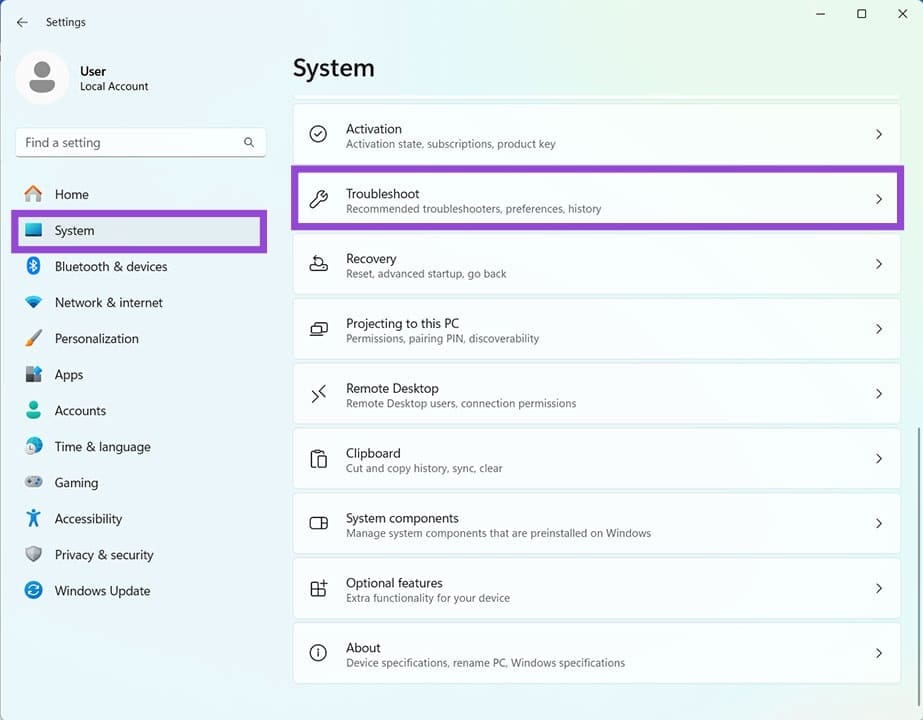
Step 1. Open Settings (Win + I), click “System,” and scroll down to “Troubleshoot.”
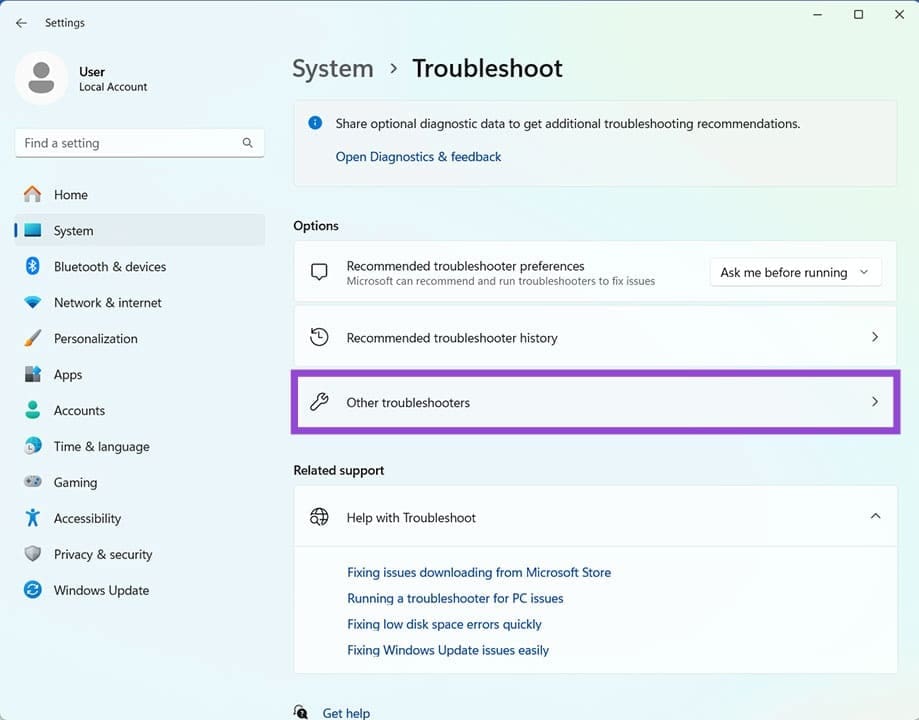
Step 2. Select “Other troubleshooters.”
Step 3. You’ll see “Windows Update” in the list. Click the “Run” button and let it go.
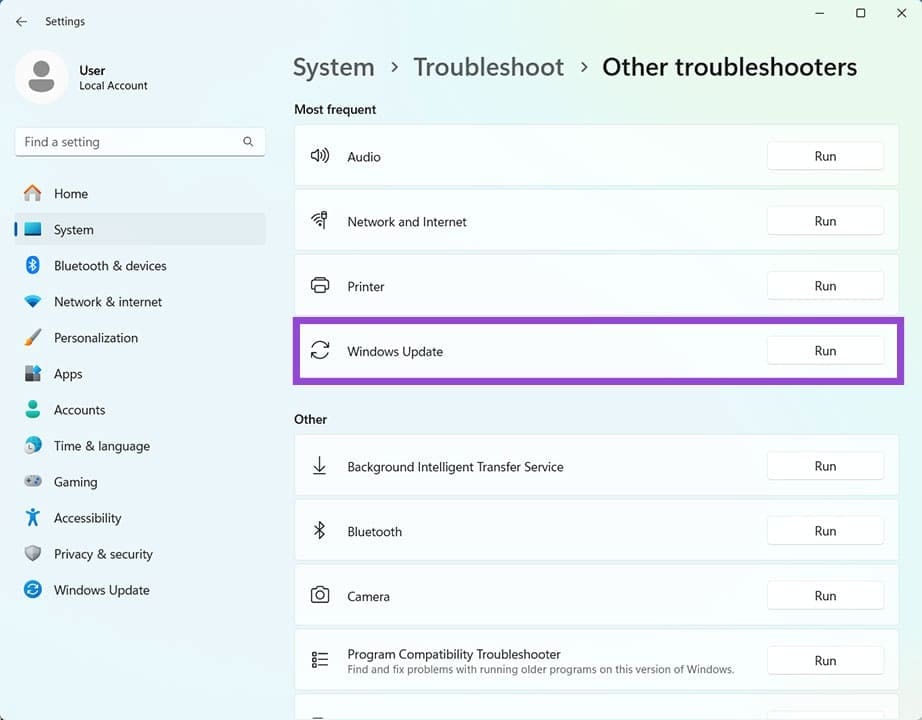
Step 4. If the troubleshooter identifies any issues, it’ll try to repair them. Restart afterwards and try updating again.
Delete the Update Cache
A good next step is to ensure no fragmented and corrupted download files remain in the update cache. The quickest way is to delete them in Explorer:
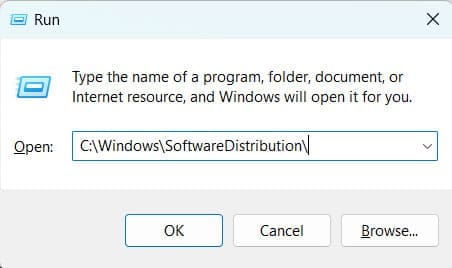
Step 1. Open the Run dialog (Win + R) and enter “C:\Windows\SoftwareDistribution\” before hitting “Enter.”
Step 2. An Explorer window will open. Select all the files and folders and delete them. You can press (Shift + Del) to skip sending them to the Recycle Bin and remove them completely.
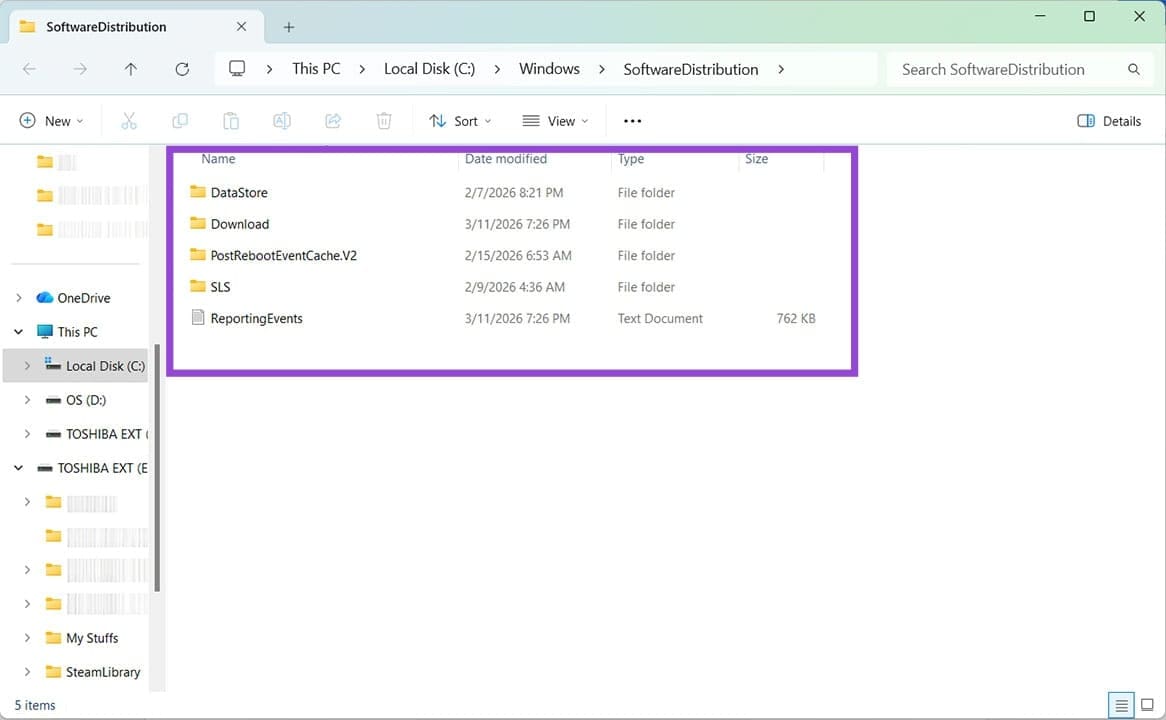
Step 3. Your files should be deleted and the cache cleared. Windows will recreate the folders when you restart.
Step 4. On rebooting, try the update again.
Check Your Disk Space
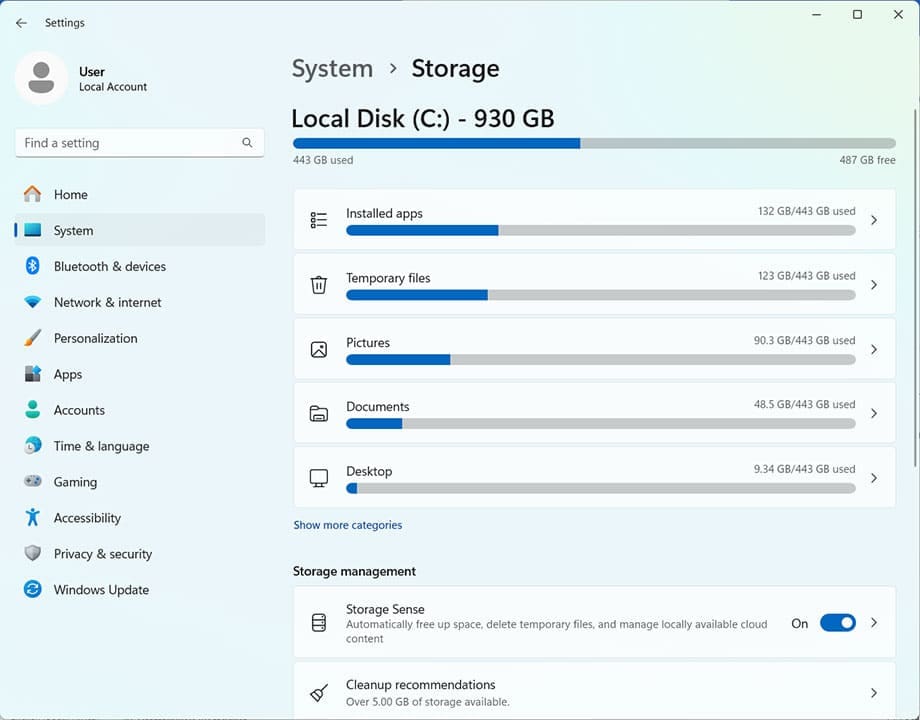
Updates need space to download and install. Error code 0x80070643 might be an indication that you need to free up space. The fastest way is to use Storage Sense.
You can find Storage Sense in Settings, under “System” and “Storage.” Once there, you’ll see the overall disk space on your main hard drive and can clear sections.
Storage Sense automatically deletes unused files from your machine to keep space free, too. Enable this under “Storage management” if you don’t mind the process being automated.
Reset Your Catroot 2 Folder
Catroot is an important system folder related to updating information. Resetting it might help the update process complete:
Step 1. Open up the Run Dialog (Win + R) and type “cmd” before hitting (Ctrl + Shift + Enter) to run as Admin.
Step 2. Type the following commands into Command Prompt, pressing “Enter” after each:
net stop cryptsvc
md %systemroot%\system32\catroot2.old
xcopy %systemroot%\system32\catroot2 %systemroot%\system32\catroot2.old /s
Step 3. Open up an Explorer window (Win + E) and navigate to ([Drive] > Windows > System 32).
Step 4. (Shift + Del) all the contents inside the “catroot 2” folder.
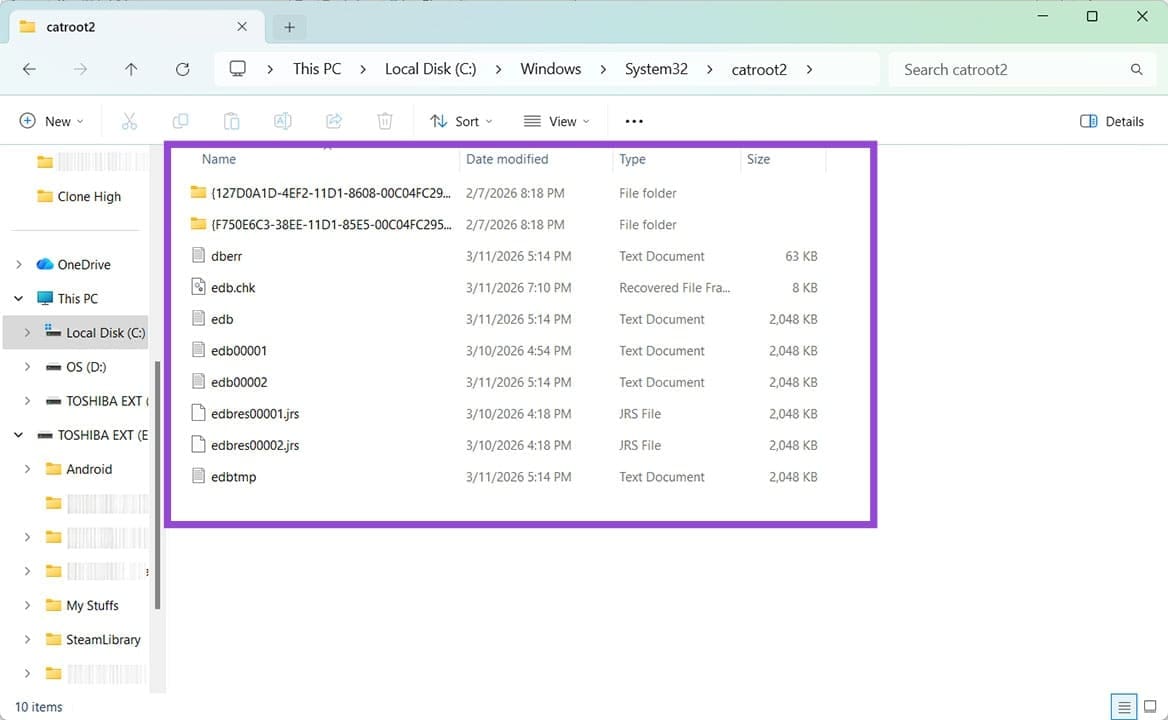
Step 5. Back in Command Prompt, type “net start cryptsvc” and restart your PC. The folder will be reset.
Was this helpful?
Last updated on 15 March, 2026
Read Next
 Top 3 Ways to Fix OneDrive Connectivity Error Code 0x8004de40 in Windows 10
OneDrive is arguably one of the best cloud storage and backup solutions for Windows computers.
Top 3 Ways to Fix OneDrive Connectivity Error Code 0x8004de40 in Windows 10
OneDrive is arguably one of the best cloud storage and backup solutions for Windows computers.
 4 Ways to Fix the Login Error Code E84 in Steam for Windows
Switch to a different network connection: A slow or intermittent internet connection can also cause login errors in Steam.
4 Ways to Fix the Login Error Code E84 in Steam for Windows
Switch to a different network connection: A slow or intermittent internet connection can also cause login errors in Steam.
 4 Ways to Fix Graphics Device Driver Error Code 22 on Windows
Fix 1: Enable and Update the Graphics Driver You may see error code 22 on Windows if you have previously disabled the graphics driver or if it's outdated.
4 Ways to Fix Graphics Device Driver Error Code 22 on Windows
Fix 1: Enable and Update the Graphics Driver You may see error code 22 on Windows if you have previously disabled the graphics driver or if it's outdated.
 Windows 11: How to Fix Error Code 0xc0000001
What Is 0xc0000001 Error Code in Windows 11?
Windows 11: How to Fix Error Code 0xc0000001
What Is 0xc0000001 Error Code in Windows 11?
 4 Ways to Fix Error Code 0xc000000f in Windows 11
Basic Fixes: Disconnect all external devices: Error code 0xc00000f can indicate issues with the boot configuration data (BCD), but sometimes, it may arise due to conflicts with external devices like
4 Ways to Fix Error Code 0xc000000f in Windows 11
Basic Fixes: Disconnect all external devices: Error code 0xc00000f can indicate issues with the boot configuration data (BCD), but sometimes, it may arise due to conflicts with external devices like
 How to Fix Printer Not Activated (Error Code 30) on Windows 11
Basic Fixes Reconnect printer: If you're using a wired printer, its loose USB connection to your PC may result in 'Printer not activated (Error Code 30)'.
How to Fix Printer Not Activated (Error Code 30) on Windows 11
Basic Fixes Reconnect printer: If you're using a wired printer, its loose USB connection to your PC may result in 'Printer not activated (Error Code 30)'.
 4 Ways to Fix Error Code 0x80070570 in Windows
Fix 1: Re-Download Windows ISO Finding the correct Windows ISO for your PC is crucial for proper installation.
4 Ways to Fix Error Code 0x80070570 in Windows
Fix 1: Re-Download Windows ISO Finding the correct Windows ISO for your PC is crucial for proper installation.
 What to Do With Error Code 0xC004C003 When Activating Windows
Updating your Windows to a new version, or performing a fresh install, can be a traumatic experience for most users, but add to that an error code at the finish
What to Do With Error Code 0xC004C003 When Activating Windows
Updating your Windows to a new version, or performing a fresh install, can be a traumatic experience for most users, but add to that an error code at the finish
The article above may contain affiliate links which help support Guiding Tech. The content remains unbiased and authentic and will never affect our editorial integrity.