Things to Know Before Deleting Your ChatGPT Account
You need to know some significant points before deleting your ChatGPT account because there is no going back after your account has been deleted.
- Once you delete your account, you cannot restore it.
- All the conversations will be removed.
- You can’t use the same email and phone number linked to the existing account to create a new account.
- All the services that use the APIs associated with your account will stop working.
- Even after deleting your ChatGPT account, you will continue to receive newsletters, updates, and other communications from OpenAI and ChatGPT unless you unsubscribe from them.
With that out of the way, let’s move on. Note that there are different steps for deleting an account, depending on if you are logged in or out.
Delete Your ChatGPT Account When Logged In
If you have logged into your ChatGPT account, follow these steps.
Step 1: Click your profile image on the top right and click Settings.

Step 2: Select Data controls and choose Delete.

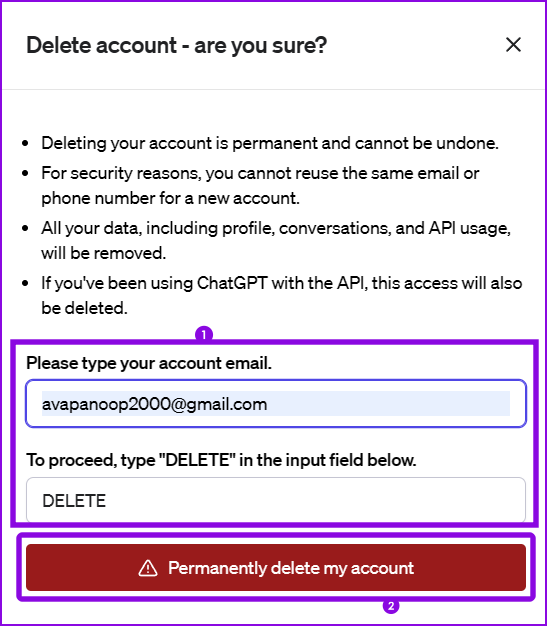
Step 3: Enter the linked account email ID and type DELETE in all caps.
Note: If you have been using ChatGPT for a long time (more than 10 minutes), hit Refresh login and log in again.
Step 6: Once you fill in all the relevant fields, hit Permanently delete my account.
If you don’t want to share your data with ChatGPT, toggle off Chat history & training from ChatGPT settings.
Alternatively, you can use the Help option to ask the OpenAI team to delete your ChatGPT account. However, the process can take up to four weeks.
Delete Your ChatGPT Account Without Logging In
If you are not logged into your account, you may submit a request to the service center on the GhatGPT Policy page to delete your ChatGPT account. Below are the steps.
Step 1: Navigate to the ChatGPT policy page on your browser.
Step 2: Click the Make a Privacy Request button at the top right.

Step 3: Click I have an OpenAI account, or I have an OpenAI account but cannot access it, depending on what best fits.

Step 4: Select Delete my OpenAI account.

Step 5: Enter your email address and click Send Email.

Step 6: Click on the login link in the email that was sent to you.
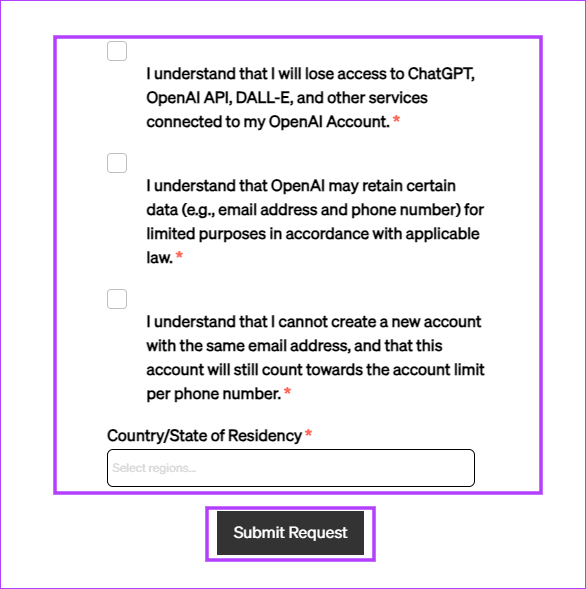
Step 7: Fill out the form and click Submit Request.
Remember that you may rather delete your ChatGPT history than the more radical account deletion.
FAQs
How do I remove my number from ChatGPT?
You cannot remove your phone number from a ChatGPT account. The only way to unlink it is to delete the linked ChatGPT account.
Does deleting a ChatGPT account remove all data?
Generally, your data will be deleted within 30 days, but in some cases, OpenAI may retain a limited set of data for a longer duration where the law requires it.
Can I recover ChatGPT account after deleting it?
No. Once an account is deleted, it can no longer be recovered.
Was this helpful?
Last updated on 14 July, 2024
Read Next
 3 Ways to Fix ChatGPT Login Not Working
Why ChatGPT Login Isn’t Working ChatGPT may fail to log you in due to one of the following reasons: You're connected to an unstable or slow internet.
3 Ways to Fix ChatGPT Login Not Working
Why ChatGPT Login Isn’t Working ChatGPT may fail to log you in due to one of the following reasons: You're connected to an unstable or slow internet.
 How to View Old Chats on ChatGPT Without Sharing Data
Accessing ChatGPT Chat History Wasn’t Available With Data Sharing Turned Off OpenAI used to provide the option to disable data sharing, which meant losing access to your chat history altogether.
How to View Old Chats on ChatGPT Without Sharing Data
Accessing ChatGPT Chat History Wasn’t Available With Data Sharing Turned Off OpenAI used to provide the option to disable data sharing, which meant losing access to your chat history altogether.
 How to View and Delete ChatGPT History on iPhone, Android, and Web
Viewing and Deleting Chat History On Web Hover your mouse to a chat you want to delete.
How to View and Delete ChatGPT History on iPhone, Android, and Web
Viewing and Deleting Chat History On Web Hover your mouse to a chat you want to delete.
 How to Disable Tumblr Safe Mode or Bypass it Without an Account
Tumblr is a great place to get your daily fix of cool GIFs and memes.
How to Disable Tumblr Safe Mode or Bypass it Without an Account
Tumblr is a great place to get your daily fix of cool GIFs and memes.
 5 Ways to Search Facebook Without an Account
Method 1: Using the Facebook Public Directory Facebook offers a public directory where you may search for people.
5 Ways to Search Facebook Without an Account
Method 1: Using the Facebook Public Directory Facebook offers a public directory where you may search for people.
 How to View Instagram Posts and Stories Without an Account
How to See Instagram Stories Without an Account Unlike posts on Instagram (mentioned below), users can see who opened/viewed their Instagram Stories.
How to View Instagram Posts and Stories Without an Account
How to See Instagram Stories Without an Account Unlike posts on Instagram (mentioned below), users can see who opened/viewed their Instagram Stories.
 How to Message a Private Account on Instagram (Without Following)
Message a Private Account on Instagram There are three ways to message a private account on Instagram, whether you follow them or not.
How to Message a Private Account on Instagram (Without Following)
Message a Private Account on Instagram There are three ways to message a private account on Instagram, whether you follow them or not.
 How to View LinkedIn Profiles Anonymously or Without Account
Method 1: Use Private Mode on LinkedIn LinkedIn lets you select whether you want to disclose your identity while viewing someone else's profile natively.
How to View LinkedIn Profiles Anonymously or Without Account
Method 1: Use Private Mode on LinkedIn LinkedIn lets you select whether you want to disclose your identity while viewing someone else's profile natively.
The article above may contain affiliate links which help support Guiding Tech. The content remains unbiased and authentic and will never affect our editorial integrity.