


How to Check Call History and Duration in Google Phone App
Most Android phone manufacturers use Google’s Phone app by default. Using this app, you can manage your voice and video calls. So, follow the steps below to check the call history of a number in the Google Phone app.
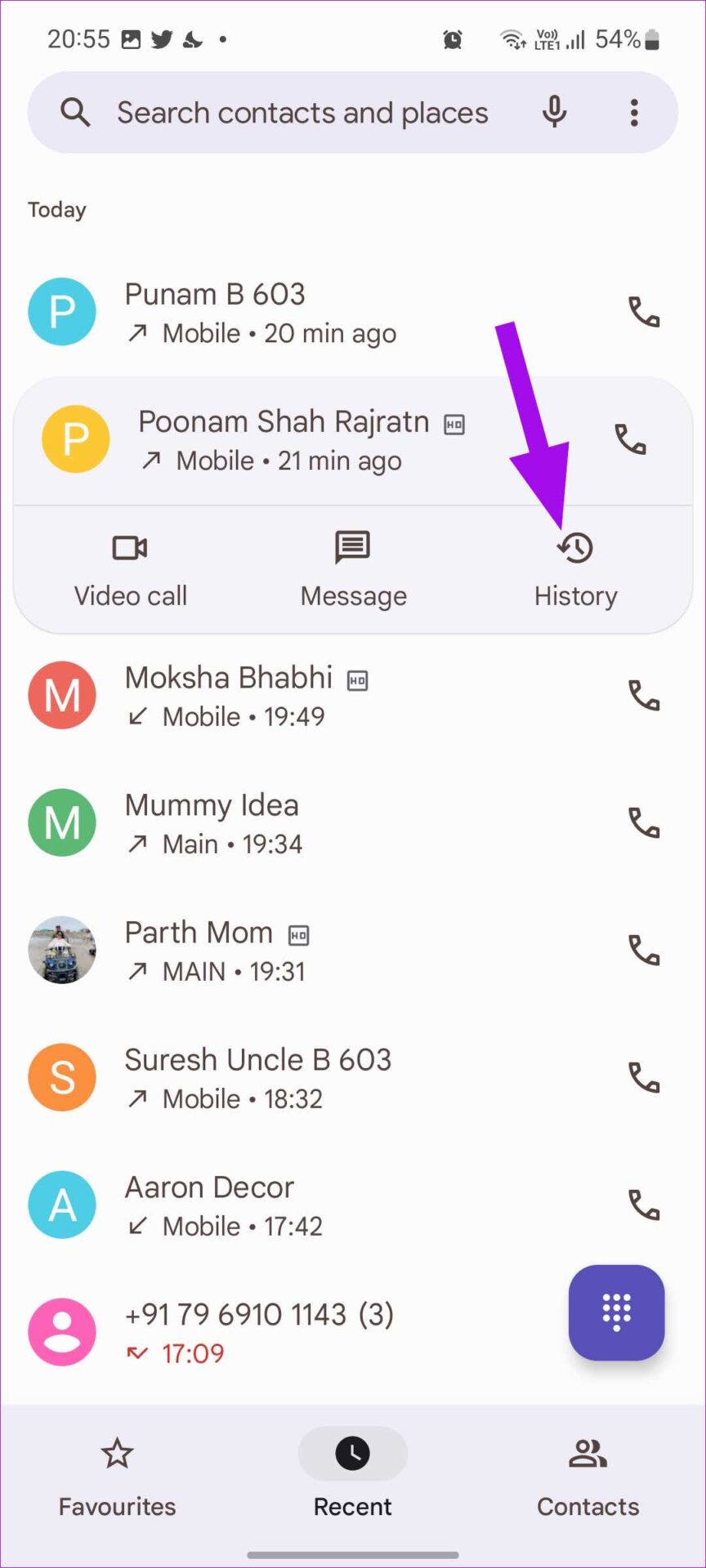
Step 1: Open the Google Phone app and go to the Recent tab.
Step 2: Select the relevant number or contact. Tap on History and check the call details.

Delete Call History
You can also delete the call history for the relevant number or contact. However, doing this will delete the entire call history. Here’s how to do it.
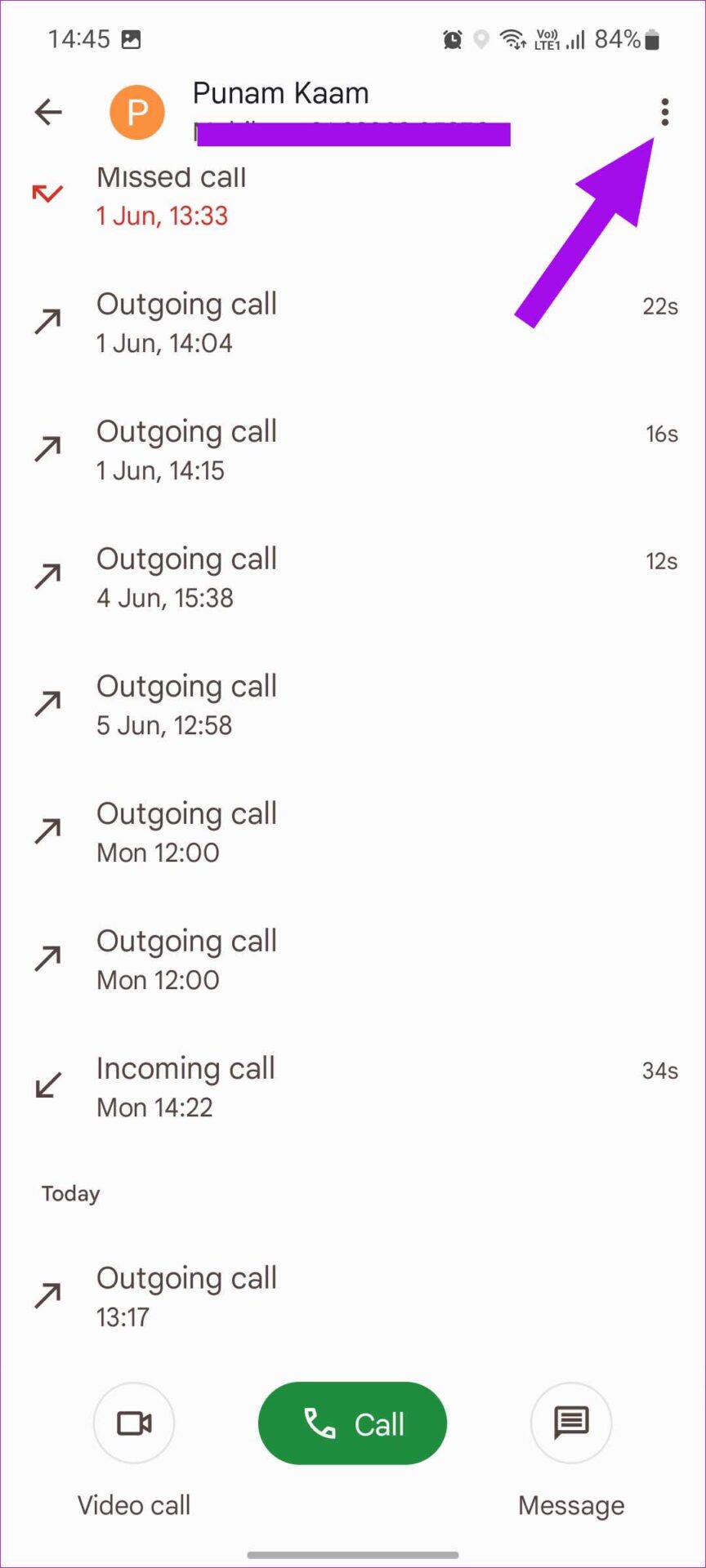
Step 1: Open the call history and tap the three-dot icon at the top right corner.
Step 2: Select Delete history and confirm your decision.

Also Read: How to check call duration on iPhone and Android
How to Check Call History and Duration on Samsung Phones
If you’re using a Samsung device, you may be using the Samsung Phone app by default. Similar to the Google Phone app, you can also use the Samsung Phone app to manage your call details. Using the below steps, you can check the call history of a number on your Samsung phone.
Step 1: Open the Samsung Phone app and tap on Recents. Tap on the relevant contact.
Step 2: Tap on the menu icon and check call details from the following menu.


Tip: You can also check out our guide to learn how to improve the sound quality of your Samsung phone.
Delete Call History
You can delete the relevant call details and check your previous call history. And unlike the Google Phone app, you get the option of deleting the call history one by one as well. Here’s how.
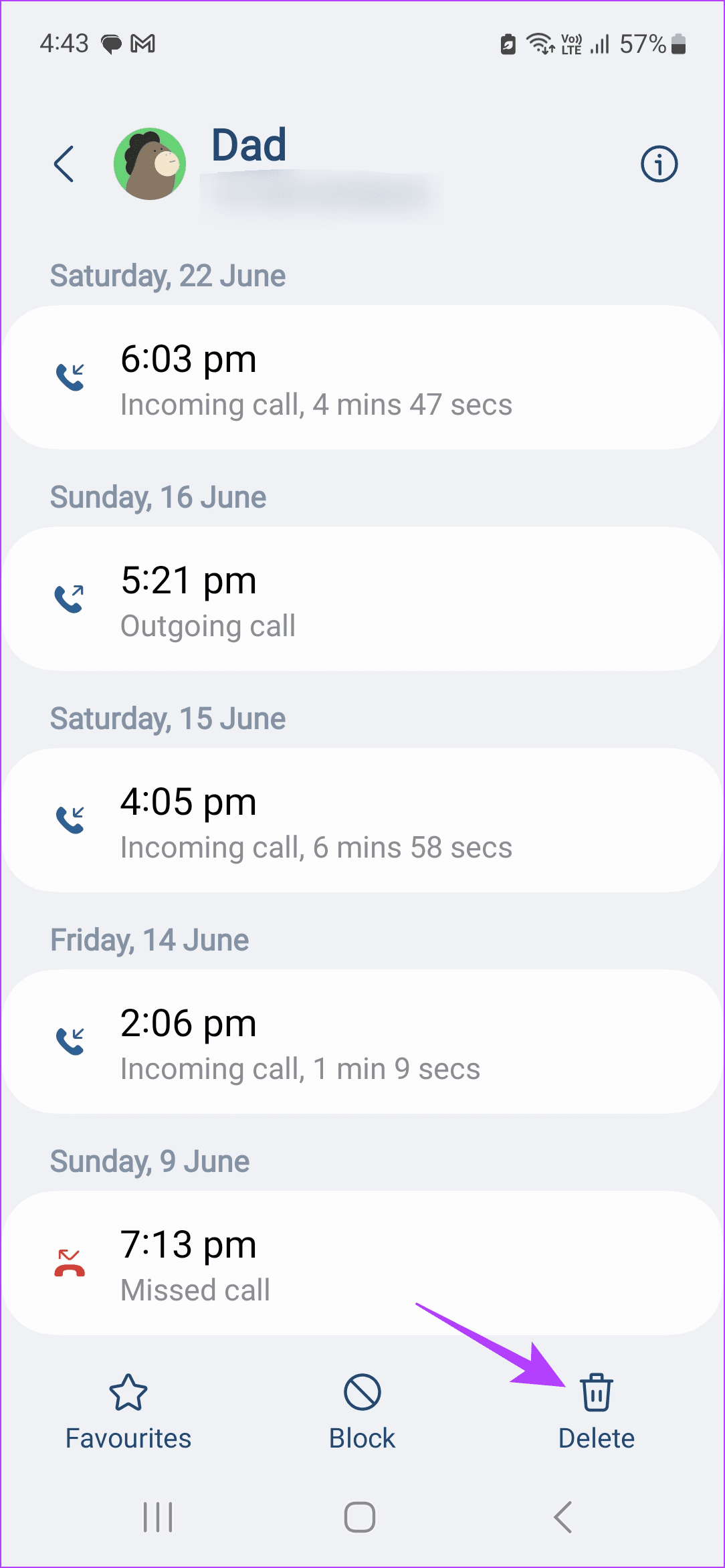
Step 1: Open the relevant call history and tap on Delete.
Step 2: Select relevant calls and tap on Delete. Confirm your decision when prompted.

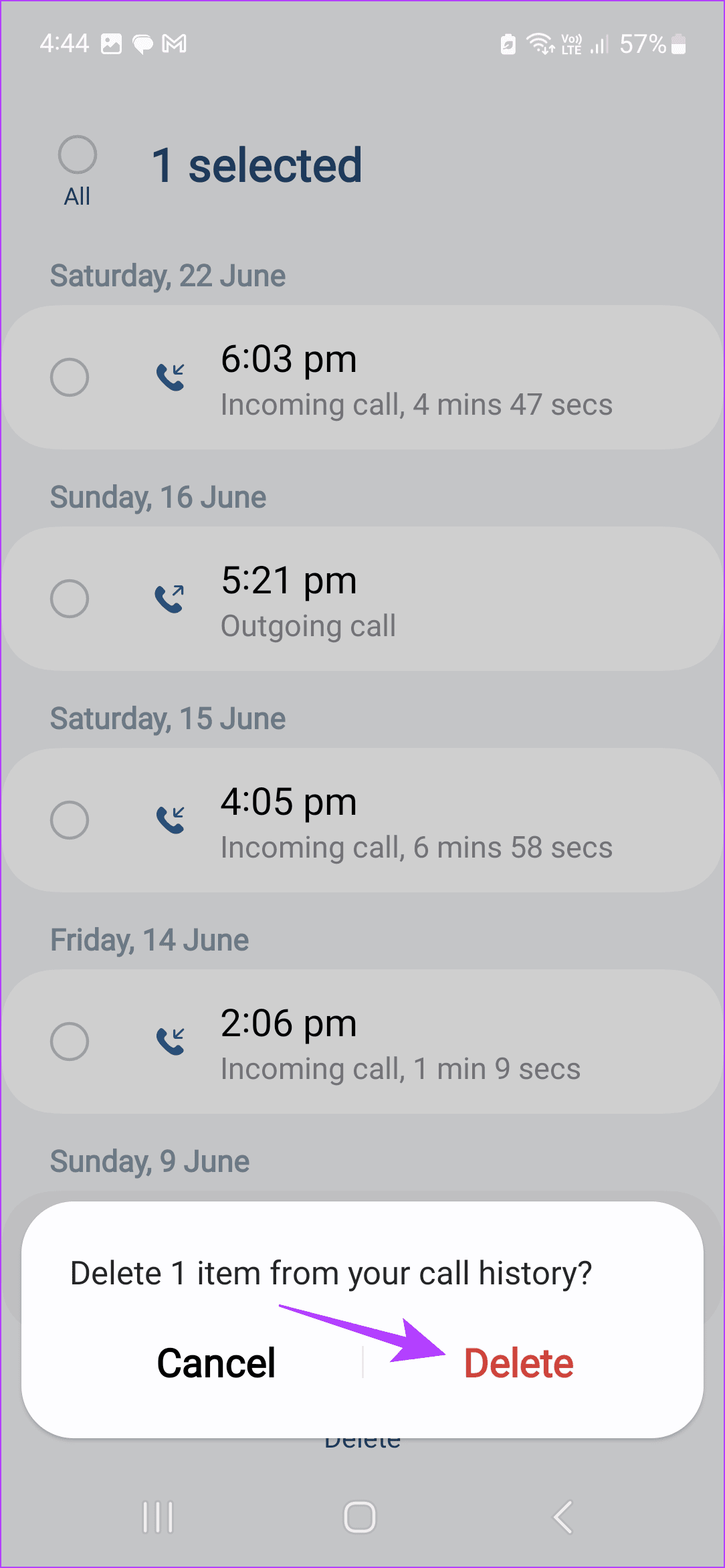
If you wish to completely delete the call history for the selected contact, use the All option to select all the calls. Then, follow the above steps to delete them from your Samsung phone.
Was this helpful?
Last updated on 01 July, 2024
4 Comments
Leave a Reply
Read Next
 6 Ways to Fix Call History Not Showing on Android
Fix 1: Allow the Phone App to Access Call Logs The Phone app may not show any call history if it does not have the necessary permissions to access and
6 Ways to Fix Call History Not Showing on Android
Fix 1: Allow the Phone App to Access Call Logs The Phone app may not show any call history if it does not have the necessary permissions to access and
 How to Check Call Duration on iPhone and Android
How to Check Call Duration on Google Phone App on Android Most Android devices use the Google Phone app as the phone's default dialer app.
How to Check Call Duration on iPhone and Android
How to Check Call Duration on Google Phone App on Android Most Android devices use the Google Phone app as the phone's default dialer app.
 How to Delete WhatsApp Call History on Android and iOS Devices
How to Clear All WhatsApp Call History If you wish to permanently find and delete all WhatsApp call history and start as a clean slate, WhatsApp lets you do so
How to Delete WhatsApp Call History on Android and iOS Devices
How to Clear All WhatsApp Call History If you wish to permanently find and delete all WhatsApp call history and start as a clean slate, WhatsApp lets you do so
 How to Check and Recover Clipboard History on Android
Method 1: Check and Recover Clipboard History Using Gboard One of the easiest ways to view and recover your clipboard history on an Android device is by using Gboard, the
How to Check and Recover Clipboard History on Android
Method 1: Check and Recover Clipboard History Using Gboard One of the easiest ways to view and recover your clipboard history on an Android device is by using Gboard, the
 Top 8 Fixes for Call History Not Showing on iPhone
Your iPhone keeps a log of incoming, outgoing, and missed calls as Call History.
Top 8 Fixes for Call History Not Showing on iPhone
Your iPhone keeps a log of incoming, outgoing, and missed calls as Call History.
 How to See and Delete Call History on iPhone
How to Check Call History on iPhone If you're looking for any particular contact or just want to know who last called you, you can do it by checking your
How to See and Delete Call History on iPhone
How to Check Call History on iPhone If you're looking for any particular contact or just want to know who last called you, you can do it by checking your
 6 Ways to Stop Call History From Showing on Another iPhone
Basic Ways: Use a different Apple ID on both devices: A sure-shot way of ensuring your call history doesn’t appear on another iPhone is by switching to a different Apple
6 Ways to Stop Call History From Showing on Another iPhone
Basic Ways: Use a different Apple ID on both devices: A sure-shot way of ensuring your call history doesn’t appear on another iPhone is by switching to a different Apple
 5 Ways to Retrieve Deleted Call History on iPhone
Method 1: Using iCloud Backup Your iPhone takes a regular backup of your data.
5 Ways to Retrieve Deleted Call History on iPhone
Method 1: Using iCloud Backup Your iPhone takes a regular backup of your data.
The article above may contain affiliate links which help support Guiding Tech. The content remains unbiased and authentic and will never affect our editorial integrity.

i know call history
Iknow call history
Iknow call history
Call history