Method 1: Use the Close Friends List
You can hide your story from all except one by using the close friends list. Anyone added to your close friends list has exclusive access to your stories. So, when you add a story to your close friends list, only the people added to the list can view the story. Others do not have access to such stories.
In this case, add that one person to your close friends list. The story will then be visible only to that particular person.
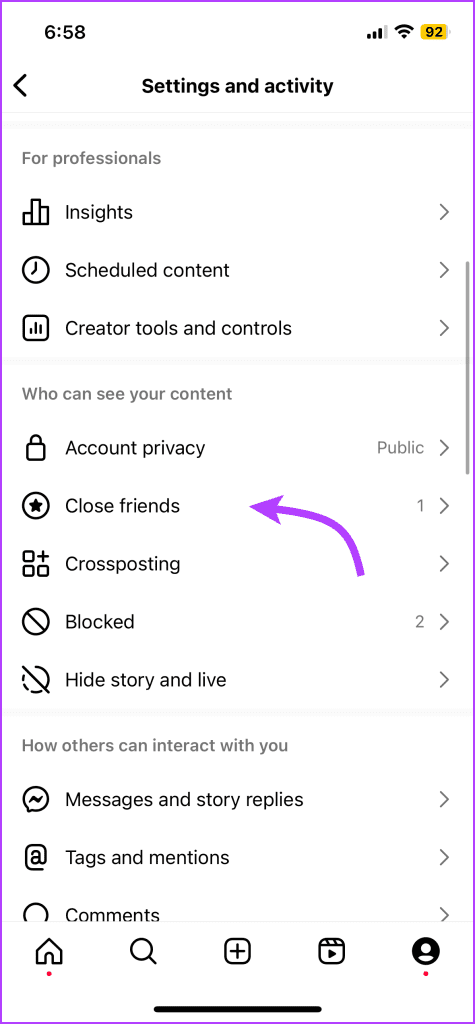
Step 1: Go to the profile screen of the Instagram app > tap the three-bar icon at the top.
Step 2: Select Close Friends.

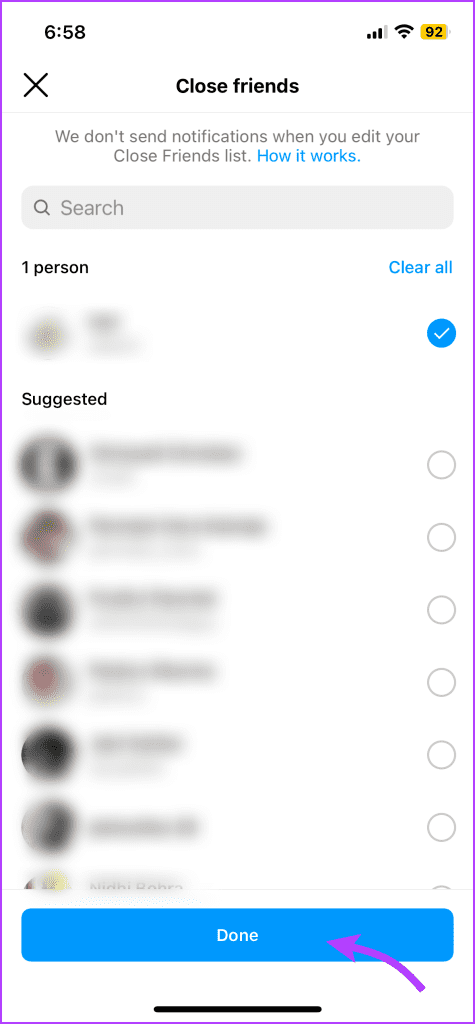
Step 3: Search and select the person you want to add to your list. Remove others and tap Done.
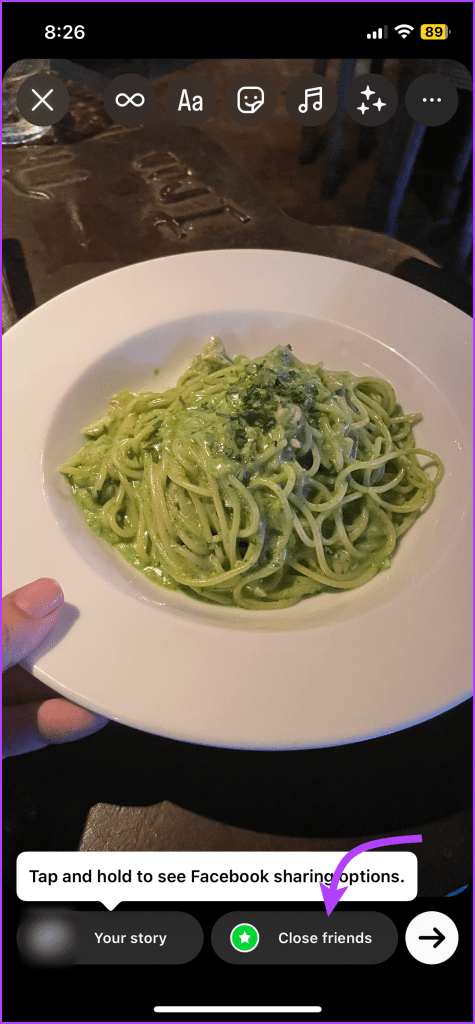
Step 4: Now, create the story as per your preference. Tap the Close Friends button at the bottom. The story will be visible to the selected person only.
Tip: Follow this quick guide for some amazing tips and tricks for Instagram Stories.
What’s the Caveat?
Even though this process may seem effortless, there is a catch. The stories added to the close friends list have a green circle around them instead of the usual pinkish-red.
So, the other person will know that you have added them to this list. If the person is already on your close friends list, it’s the best way since you just use an existing feature.
Method 2: Using the Hide Story Option
This one’s a bit complicated as it is the reverse approach. Instead of selecting the person you want to share the story with, you’re selecting the people you don’t want to share the story with; i.e., everyone except the special person.
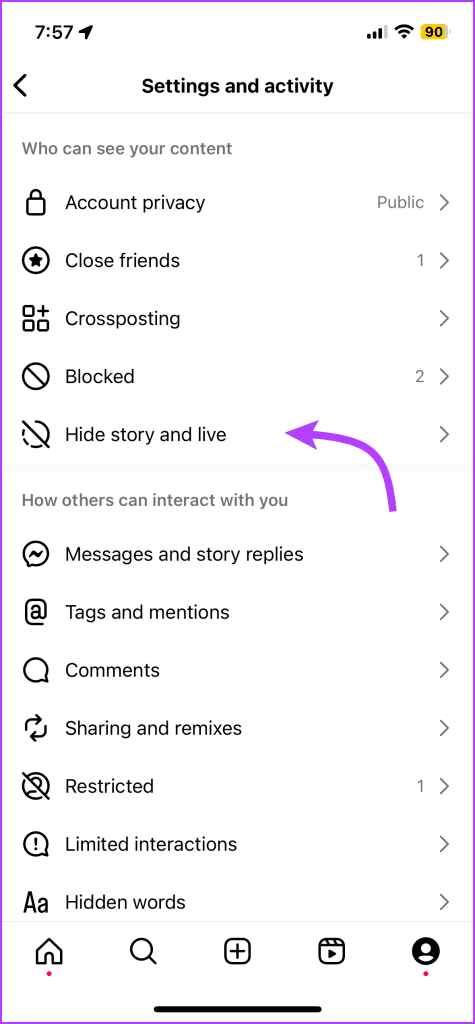
Step 1: Open the Instagram app > go to your profile > tap on the three-bar icon at the top.
Step 2: Scroll down to Hide story and live > tap Hide story and live from.
Step 3: In the next window, select everyone from the list except for the special person.
Step 4: Once done, tap the check icon (Android) or Done (iPhone).


However, There’s a Catch
When you use this method, the other person will not know you created the story especially for them. However, as you must have noticed, the method is tiresome since you have to select all your followers manually.
Further, if you have a public profile, your non-followers can still have access to your story. That’s because you have hidden your story from your followers only. If that’s an issue, you should make your profile private. For that, go to Instagram Settings → Privacy → Account Privacy. Enable Private Account.
Do Others Know When You Hide Your Story
No. Your followers will not be informed when you hide your story from them.
Although you can achieve the task of hiding stories from everyone by the above two methods, it would have been great if Instagram had a native option without any conditions.
Was this helpful?
Last updated on 30 July, 2024
Read Next
 Hide WhatsApp Online Status From One Person or Specific Contacts
 on iPhone Sometimes, you may not want certain people to know when you are online or using WhatsApp.
Hide WhatsApp Online Status From One Person or Specific Contacts
Hide WhatsApp Online Status From One Person or Specific Contacts on iPhone Sometimes, you may not want certain people to know when you are online or using WhatsApp.
 Facebook Story vs Messenger Story: Similarities and Differences
Key Differences and Similarities FeatureFacebook StoriesMessenger StoriesCross-PostingFacebook Stories are visible to Messenger contacts.Messenger Stories are visible to Facebook friends.AvailabilityAvailable on mobile apps and the Facebook website.Available only on the mobile
Facebook Story vs Messenger Story: Similarities and Differences
Key Differences and Similarities FeatureFacebook StoriesMessenger StoriesCross-PostingFacebook Stories are visible to Messenger contacts.Messenger Stories are visible to Facebook friends.AvailabilityAvailable on mobile apps and the Facebook website.Available only on the mobile
 Why Is Delete for Everyone Not Showing or Working on WhatsApp
1.
Why Is Delete for Everyone Not Showing or Working on WhatsApp
1.
 How to Send a Snap to Everyone at Once on Snapchat
If you're a regular Snapchatter, your Snaps sometimes become your calling card.
How to Send a Snap to Everyone at Once on Snapchat
If you're a regular Snapchatter, your Snaps sometimes become your calling card.
 How to Block All Websites Except Approved Ones on Windows
Method 1: Block All Websites Except Approved Ones Using Control Panel The fastest way to block all websites except approved ones is through Internet Options in the Control Panel.
How to Block All Websites Except Approved Ones on Windows
Method 1: Block All Websites Except Approved Ones Using Control Panel The fastest way to block all websites except approved ones is through Internet Options in the Control Panel.
 ASUS ROG Ally Review: All Sorts of Power Except One
There's no denying the fact that the Nintendo Switch paved the way for modern handled gaming consoles.
ASUS ROG Ally Review: All Sorts of Power Except One
There's no denying the fact that the Nintendo Switch paved the way for modern handled gaming consoles.
 3 Ways to Block All Calls Except Contacts on Android and iPhone
Method 1: Block Unknown Numbers From Calling You You can block calls from unidentified callers on Android.
3 Ways to Block All Calls Except Contacts on Android and iPhone
Method 1: Block Unknown Numbers From Calling You You can block calls from unidentified callers on Android.
 How to Hide a Story from Someone on Snapchat
Snapchat on iOS and Android uses a similar UI.
How to Hide a Story from Someone on Snapchat
Snapchat on iOS and Android uses a similar UI.
The article above may contain affiliate links which help support Guiding Tech. The content remains unbiased and authentic and will never affect our editorial integrity.