


Why Did WhatsApp Restrict My Account?
Like any other social media platform, WhatsApp has strict rules. When you break these rules or don’t follow guidelines, WhatsApp may temporarily ban your account. Here are some of the scenarios that may result in temporary restrictions.
- When you spam someone or a group with endless messages, the person or admin may report your account on WhatsApp.
- When your account is involved in sharing questionable material on WhatsApp. If you receive such content on your WhatsApp account, you shouldn’t forward it either.
- When you use unofficial apps to manage your WhatsApp account. You should not connect unauthorized apps and services to WhatsApp.
- If several people block or report you on WhatsApp, the company may prevent you from using the service.
- When your WhatsApp account is involved in scams.
But if you’re not in the wrong and WhatsApp has mistakenly restricted your account, here’s what to do.
Basic Fixes
- Try Using a VPN: WhatsApp may ban your IP address from using the service. You can temporarily use a VPN, change your IP address, and try again. The trick also works when your local government bans WhatsApp in the region.
- Ensure SIM card in the main device: If your main SIM is on another phone, WhatsApp may prevent you from using the account for privacy reasons. So, keep your SIM card on the phone and try logging into your WhatsApp account.
- Wait it out: Your WhatsApp account may be banned temporarily. You should wait a week or two and try again.
Fix 1. Reinstall or Update WhatsApp
An outdated WhatsApp app can be the main culprit. The company regularly releases new updates to fix bugs. You should install the latest WhatsApp update from the Google Play Store or App Store.
If you’re still having trouble using WhatsApp on your phone, it’s time to reinstall the app.
On Android
Step 1: Long-press on the WhatsApp icon > open the App Info menu.
Step 2: Select Uninstall.
On iPhone
Step 1: Long-press on WhatsApp.
Step 2: Select Remove App > tap Delete App.
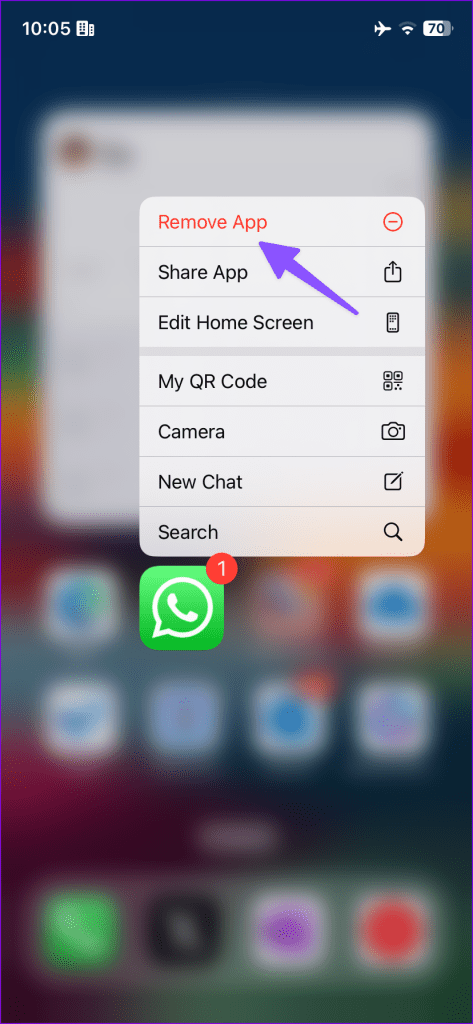

Install WhatsApp from the App Store or Google Play Store and log in with your number.
Fix 2. Request a Review of Your Account
Still cannot get your WhatsApp account back? If the company has suspended your account wrongfully, use the steps below to contact it.
Step 1: Open WhatsApp’s Contact page.
Step 2: Enter your phone number, email address, and preferred WhatsApp platform. Then, type the error you’re facing.

Step 3: Click Next and follow the on-screen instructions to send your message.
If nothing works, try changing your mobile number to circumvent the issue.
Was this helpful?
Last updated on 31 July, 2024
7 Comments
Leave a Reply
Read Next
 2 Ways to Fix Google Meet “Not Allowed to Join” Error
Basic Fixes Sign into Google: The admin may have configured it to only allow participants who have signed in to a Google Account.
2 Ways to Fix Google Meet “Not Allowed to Join” Error
Basic Fixes Sign into Google: The admin may have configured it to only allow participants who have signed in to a Google Account.
 4 Ways to Fix ‘Copying Is Not Allowed on This Webpage’
We advise against copying text from websites that restrict copying content to avoid plagiarism.
4 Ways to Fix ‘Copying Is Not Allowed on This Webpage’
We advise against copying text from websites that restrict copying content to avoid plagiarism.
 What Happens When You Delete WhatsApp Account
What Happens to Existing Message History and Backup Deleting WhatsApp will clear all the chat records on your phone.
What Happens When You Delete WhatsApp Account
What Happens to Existing Message History and Backup Deleting WhatsApp will clear all the chat records on your phone.
 How to Log Out Linked Devices From WhatsApp Account
https://youtu.be/Ij8bVFcMnbE Log Out Linked Devices From WhatsApp on Mobile Before moving on with the steps, we suggest updating WhatsApp version on your iPhone or Android.
How to Log Out Linked Devices From WhatsApp Account
https://youtu.be/Ij8bVFcMnbE Log Out Linked Devices From WhatsApp on Mobile Before moving on with the steps, we suggest updating WhatsApp version on your iPhone or Android.
 5 Ways to Fix Waiting for This Message Error on WhatsApp
Why Do I See the 'Waiting for This Message' Error?
5 Ways to Fix Waiting for This Message Error on WhatsApp
Why Do I See the 'Waiting for This Message' Error?
 How to Fix “Unable to Initiate Call” Error in WhatsApp
Basic Fixes Check WhatsApp server - If the server is facing the issue, you can't make WhatsApp calls from any device, say iPhone or Android phone, Mac, or Windows, Go
How to Fix “Unable to Initiate Call” Error in WhatsApp
Basic Fixes Check WhatsApp server - If the server is facing the issue, you can't make WhatsApp calls from any device, say iPhone or Android phone, Mac, or Windows, Go
 6 Ways to Fix WhatsApp Media Download Failed Error on Phone
Basic Fixes: Use a strong network connection: Large media files require a stable and strong network connection for a smooth download process in WhatsApp.
6 Ways to Fix WhatsApp Media Download Failed Error on Phone
Basic Fixes: Use a strong network connection: Large media files require a stable and strong network connection for a smooth download process in WhatsApp.
 5 Ways to Fix ‘This Video Is Not Available’ Error on WhatsApp
Basic Fixes: Check WhatsApp Server Status: WhatsApp servers can randomly go down for maintenance or other reasons.
5 Ways to Fix ‘This Video Is Not Available’ Error on WhatsApp
Basic Fixes: Check WhatsApp Server Status: WhatsApp servers can randomly go down for maintenance or other reasons.
The article above may contain affiliate links which help support Guiding Tech. The content remains unbiased and authentic and will never affect our editorial integrity.
I can’t log into WhatsApp using my phone number
Hello. Today i tried upgrading my WhatsApp and later it says, this account can not use whatsaap due to spam. Can you please reconnect me
Good day!. Today I received a spam message, after which I can not log into my WhatsApp – a message appeared that this account can no longer use WhatsApp due to spam. I tried to delete WhatsApp and reinstall it, but to no avail. Please help me solve the problem and reconnect me to WhatsApp.
I cannot access my whatsapp, im getting an arror advising that im blocked due to spam
I can’t access my WhatsApp, a message appears that the account can no longer WhatsApp due to spam….Very strange…
I tried it refused
If your account is banned, you’ll see the following message when you open WhatsApp Business: “Your account can no longer use WhatsApp.” It will also include an explanation of why your account was banned.