Common Fixes
- Check volume levels – Go to Settings > Sounds & Haptics and maximize the Ringtone and Alerts volume slider.
- Disable Low Power Mode – Open Settings > Battery > toggle off the Low Power Mode.
- Update Telegram – Open the Apple App Store > search the Telegram app > tap Update.
- Update iOS – Head to Settings > General > Software Update > tap Update Now (if available).
Fix 1: Disable Bluetooth Devices
Telegram fails to switch a call to the speaker when you connect your iPhone to a nearby Bluetooth accessory, such as earphones. Toggling off Bluetooth should fix the bug.
Step 1: Open the Settings app > tap Bluetooth > turn off its toggle to disable all connected devices.
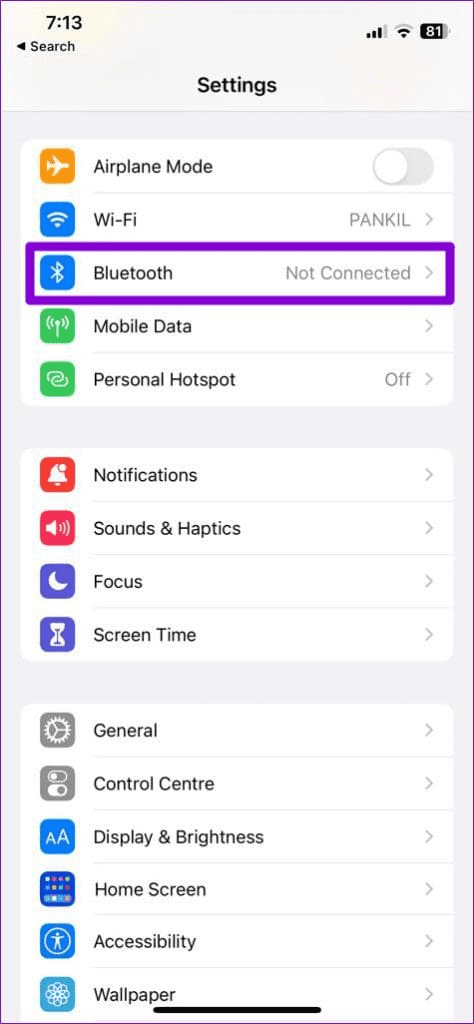

Step 2: Tap i next to a paired accessory and press Forget This Device to prevent automatic connection.


Fix 2: Force Quit and Relaunch Telegram
Force closing the Telegram app fixes most app glitches automatically. Swipe up from the bottom to switch apps, locate Telegram, and swipe up again to force quit it. Further, relaunch the Telegram app.
Fix 3: Reset All Settings
Resetting all iPhone settings is another way to fix the Telegram calls issue without losing your data. Doing this will restore normalcy to your device speaker.
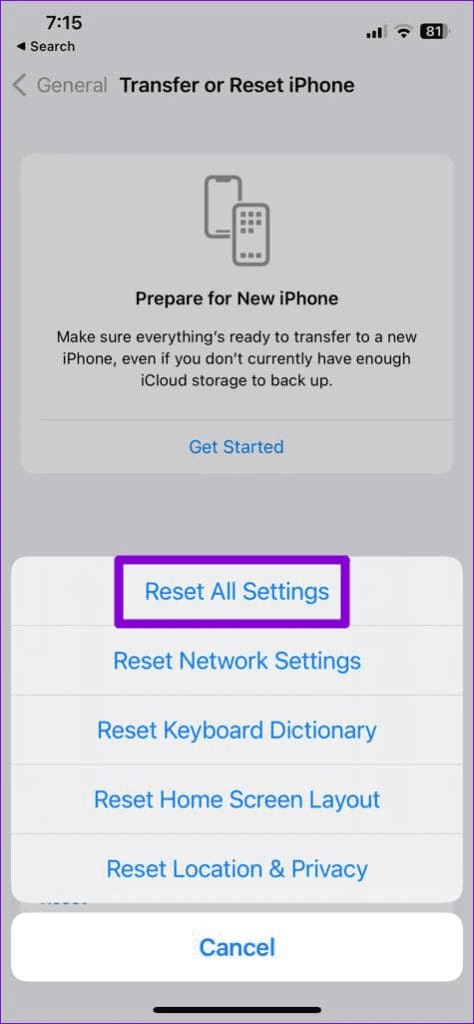
Step 1: Open General settings on your iPhone > scroll to the bottom > press Transfer or Reset iPhone.
Step 2: Tap Reset > select Reset All Settings. When prompted, provide your device passcode to confirm the action.


Was this helpful?
Last updated on 20 April, 2024
Read Next
 3 Fixes for iPhone Speaker Not Working During Calls
https://youtu.be/dTAtDgY5NPc Basic Fixes Disable Bluetooth devices: Disconnect Bluetooth devices from your iPhone.
3 Fixes for iPhone Speaker Not Working During Calls
https://youtu.be/dTAtDgY5NPc Basic Fixes Disable Bluetooth devices: Disconnect Bluetooth devices from your iPhone.
 4 Ways to Fix iPhone Keeps Switching to Mobile Data From Wi-Fi
Basic Fixes Move close to your router: Poor Wi-Fi signal can force your iPhone to switch to mobile data instead of Wi-Fi.
4 Ways to Fix iPhone Keeps Switching to Mobile Data From Wi-Fi
Basic Fixes Move close to your router: Poor Wi-Fi signal can force your iPhone to switch to mobile data instead of Wi-Fi.
 How to Stop iPhone Camera From Switching to Macro Mode Automatically
Apple introduced a new Macro Mode in the camera app with the iPhone 13 Pro.
How to Stop iPhone Camera From Switching to Macro Mode Automatically
Apple introduced a new Macro Mode in the camera app with the iPhone 13 Pro.
 6 Ways to Fix Telegram Calls Not Ringing on iPhone
Basic Fixes: Allow anyone to call you: Telegram offers excellent privacy and security options.
6 Ways to Fix Telegram Calls Not Ringing on iPhone
Basic Fixes: Allow anyone to call you: Telegram offers excellent privacy and security options.
 A Detailed Guide to Fixing AirPods Not Switching to Noise Cancellation
The AirPods Pro features Active Noise Cancellation, and that's what makes them better over AirPods.
A Detailed Guide to Fixing AirPods Not Switching to Noise Cancellation
The AirPods Pro features Active Noise Cancellation, and that's what makes them better over AirPods.
 3 Ways to Fix iPhone Speaker Crackling
Fix 1: Clean the Speaker Grille and Earpiece Using the iPhone daily in different environments could make the speaker grille susceptible to dust particles and grime.
3 Ways to Fix iPhone Speaker Crackling
Fix 1: Clean the Speaker Grille and Earpiece Using the iPhone daily in different environments could make the speaker grille susceptible to dust particles and grime.
 3 Ways to Fix Speaker Not Working on Apple Watch
Basic Fixes Restart Your Mac: The go-to fix for any issue is the good old restart.
3 Ways to Fix Speaker Not Working on Apple Watch
Basic Fixes Restart Your Mac: The go-to fix for any issue is the good old restart.
 5 Ways to Fix Telegram Desktop Video Calls Not Working
Basic Fixes Switch to 5GHz Wi-Fi: If you have a dual-band router, try switching to a 5GHz frequency band to get faster internet speeds.
5 Ways to Fix Telegram Desktop Video Calls Not Working
Basic Fixes Switch to 5GHz Wi-Fi: If you have a dual-band router, try switching to a 5GHz frequency band to get faster internet speeds.
The article above may contain affiliate links which help support Guiding Tech. The content remains unbiased and authentic and will never affect our editorial integrity.