Fix 1: Upgrade Netflix Plan
If you are from a country where Netflix offers an ad-supported version, you must upgrade to a premium plan. As per Netflix, PiP mode is unavailable for the freemium version, and one needs to upgrade to a paid plan. In the ad-supported version, Netflix also restricts casting, i.e., mobile to smart TV.
Fix 2: Enable Picture-in-Picture Mode for Netflix
To use it, you must enable the picture-in-picture mode on your Android device. It is usually enabled by default for all the supported apps, but it is worth checking.
Step 1: Open device Settings and go to Apps > Special app access.
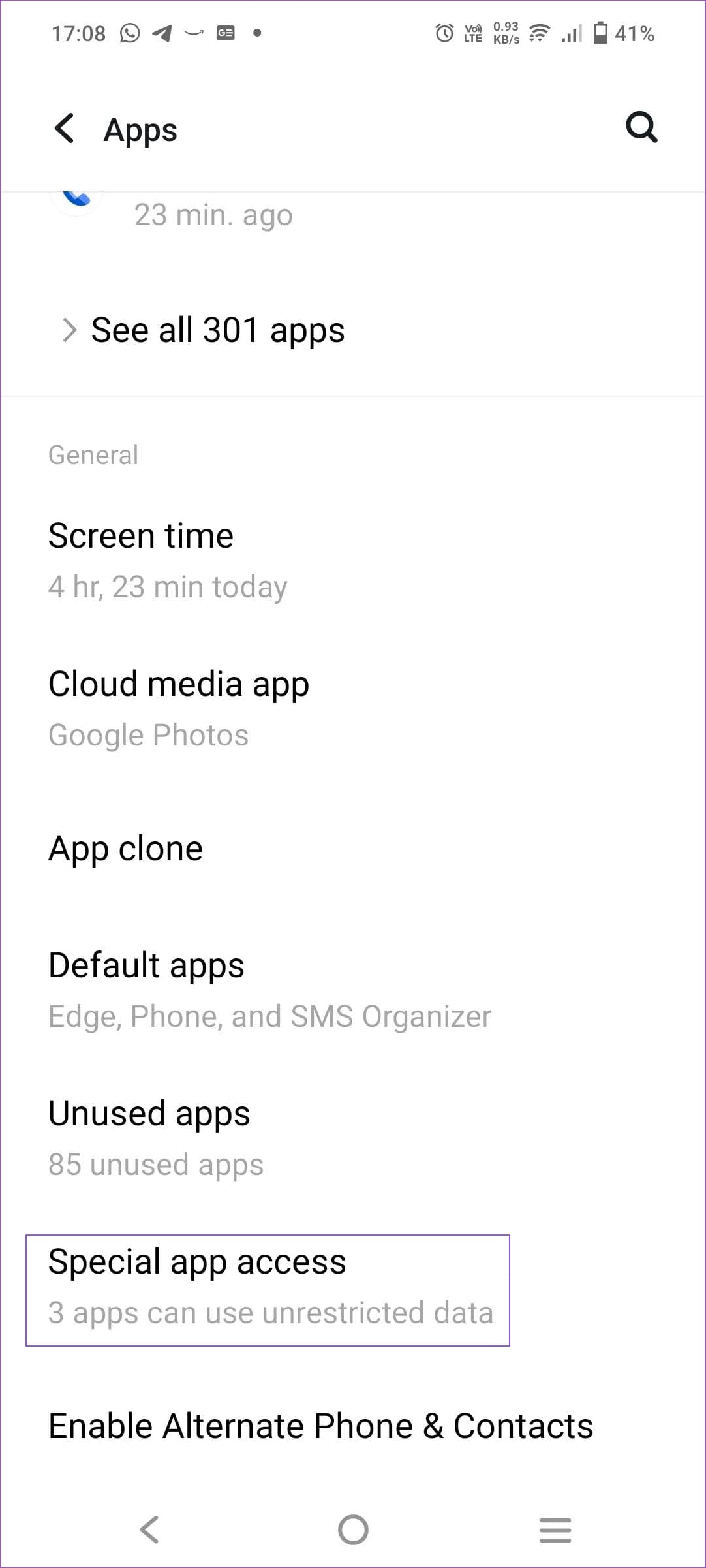
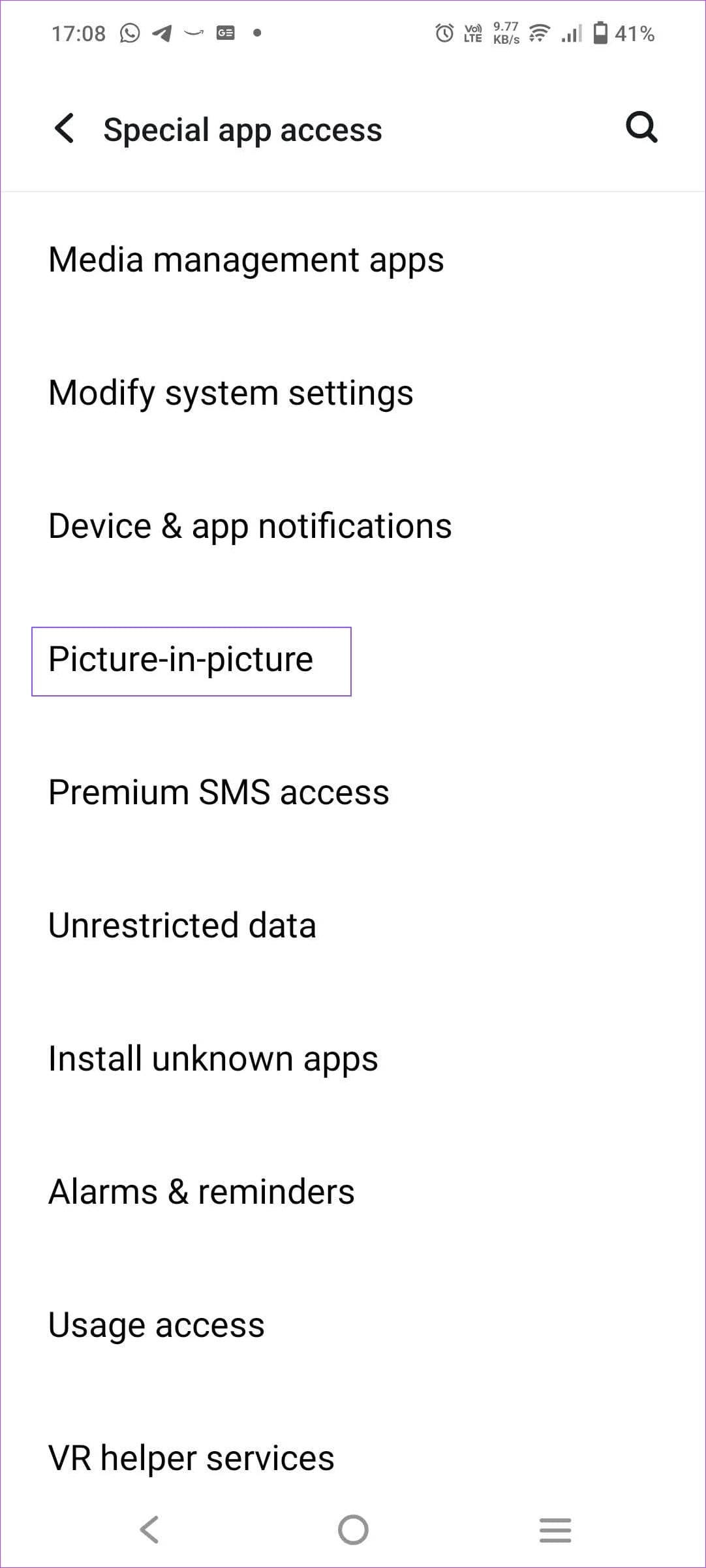
Step 2: Tap on Picture-in-picture and select Netflix.
Step 3: Turn on the toggle for Allow picture-in-picture.


Fix 3: Use Picture-In-Picture Mode Properly
Step 1: Open the Netflix app and play any TV show or movie.
Step 2: Once the video starts playing, press your device’s Home button. A small floating window with the Netflix video will appear on your screen as soon as you do this.
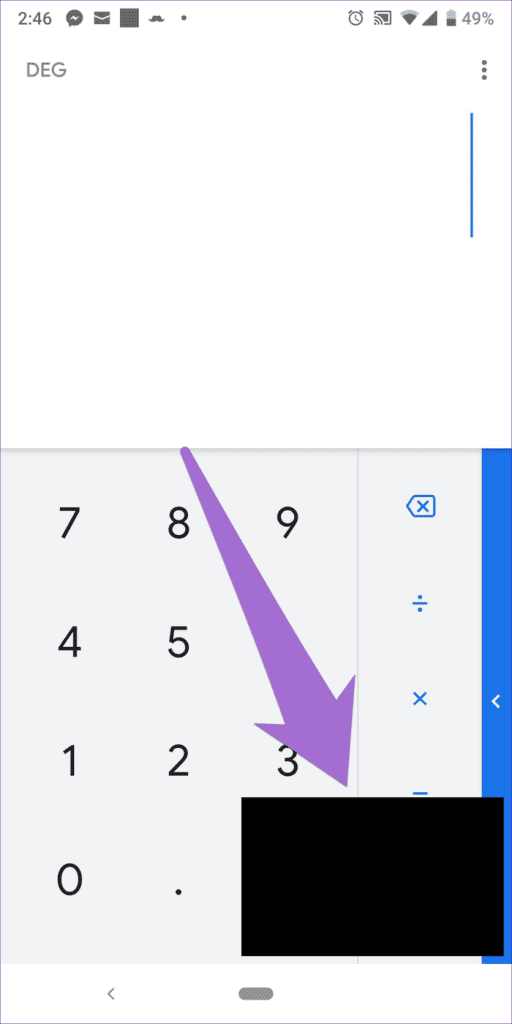

Note: The video appears in a floating window, so you can easily change its position by holding and dragging it to the new location.
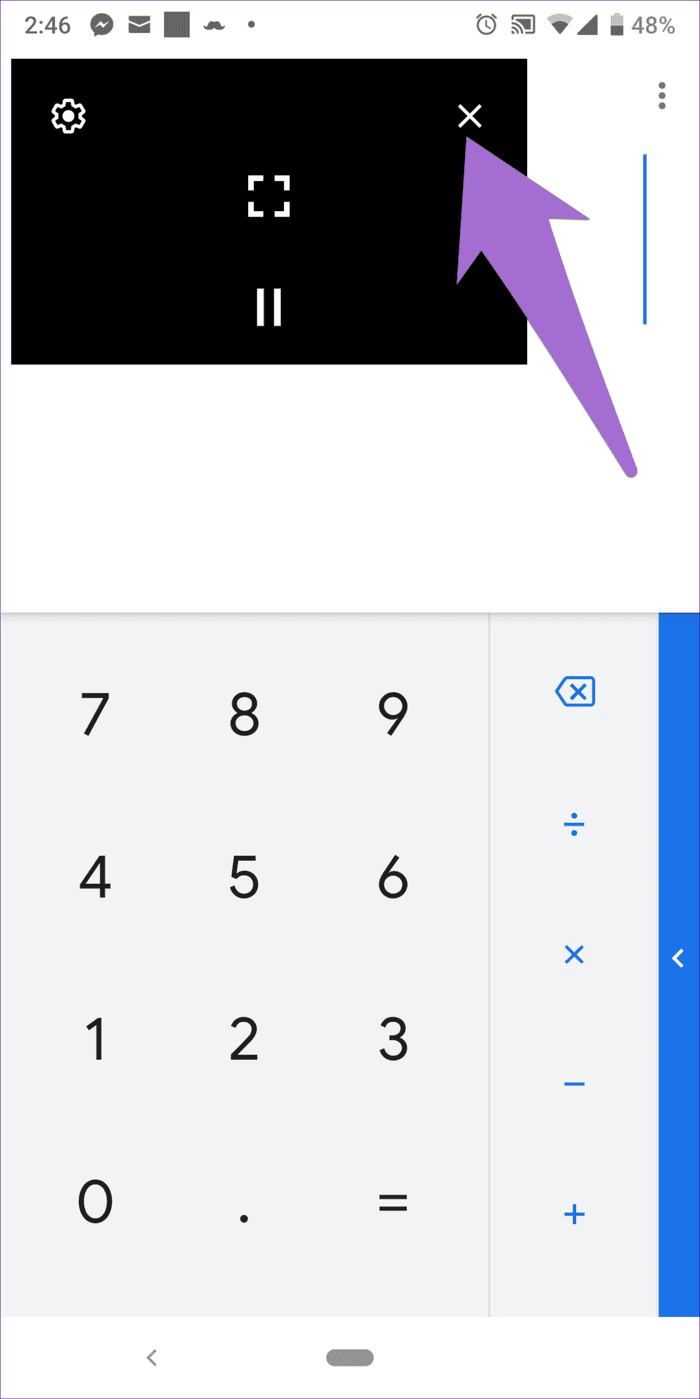
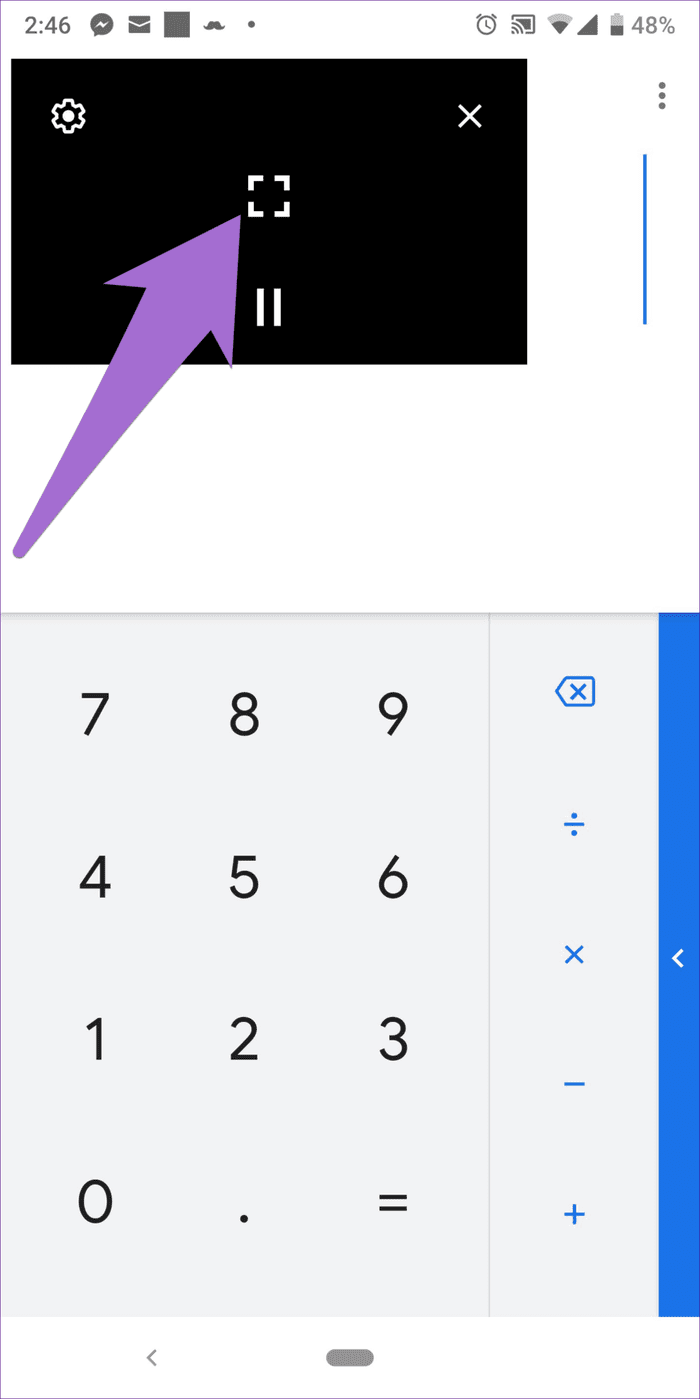
Step 3: To close the video at any point, tap on it once and hit the cross button at the top. To make the video big again, tap once on the video and hit the Full-screen icon in the center.
Note: Alternatively, drag the video to the bottom-middle of the screen to dismiss it.
FAQs
Do You Need to Give Special Permission to Netflix for PIP Mode?
When you install the Netflix app for the first time and initiate the PIP mode, the app will instantly ask for the required permission. So, you don’t need to give it exclusive permission. However, if you manually disable it, you must enable it.
Does Netflix Support PIP Mode in Chrome or Edge?
No, Netflix doesn’t offer PIP mode for browsers, but you can use browser extensions to achieve it. Picture-in-Picture extension (by Google) is one such extension that helps you achieve it.
Was this helpful?
Last updated on 05 June, 2024
Read Next
 4 Ways to Fix Picture-In-Picture Mode Not Working on Android
Try Basic Fixes Update the problematic app: If the picture-in-picture mode is not working due to a buggy app build, you should be able to fix it by updating the
4 Ways to Fix Picture-In-Picture Mode Not Working on Android
Try Basic Fixes Update the problematic app: If the picture-in-picture mode is not working due to a buggy app build, you should be able to fix it by updating the
 Top 6 Fixes for Facetime Picture-in-Picture Not Working on iPhone & iPad
With the Picture-in-Picture (PiP) mode, multitasking is easy on iPhone and iPad.
Top 6 Fixes for Facetime Picture-in-Picture Not Working on iPhone & iPad
With the Picture-in-Picture (PiP) mode, multitasking is easy on iPhone and iPad.
 3 Fixes for Picture-in-Picture Not Working in Telegram
Basic Fixes Force quit and relaunch Telegram: This will give the app a fresh start on your iPhone or Android phone.
3 Fixes for Picture-in-Picture Not Working in Telegram
Basic Fixes Force quit and relaunch Telegram: This will give the app a fresh start on your iPhone or Android phone.
 How to Enable or Disable Picture-in-Picture Mode on iPhone and iPad
Enable Automatic Picture-in-Picture Mode on iPhone and iPad If your iPhone or iPad doesn't automatically open videos in Picture-in-Picture mode when quitting to the Home screen, it's likely that your
How to Enable or Disable Picture-in-Picture Mode on iPhone and iPad
Enable Automatic Picture-in-Picture Mode on iPhone and iPad If your iPhone or iPad doesn't automatically open videos in Picture-in-Picture mode when quitting to the Home screen, it's likely that your
 4 Ways to Fix WhatsApp Picture-In-Picture Not Working
Basic Fixes Update WhatsApp: Open the Google Play Store or Apple App Store, search WhatsApp, and tap Update (if available).
4 Ways to Fix WhatsApp Picture-In-Picture Not Working
Basic Fixes Update WhatsApp: Open the Google Play Store or Apple App Store, search WhatsApp, and tap Update (if available).
 3 Ways to Fix Prime Video Picture-in-Picture Not Working on Android and iPhone
Basic Fixes Restart Prime Video: Restart the Prime Video app and your smartphone to eliminate bugs and glitches.
4 Ways to Fix the iPhone Picture-in-Picture Not Working
Before you begin, try restarting your iPhone, and update the app you are trying to use picture-in-picture with, to the latest version.
3 Ways to Fix Prime Video Picture-in-Picture Not Working on Android and iPhone
Basic Fixes Restart Prime Video: Restart the Prime Video app and your smartphone to eliminate bugs and glitches.
4 Ways to Fix the iPhone Picture-in-Picture Not Working
Before you begin, try restarting your iPhone, and update the app you are trying to use picture-in-picture with, to the latest version.
 3 Ways to Fix Picture-In-Picture Not Working in Facebook Messenger
Common Fixes Restart device - Long-press the physical Power button and tap Reboot to restart Android.
3 Ways to Fix Picture-In-Picture Not Working in Facebook Messenger
Common Fixes Restart device - Long-press the physical Power button and tap Reboot to restart Android.
The article above may contain affiliate links which help support Guiding Tech. The content remains unbiased and authentic and will never affect our editorial integrity.