Basic Fixes
- Check Spam: Sometimes even the most important and legitimate emails land up in the Spam folder. So check that and remove your email(s) from there.
- Check Google account storage space: By default, you get 15GB of Google Drive storage space. If that space is less, your newer emails won’t get delivered.
- Check your internet connection: Switch to 5G or Wi-Fi to instantly receive your emails in the Gmail app.
- Update Gmail app: Installing the updated version always keeps the app functioning smoothly.
Fix 1: Adjust Fetch Settings
Once you sign in to the Gmail app, it automatically fetches new emails from the server to appear on your iPhone. Now, you can automatically or manually fetch your emails. We suggest checking the same and selecting the appropriate setting.
In Gmail App
Step 1: Open Settings and go to Gmail.
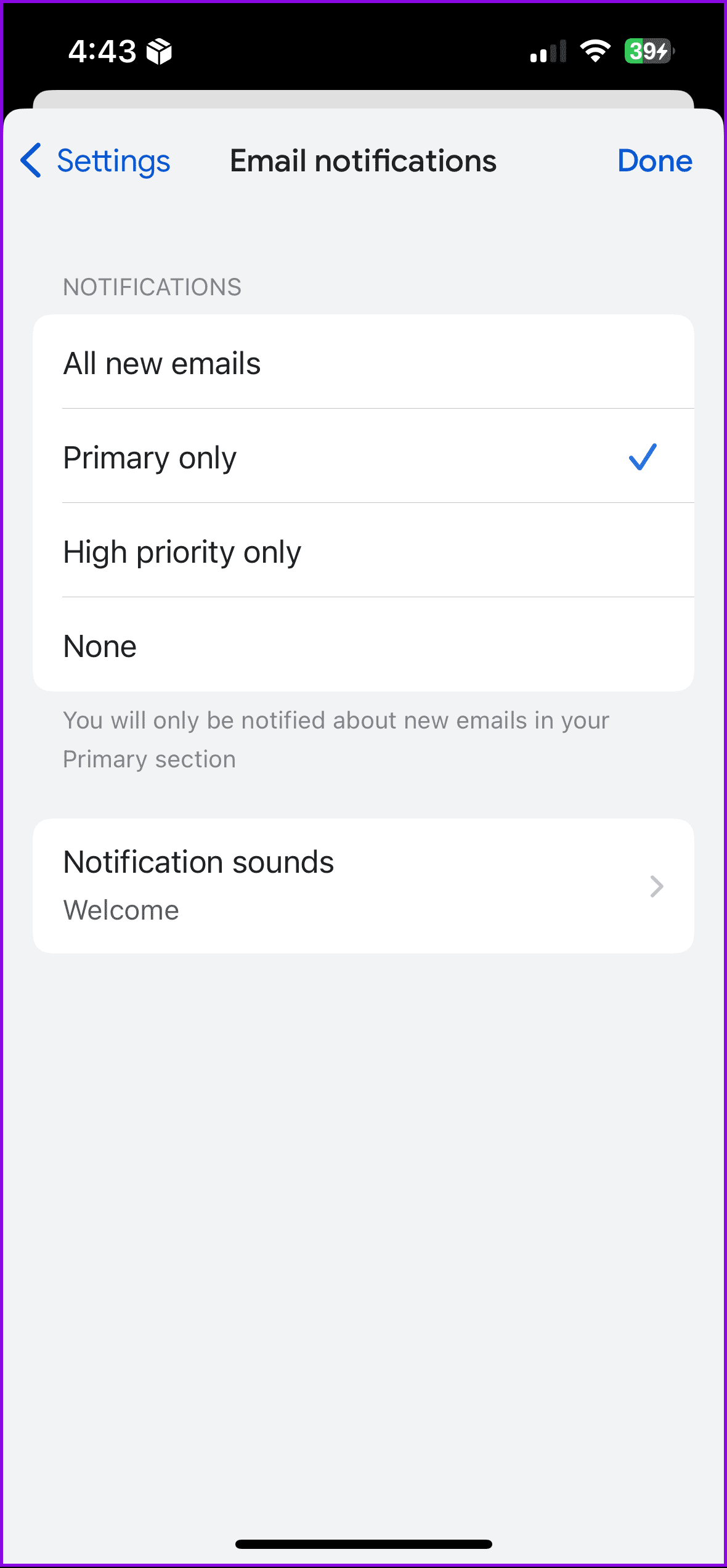
Step 2: Tap the hamburger menu icon at the top-left corner > choose Settings.
Step 3: Select Email Notifications > ensure to allow email notifications.

In Apple Mail App
Open Settings > Mail > Accounts > Fetch New Data > choose Automatically.


Tip: Learn how to snooze email in the Gmail app
Fix 2: Enable Background App Refresh
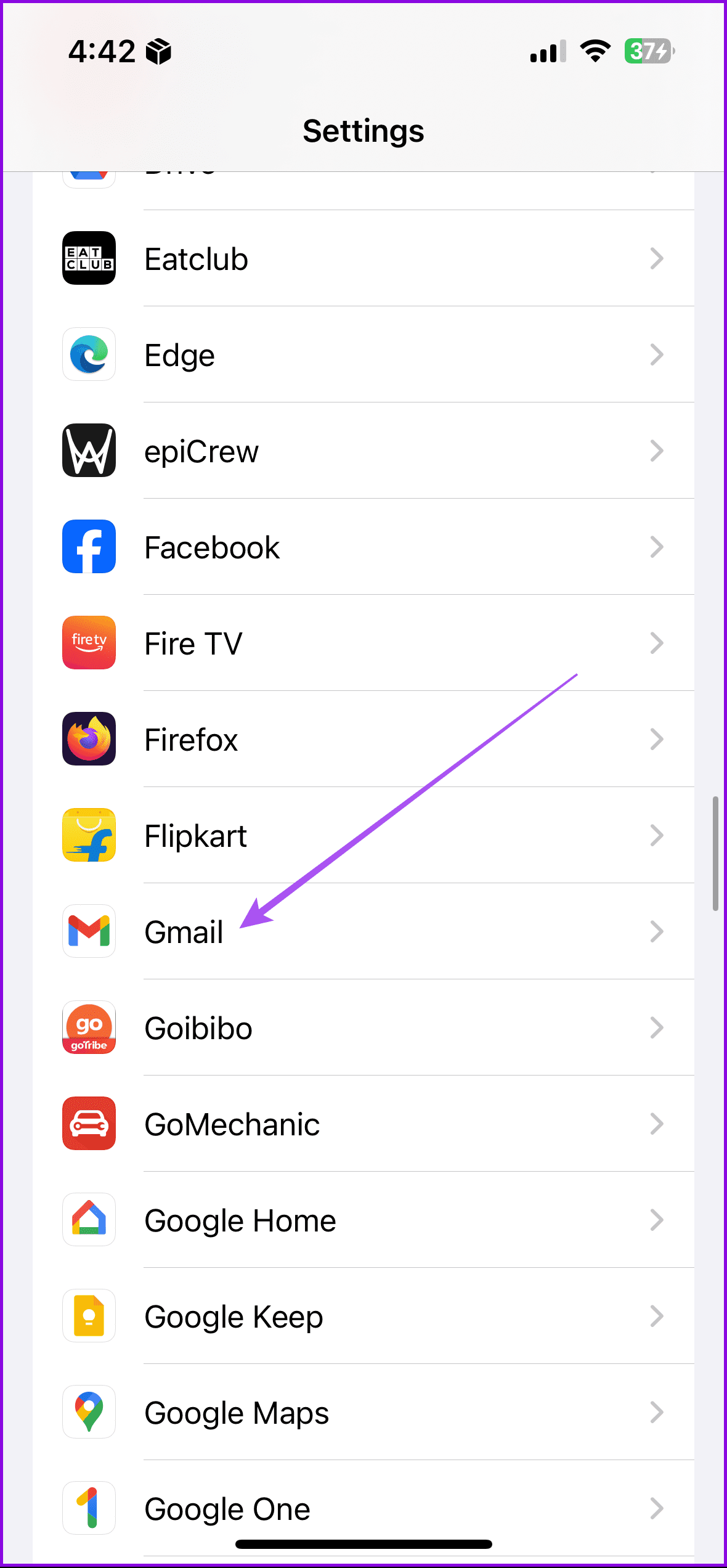
If you have Background App Refresh disabled for Gmail on your iPhone, you might not receive emails immediately after they arrive. You want to ensure Gmail’s Background App Refresh is enabled. Here’s how.
Open Settings > Gmail > enable Background App Refresh.

Fix 3: Sign Out of Gmail App
Yes, signing your account out of the Gmail app and signing it back in could also help fix this issue.
Step 1: Launch your iPhone’s Gmail app > tap the account profile picture at the top-right corner.
Step 2: Tap Manage accounts on this device. If you have multiple accounts connected to your Gmail app, tap the Remove from this device for the account that isn’t receiving emails.
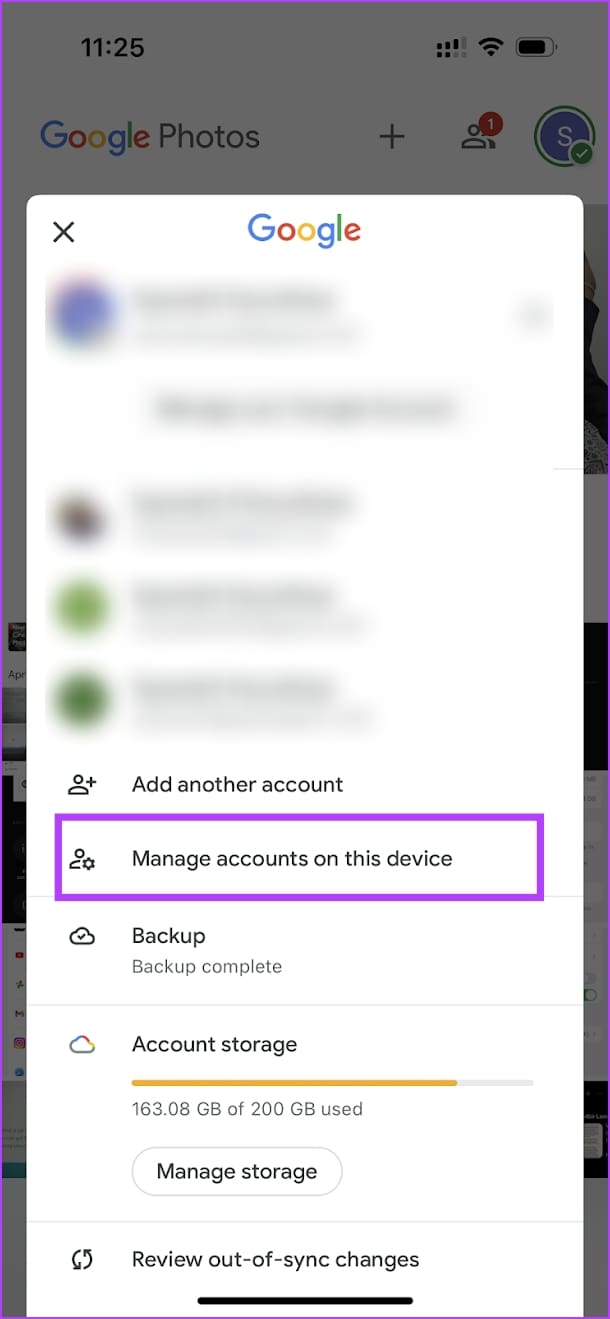

Step 3: Add your accounts again to the app and see if the problem is solved.
Tip: Learn how to import Gmail contacts to iPhone.
Was this helpful?
Last updated on 29 July, 2024
Read Next
 4 Fixes When Outlook Is Not Receiving Emails From Gmail on Windows
Basic Fixes: Free up Mailbox Storage: If your mailbox storage is full, you will not receive new emails, and deleting or creating extra storage is the only option.
4 Fixes When Outlook Is Not Receiving Emails From Gmail on Windows
Basic Fixes: Free up Mailbox Storage: If your mailbox storage is full, you will not receive new emails, and deleting or creating extra storage is the only option.
 5 Ways to Fix Gmail Receiving Late Emails on Phone
Common Fixes Check your network connection: Ensure your phone has a good internet connection to avoid delays in receiving new emails on Gmail.
5 Ways to Fix Gmail Receiving Late Emails on Phone
Common Fixes Check your network connection: Ensure your phone has a good internet connection to avoid delays in receiving new emails on Gmail.
 5 Ways to Fix Outlook Not Receiving Emails on iPhone
Common Fixes Enable and disable the Airplane Mode: Open the Settings app, toggle on the Airplane Mode, and turn it off after a few seconds.
5 Ways to Fix Outlook Not Receiving Emails on iPhone
Common Fixes Enable and disable the Airplane Mode: Open the Settings app, toggle on the Airplane Mode, and turn it off after a few seconds.
 4 Ways to Fix iPhone Not Receiving Emails
https://youtu.be/F6cOkDGNWuU Basic Fixes: Manually refresh the email inbox: Open the Mail app on your iPhone and swipe down from the top to refresh the inbox.
4 Ways to Fix iPhone Not Receiving Emails
https://youtu.be/F6cOkDGNWuU Basic Fixes: Manually refresh the email inbox: Open the Mail app on your iPhone and swipe down from the top to refresh the inbox.
 4 Ways to Fix iPad Not Receiving Emails
Basic Fixes: Check network connection: If your iPad has network connection issues, it can’t receive new emails and update the current inbox in the Mail app. So, connect to a better network
4 Ways to Fix iPad Not Receiving Emails
Basic Fixes: Check network connection: If your iPad has network connection issues, it can’t receive new emails and update the current inbox in the Mail app. So, connect to a better network
 Top 17 Fixes for Gmail Not Showing New Emails on Android
Typically, when you add a Google account to your Android phone and enable sync for Gmail, you should start receiving new emails without any issue.
Top 17 Fixes for Gmail Not Showing New Emails on Android
Typically, when you add a Google account to your Android phone and enable sync for Gmail, you should start receiving new emails without any issue.
 4 Fixes for Outlook Web Not Receiving Emails
Basic Fixes Check outlook server status: Visit DownDetector and check whether Outlook servers are responding in your region.
4 Fixes for Outlook Web Not Receiving Emails
Basic Fixes Check outlook server status: Visit DownDetector and check whether Outlook servers are responding in your region.
 3 Fixes for Microsoft Outlook Not Receiving Emails on Android
Basic Fixes Check other inboxes: If you have multiple email accounts in the Outlook app, you might have opened the wrong one in the app.
3 Fixes for Microsoft Outlook Not Receiving Emails on Android
Basic Fixes Check other inboxes: If you have multiple email accounts in the Outlook app, you might have opened the wrong one in the app.
The article above may contain affiliate links which help support Guiding Tech. The content remains unbiased and authentic and will never affect our editorial integrity.