


Common Fixes
- Update Windows 11: Press the Windows + I shortcut to open the Settings app, select Windows Update from the left sidebar, and install available system updates.
- Perform a clean boot: A recently installed software might be conflicting with the Control Panel app. Clean boot your Windows 11 system, and retry opening it.
- Restart the Windows Explorer: The Control Panel app may fail to open if there’s an issue with the Windows Explorer process. Restart it manually and reopen the Control Panel.
Fix 1: Open the Control Panel Using the Run Dialog
If the Control Panel app isn’t opening directly on Windows 11, you can use the following nifty trick to regain access.
Step 1: Press the Windows + R shortcut to open the Run dialog, type appwiz.cpl, and press Enter.
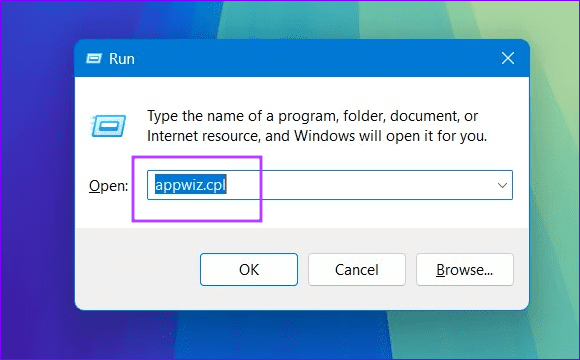
Step 2: Click Control Panel Home at the top left to access the app’s home screen.

Fix 2: Repair Corrupt System Files to Fix the Control Panel
The Control Panel app may fail to open if Windows system files are corrupt. Run the System File Checker (SFC) and Deployment Image Servicing and Management (DISM) scans to repair and restore your system image.
Step 1: Press the Windows key, search Command Prompt, and click Run as administrator.

Step 2: Type SFC /scannow in the console and press Enter to let System File Checker repair corrupt system files.
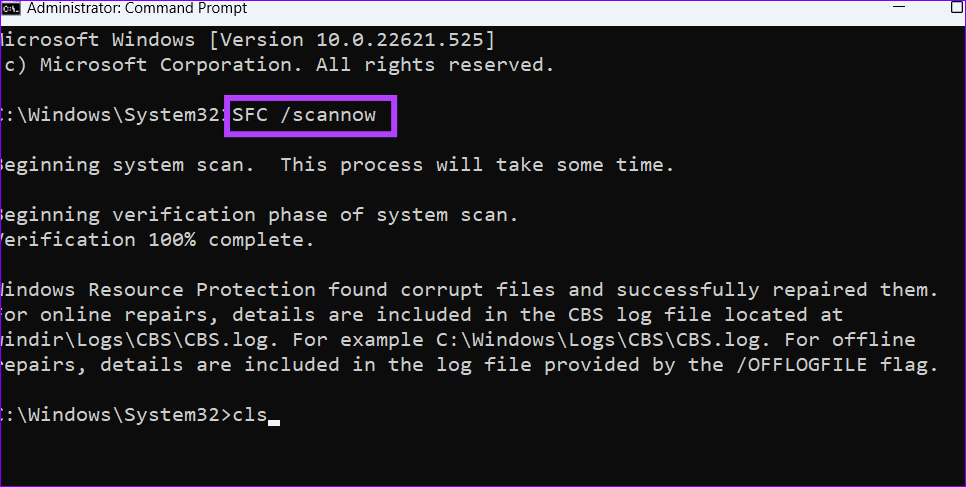
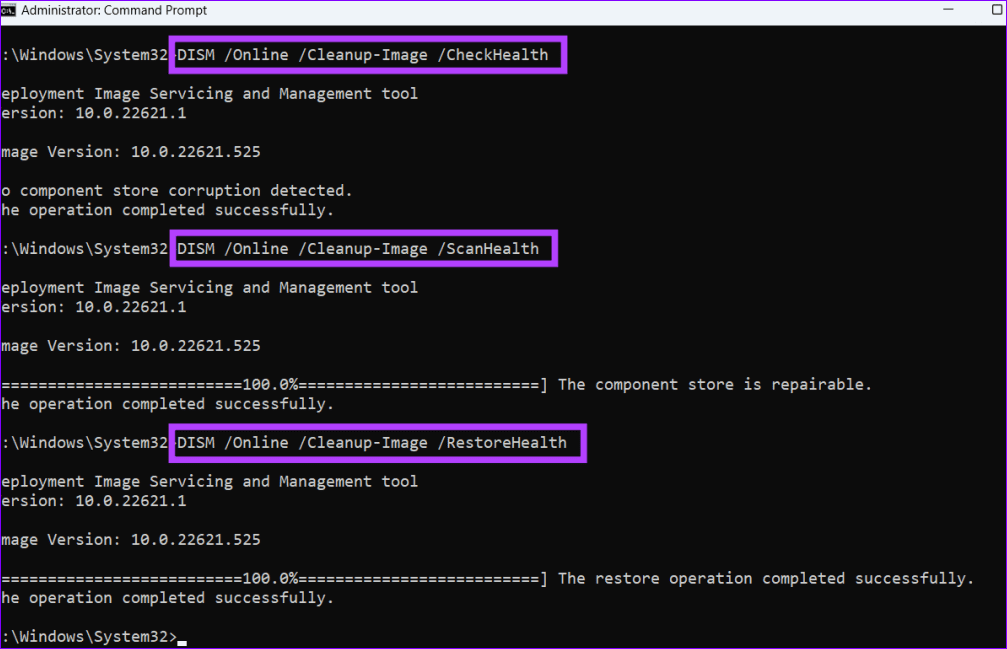
Step 3: Next, execute the following DISM commands sequentially and reboot your PC.
DISM /Online /Cleanup-Image /CheckHealth
DISM /Online /Cleanup-Image /ScanHealth
DISM /Online /Cleanup-Image /RestoreHealth
Fix 3: Manually Restart the Windows Services
When one of the Windows services stops working in the background, the system might fail to open the Control Panel. Start them manually from the Services window and try reopening the app.
Step 1: Press the Windows key, search Services, and click Run as administrator.
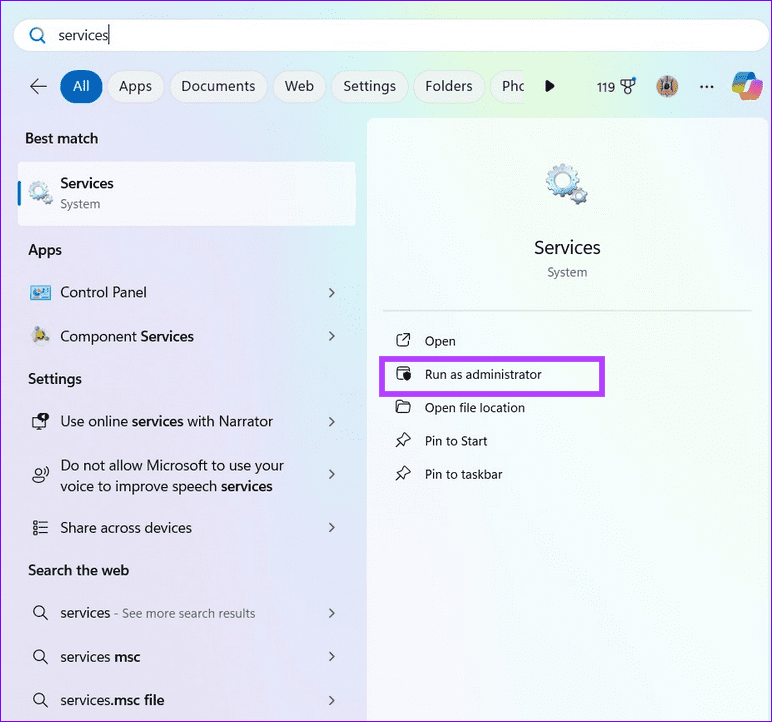
Step 2: Locate and double-click Software Protection, and click Start.

Step 3: Finally, double-click Windows Error Reporting Service, click Start, and retry opening the Control Panel.

Was this helpful?
Last updated on 12 July, 2024
Read Next
 5 Ways to Fix Intel Graphics Control Panel Not Showing After Windows 11 Update
Common Fixes Check the Windows 11 context menu: Right-click the blank space on your desktop and select Show more options.
5 Ways to Fix Intel Graphics Control Panel Not Showing After Windows 11 Update
Common Fixes Check the Windows 11 context menu: Right-click the blank space on your desktop and select Show more options.
 How to Access the Old Add or Remove Programs Panel and Other Classic Features in Windows 10
Windows 10 is a dramatic improvement over its predecessors in terms of both speed and stability.
How to Access the Old Add or Remove Programs Panel and Other Classic Features in Windows 10
Windows 10 is a dramatic improvement over its predecessors in terms of both speed and stability.
 2 Ways to Fix Discord Not Opening on Windows 10 and Windows 11
Try Basic Fixes End Discord processes: Press Ctrl + Shift + Esc to launch the Task Manager.
2 Ways to Fix Discord Not Opening on Windows 10 and Windows 11
Try Basic Fixes End Discord processes: Press Ctrl + Shift + Esc to launch the Task Manager.
 6 Ways to Fix Windows Security Not Opening or Working on Windows 11
Try Basic Fixes Uninstall any third-party antivirus program: Third-party antivirus programs can sometimes interfere with the Windows Security app and prevent it from opening on your Windows 11 PC.
6 Ways to Fix Windows Security Not Opening or Working on Windows 11
Try Basic Fixes Uninstall any third-party antivirus program: Third-party antivirus programs can sometimes interfere with the Windows Security app and prevent it from opening on your Windows 11 PC.
 4 Ways to Fix Firefox Not Opening on Windows 10 and Windows 11
Fix 1: Force Close Firefox Processes Sometimes, Firefox processes may become unresponsive on your PC, resulting in such issues.
4 Ways to Fix Firefox Not Opening on Windows 10 and Windows 11
Fix 1: Force Close Firefox Processes Sometimes, Firefox processes may become unresponsive on your PC, resulting in such issues.
 4 Ways to Fix Windows Terminal Not Opening on Windows 11
Fix 1: Ensure Windows Terminal Is Not Disabled If you cannot launch Windows Terminal via the Start menu or Run dialog box, ensure the app is not disabled on your
4 Ways to Fix Windows Terminal Not Opening on Windows 11
Fix 1: Ensure Windows Terminal Is Not Disabled If you cannot launch Windows Terminal via the Start menu or Run dialog box, ensure the app is not disabled on your
 4 Ways to Fix OneDrive Not Opening on Startup in Windows 11
Fix 1: Enable OneDrive as a Startup App Windows 11 provides several options for running apps at startup.
4 Ways to Fix OneDrive Not Opening on Startup in Windows 11
Fix 1: Enable OneDrive as a Startup App Windows 11 provides several options for running apps at startup.
 4 Ways to Fix Notepad Not Opening on Windows 11
Basic Fixes Restart PC: Press the Windows + X shortcut to open the Power User Menu.
4 Ways to Fix Notepad Not Opening on Windows 11
Basic Fixes Restart PC: Press the Windows + X shortcut to open the Power User Menu.
The article above may contain affiliate links which help support Guiding Tech. The content remains unbiased and authentic and will never affect our editorial integrity.
