Try Basic Fixes
- Disable interfering apps: VPNs and Wi-Fi prioritizing apps can sometimes interfere with your phone’s network. Hence, it’s best to disable them. Additionally, if you have an antivirus app installed and active on your device, you should disable it.
- Check the router’s settings and range: You might want to ensure that your phone isn’t blocked from accessing the network. Because if it is, that could be the major reason why your device can’t stay hooked to a network. It’s also advisable to stay well within the Wi-Fi range to ensure your phone establishes a strong connection with the router.
- Update the router firmware: If you are sure that your phone won’t stay connected to Wi-Fi due to some problems with your router and not your phone itself, upgrading the firmware could help fix the issue.
Fix 1: Forget and Reconnect to the Network
Sometimes, simply reinitiating the connection to your Wi-Fi network that keeps disconnecting could help fix the issue. Here are steps for the same.
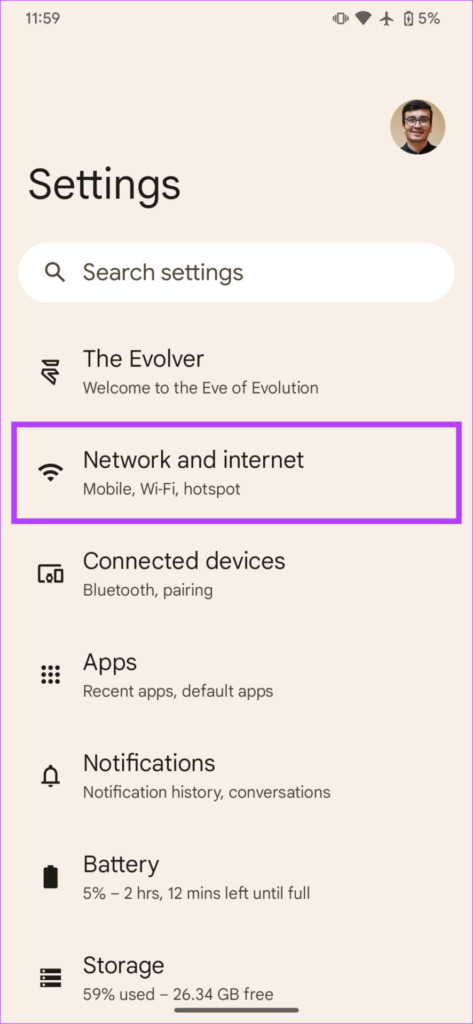
Step 1: Open your phone’s Settings app and navigate to Network and internet > Internet.
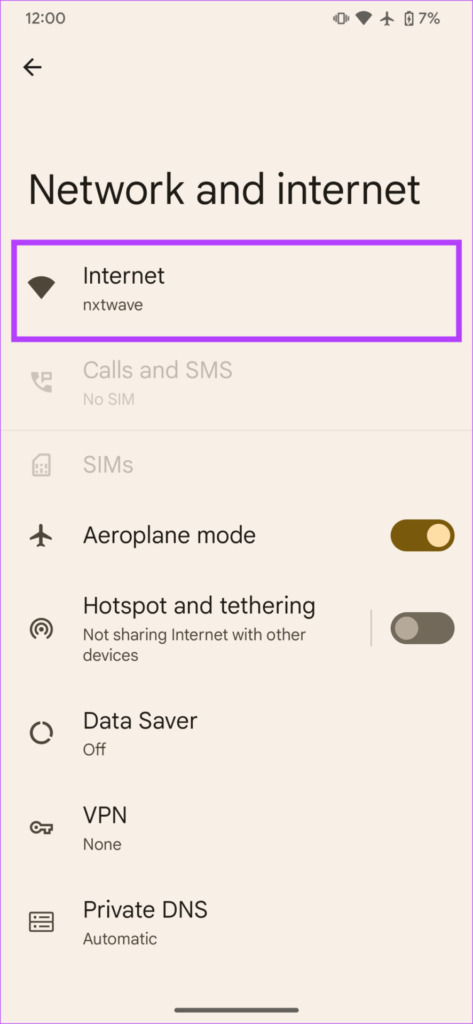
Step 2: Tap the gear icon next to the connected network and select Forget.
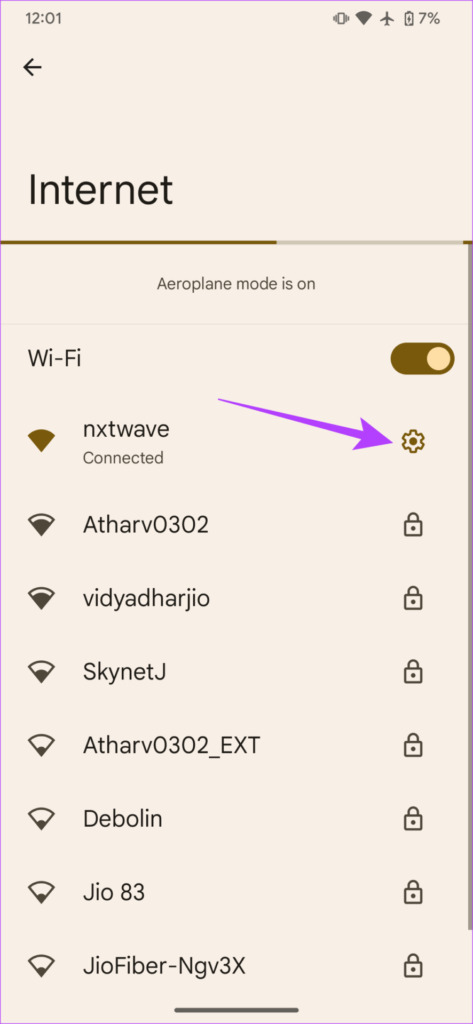

Now, reconnect to the Wi-Fi network you just disconnected from and check if the issue is resolved.
Fix 2: Reset Network Settings
Resetting your Android smartphone’s network settings could also help fix this issue with Wi-Fi disconnecting randomly. What a network reset does is refresh your phone’s Wi-Fi settings, cellular network settings, Bluetooth settings, and VPN configurations. This helps to fix network and connectivity issues on your device. Follow the steps below to reset your phone’s network settings.
Note: Resetting network settings will delete all saved (Wi-Fi and cellular) networks, passwords, as well as paired Bluetooth devices.
Step 1: Open your phone’s Settings app and head to System > Reset options.
Step 2: Tap Reset Wi-Fi, mobile, and Bluetooth and follow the on-screen prompts to finish resetting the network settings.


Was this helpful?
Last updated on 03 September, 2024
Read Next
 7 Best Ways to Fix Wear OS Smartwatch Keeps Disconnecting From Phone
A smartwatch is a great supplement to a smartphone.
7 Best Ways to Fix Wear OS Smartwatch Keeps Disconnecting From Phone
A smartwatch is a great supplement to a smartphone.
 4 Ways to Fix Android Auto Keeps Disconnecting
Basic Fixes Update the Android Auto app: Sometimes, the Android Auto interface may not support an old or outdated version of the app.
4 Ways to Fix Android Auto Keeps Disconnecting
Basic Fixes Update the Android Auto app: Sometimes, the Android Auto interface may not support an old or outdated version of the app.
 4 Ways to Fix Bluetooth Keeps Disconnecting on Android
Basic Fixes Use 5GHz Wi-Fi: Bluetooth uses a 2.4GHz frequency band, which can cause the signals to overlap and can cause problems by disconnecting the device.
4 Ways to Fix Bluetooth Keeps Disconnecting on Android
Basic Fixes Use 5GHz Wi-Fi: Bluetooth uses a 2.4GHz frequency band, which can cause the signals to overlap and can cause problems by disconnecting the device.
 6 Ways to Fix Mac Wi-Fi Keeps Disconnecting
Fix 1: Run macOS Wireless Diagnostics macOS has a built-in diagnostic tool to diagnose and fix connectivity problems on your Mac.
6 Ways to Fix Mac Wi-Fi Keeps Disconnecting
Fix 1: Run macOS Wireless Diagnostics macOS has a built-in diagnostic tool to diagnose and fix connectivity problems on your Mac.
 8 Best Ways to Fix Windows 10 Ethernet Keeps Disconnecting
On Windows 10 computers, both wired and wireless connections come with their respective problems.
8 Best Ways to Fix Windows 10 Ethernet Keeps Disconnecting
On Windows 10 computers, both wired and wireless connections come with their respective problems.
 Top 14 Ways to Fix Apple CarPlay Keeps Disconnecting
Apple CarPlay is quite helpful while driving.
Top 14 Ways to Fix Apple CarPlay Keeps Disconnecting
Apple CarPlay is quite helpful while driving.
 How to Fix iPhone Hotspot Keeps Disconnecting on Windows and Mac
Why Does My iPhone Hotspot Keeps Disconnecting Before we show you step-by-step instructions to fix the hotspot issue on your iPhone, let's quickly go over some of the possible reasons
How to Fix iPhone Hotspot Keeps Disconnecting on Windows and Mac
Why Does My iPhone Hotspot Keeps Disconnecting Before we show you step-by-step instructions to fix the hotspot issue on your iPhone, let's quickly go over some of the possible reasons
 4 Ways to Fix USB Devices Keep Disconnecting and Reconnecting in Windows 11
https://youtu.be/tUV-xdBsm5o Try Basic Fixes Reconnect the device: Unplugging your USB device and plugging it back in should help fix any issues caused by a loose connection.
4 Ways to Fix USB Devices Keep Disconnecting and Reconnecting in Windows 11
https://youtu.be/tUV-xdBsm5o Try Basic Fixes Reconnect the device: Unplugging your USB device and plugging it back in should help fix any issues caused by a loose connection.
The article above may contain affiliate links which help support Guiding Tech. The content remains unbiased and authentic and will never affect our editorial integrity.