Method 1: Find People Using Their Phone Number on Instagram
You can use Instagram’s native contact syncing option to find people by their phone number.
Step 1: Open the Instagram app and tap on your profile icon at the bottom-right corner.
Step 2: Tap the hamburger menu icon at the top-right corner > select Follow and invite friends.
Step 3: Tap on Follow contacts and enable Instagram to access your phone contacts.
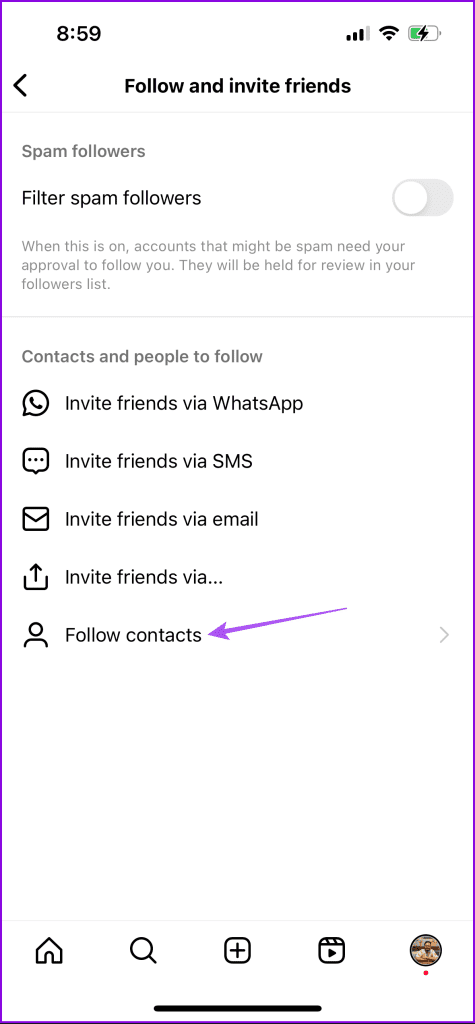
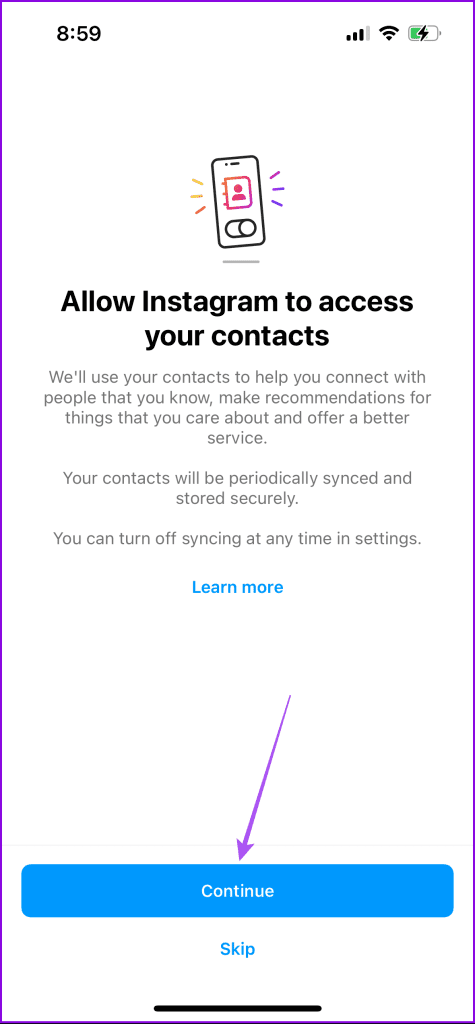
After you grant the app access to your contacts, Instagram will automatically sync phone numbers from your phone to your account.
Method 2: Find People Using Search Bar
Step 1: Open the Instagram app and tap the Search icon at the bottom Menu Bar.
Step 2: Enter the phone number of your contacts and tap on Accounts.


If the user has registered their number to their account, you will spot their name. If you cannot find your friends by their phone numbers, there are only two reasons: they have registered using a different number or have not added a number at all.
Was this helpful?
Last updated on 30 April, 2024
Read Next
 How to Wake Someone up Over the Phone: 4 Practical Ways
If you wish to wake someone up over the phone, a call is usually enough.
How to Wake Someone up Over the Phone: 4 Practical Ways
If you wish to wake someone up over the phone, a call is usually enough.
 How to Find Someone’s Location by Phone Number on Google Maps
Google Maps is more than just a navigation app.
How to Find Someone’s Location by Phone Number on Google Maps
Google Maps is more than just a navigation app.
 How to Find Someone’s Phone Number on Telegram
Like any other messaging app, Telegram allows you to meet and keep in touch with other people.
How to Find Someone’s Phone Number on Telegram
Like any other messaging app, Telegram allows you to meet and keep in touch with other people.
 How to Know if Someone Blocked You on Instagram
https://www.youtube.com/embed/W8JfcQAwk0Q Fix 1.
How to Know if Someone Blocked You on Instagram
https://www.youtube.com/embed/W8JfcQAwk0Q Fix 1.
 Why Can’t I Follow Someone on Instagram
Preliminary Fixes You Have Exceeded Limit: Instagram has limits in place to prevent spam and misuse of its platform.
Why Can’t I Follow Someone on Instagram
Preliminary Fixes You Have Exceeded Limit: Instagram has limits in place to prevent spam and misuse of its platform.
 3 Easy Ways to Hide Posts From Someone on Instagram
Note: Changing settings on your desktop automatically syncs to your mobile device, so you don't have to follow the same methods on your mobile device as you would on your
3 Easy Ways to Hide Posts From Someone on Instagram
Note: Changing settings on your desktop automatically syncs to your mobile device, so you don't have to follow the same methods on your mobile device as you would on your
 How to Tag Someone on Instagram Story After Posting
Have you ever spent hours crafting the perfect Instagram Story, only to regret it when you post and realize you forgot to tag someone?
How to Tag Someone on Instagram Story After Posting
Have you ever spent hours crafting the perfect Instagram Story, only to regret it when you post and realize you forgot to tag someone?
 How to Tag/Mention Someone on Instagram Story Without It Showing
Instagram's tagging system is great for public shoutouts, but what about when you want to send a secret message to your friend?
How to Tag/Mention Someone on Instagram Story Without It Showing
Instagram's tagging system is great for public shoutouts, but what about when you want to send a secret message to your friend?
The article above may contain affiliate links which help support Guiding Tech. The content remains unbiased and authentic and will never affect our editorial integrity.