

Your personal information might be available on the dark web without you even knowing it. When companies experience data breaches, the exposed data often ends up in this part of the internet where it can be sold or traded. This includes email addresses, phone numbers, passwords, and even home addresses.
Google now offers a way to check if any of your data has appeared in these breaches through its dark web report, a feature built into Google One. It scans known sources on the dark web and alerts you to any matches.
Make Sure You Have Google One
Step 1: Go to https://one.google.com.
Step 2: Click ‘Learn more.’

Step 3: Choose a plan.

Step 4: Complete payment and sign in.
Open the Dark Web Report Page
Step 1: Go to https://myactivity.google.com/dark-web-report/setup-profile?pli=1.
Step 2: Sign in with your Google account.

It will take you to the dark web monitoring dashboard.
Review the Information That Was Scanned
Step 1: Click ‘Select all’ then ‘Allow.’

Step 2: Select other data to include, such as phone number, name, other email addresses, or your mailing address.

Step 3: Confirm and start the scan.
Click ‘Done’ after you select your information. Google will begin checking sources on the dark web. Once you complete this, it should take you to the report dashboard.
Note: The scan usually takes less than a minute. Stay on the page while it’s completed.

Step 4: View your report.
Once the scan finishes, click ‘View all results.’ If the system finds any of your personal data, you’ll see a list of data breach entries. Each entry should include:
- The site or service affected
- The date of the breach
- The type of data the breach leaked


Step 5: Expand entries for more detail.
You can click each entry to see which of your email addresses, passwords, or accounts the dark web has exposed.

Step 6: Take action if your data was exposed.
Google will sometimes offer recommended actions to protect your data. These usually include:
- Changing passwords immediately
- Enabling two-factor authentication (2FA)
- Keeping an eye on financial accounts
- Freezing your cards

Edit Monitoring Profile
Step 1: Scroll to ‘Edit monitoring profile.’
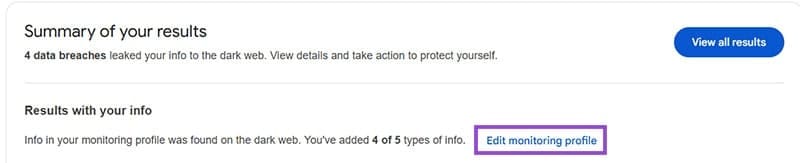
Step 2: Edit any information that is incorrect.
Remember to change the information on the dark web dashboard when you update addresses, emails or passwords.
How Data Breaches Happen
Data breaches typically occur when hackers exploit security flaws in websites, apps, or networks. These attacks can involve phishing, malware, or direct hacking of poorly protected databases. Once inside, attackers steal sensitive information, often selling it on the dark web or using it for identity theft. Even large, well-known companies can fall victim.
Was this helpful?
Last updated on 30 May, 2025
Read Next
 What Happens When You Report Someone on WhatsApp and How to Report
What Happens if You Report Someone on WhatsApp Before we move on, let’s first understand what is report in WhatsApp.
What Happens When You Report Someone on WhatsApp and How to Report
What Happens if You Report Someone on WhatsApp Before we move on, let’s first understand what is report in WhatsApp.
 The Do’s and Don’ts of Exploring the Dark Web with Tor
You may have heard a lot about the so-called Deep Web and Dark Web lately.
The Do’s and Don’ts of Exploring the Dark Web with Tor
You may have heard a lot about the so-called Deep Web and Dark Web lately.
 What Happens When You Report Someone on Instagram
 Instagram might ban or deactivate the reported account or post.
What Happens When You Report Someone on Instagram
What Happens When You Report Someone on Instagram Instagram might ban or deactivate the reported account or post.
 How to Report Someone on Snapchat and What Happens Next
How to Report Someone on Snapchat The Snapchat app offers an identical interface on the iPhone and Android.
How to Report Someone on Snapchat and What Happens Next
How to Report Someone on Snapchat The Snapchat app offers an identical interface on the iPhone and Android.
 What Happens When You Report Someone on Facebook Messenger
Being the largest social media platform worldwide, Facebook comes with several privacy tools to report harassment, restrict the recipient, and prevent others from peeking at your account.
What Happens When You Report Someone on Facebook Messenger
Being the largest social media platform worldwide, Facebook comes with several privacy tools to report harassment, restrict the recipient, and prevent others from peeking at your account.
 5 Ways to Contact Instagram to Get Support or Report a Problem
Method 1: Shake Your Phone to Report a Problem on Instagram Using this option, you can shake your phone wherever you see a problem on Instagram and report it.
5 Ways to Contact Instagram to Get Support or Report a Problem
Method 1: Shake Your Phone to Report a Problem on Instagram Using this option, you can shake your phone wherever you see a problem on Instagram and report it.
 How to Report a Discord Server: A Definitive Guide
If you encounter a Discord server that violates the community guidelines or engages in inappropriate behavior, it's important to know how to take action and report it.
How to Report a Discord Server: A Definitive Guide
If you encounter a Discord server that violates the community guidelines or engages in inappropriate behavior, it's important to know how to take action and report it.
 How to Report and Avoid Scammers on Facebook Marketplace
Facebook Marketplace – the company’s e-commerce platform, has over one billion users.
How to Report and Avoid Scammers on Facebook Marketplace
Facebook Marketplace – the company’s e-commerce platform, has over one billion users.
The article above may contain affiliate links which help support Guiding Tech. The content remains unbiased and authentic and will never affect our editorial integrity.

