

Basic Fixes
- Turn off Voiceover: Open Settings > Accessibility > VoiceOver > turn off VoiceOver.
- Disable Screen Zoom: Open Settings > Accessibility > Zoom > turn Off Zoom.
- Check your screen protector: A damaged screen protector might cause ghost touches and restrict you from using the Tap to Wake feature.
- Update iOS version: Go to Settings > General > Software Update.
Fix 1: Check if Tap to Wake Is Enabled
The first step in troubleshooting this problem is checking whether the feature is enabled. Though Tap To Wake is enabled by default, here’s how to check and manually enable it.
Open Settings > Accessibility > Touch > enable Tap to Wake.


Fix 2: Turn Off Always-On Display
With the launch of iPhone 14 Pro and 14 Pro Plus, Apple introduced the Always-On Display feature. But this feature is still a work in progress. Therefore, you can disable it and check if the problem gets solved.
Open Settings > Display and Brightness > disable Always-On Display.
Note: If you are using iOS 16.2, first tap on Always-On Display and then follow the steps mentioned above. Disabling Always-On Display also helps to fix the battery drain on your iPhone

Fix 3: Disable Battery Saver
If your iPhone is running low on power, enabling the Battery Saver can conserve battery life for a few more hours. But that can also be why the Tap to Wake feature is not working. Try turning it off to check if the problem gets solved.
Open Settings > Battery > turn off Low Power Mode.
Fix 4: Reset All Settings
This solution will reset all the settings of your iPhone, including Network, Display Preferences, Keyboard, Location, and more. So, we suggest trying this solution and checking if the problem is solved.
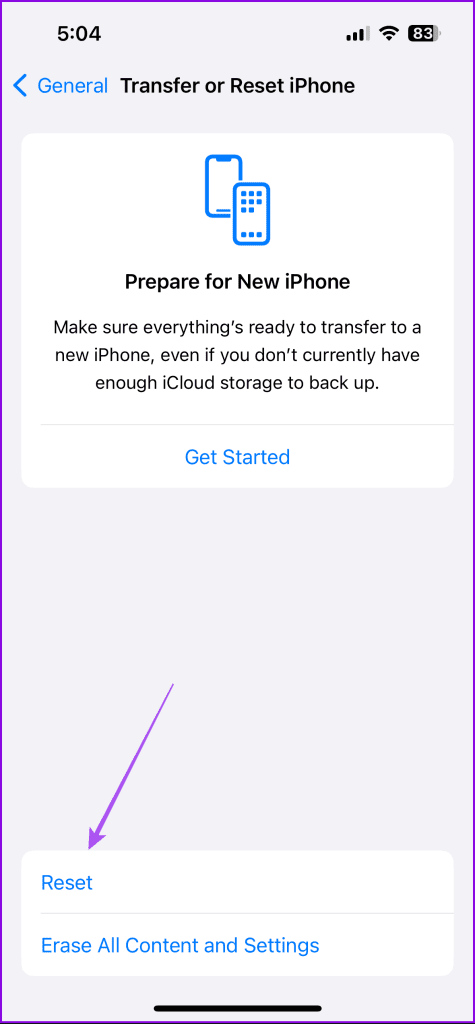
Open Settings > General > Transfer or Reset iPhone > Reset > Reset All Settings.

Was this helpful?
Last updated on 29 August, 2024
1 Comment
Leave a Reply
Read Next
 3 Ways to Fix iPhone Lock/Wake Screen Delay
https://youtu.be/94mfnn8hCSw Why Is There a Delay When Locking or Waking up Your iPhone If you have mapped a double/triple click shortcut to the power button of your iPhone, and when
3 Ways to Fix iPhone Lock/Wake Screen Delay
https://youtu.be/94mfnn8hCSw Why Is There a Delay When Locking or Waking up Your iPhone If you have mapped a double/triple click shortcut to the power button of your iPhone, and when
 10 Best Ways to Fix Windows 10 Won’t Wake up From Sleep Mode Error
The sleep mode in Windows 10 is useful for saving battery juice when taking those much-needed short breaks.
10 Best Ways to Fix Windows 10 Won’t Wake up From Sleep Mode Error
The sleep mode in Windows 10 is useful for saving battery juice when taking those much-needed short breaks.
 How to Wake Someone up Over the Phone: 4 Practical Ways
If you wish to wake someone up over the phone, a call is usually enough.
How to Wake Someone up Over the Phone: 4 Practical Ways
If you wish to wake someone up over the phone, a call is usually enough.
 2 Ways to Fix Back Tap Not Working on iPhone
Basic Fixes Check compatibility: Back tap works only on certain iPhone variants and must be running iOS 14 and above.
2 Ways to Fix Back Tap Not Working on iPhone
Basic Fixes Check compatibility: Back tap works only on certain iPhone variants and must be running iOS 14 and above.
 4 Fixes for Vibration Not Working on iPhone
Basic Fixes Test your iPhone’s vibration motor: Remove any protective case and toggle the Ring/Silent switch on your iPhone's left side.
4 Fixes for Vibration Not Working on iPhone
Basic Fixes Test your iPhone’s vibration motor: Remove any protective case and toggle the Ring/Silent switch on your iPhone's left side.
 3 Fixes for FaceTime Screen Sharing Not Working on iPhone
Basic Fixes Switch to 5G or Wi-Fi: The ability to share the screen of your iPhone during a FaceTime call depends a lot on your internet speed.
3 Fixes for FaceTime Screen Sharing Not Working on iPhone
Basic Fixes Switch to 5G or Wi-Fi: The ability to share the screen of your iPhone during a FaceTime call depends a lot on your internet speed.
 4 Fixes for Night Shift Not Working on iPhone and Mac
Basic Fix Update software version: Update the software version on your iPhone or Mac to fix bugs causing the issue.
4 Fixes for Night Shift Not Working on iPhone and Mac
Basic Fix Update software version: Update the software version on your iPhone or Mac to fix bugs causing the issue.
 3 Fixes for the Translate App Not Working on iPhone
Basic Fixes Enable or disable On-Device mode: Open Settings > Translate > Disable On-Device Mode.
3 Fixes for the Translate App Not Working on iPhone
Basic Fixes Enable or disable On-Device mode: Open Settings > Translate > Disable On-Device Mode.
The article above may contain affiliate links which help support Guiding Tech. The content remains unbiased and authentic and will never affect our editorial integrity.
Ever since I updated the Apple Watch series 6 IOS to 9.6.1, the raise wrist to wake does not work. The watch face remains black and I must tap the face to get the time. None of the solutions offerred worked.