

Tested in November 2026 using the latest available models. Disclosure: Our opinions are our own. This article contains affiliate links; we may earn a commission at no extra cost to you, and this does not affect our rankings.
For businesses reviewing lengthy contracts, proposals, and policies, Adobe Acrobat is our top pick for the best AI PDF summarizer in 2026. Its AI Assistant can summarize documents and answer questions with source-linked citations, so you can check where the information came from. It also sits within the same PDF platform teams use to edit, compare, and sign documents.
Other AI PDF summarizers may be better suited to specific needs, particularly if you’re looking for a free tool or a simpler way to extract key information.
Let’s take a deeper look at the best options for business use in 2026.
How Do the Best AI PDF Summarizers for Business Compare?
The best AI PDF summarizer for you depends on whether you need to verify information, work across multiple files, or simply get a quick overview. We’ve narrowed it down to our top five tools for business use – here’s how they compare.
| Tool | Best for | Key features | Limitations |
|---|---|---|---|
| Adobe Acrobat AI Assistant | Business PDF workflows | AI summaries and Q&A with source citations, PDF Spaces, editing, file comparison, redaction, and e-signatures | AI feature access depends on plan |
| Foxit AI | Mixed file types and local processing | Multi-document analysis, citations, on-device AI option | Local AI requires supported hardware; advanced AI features may require additional credits or subscriptions |
| Gemini Notebook | Research across multiple sources | Source-grounded answers, research notebooks | Business limits and protections vary by plan |
| Smallpdf | Quick, occasional summaries | Browser-based summaries, multiple file formats, page references | Limited free usage; fewer advanced PDF management features than Acrobat |
| ChatPDF | Targeted PDF questions | Conversational Q&A and document references | File size and page limits; no full PDF editing suite |
Best AI PDF Summarizers for Business
Adobe Acrobat AI Assistant: best for working directly with PDFs

Adobe Acrobat AI Assistant is our top pick for businesses that need to summarize PDFs and verify the information against the original documents. It generates summaries with source-linked citations, all within the same platform teams use to edit, compare, and sign PDFs. That makes it particularly useful for reviewing contracts, proposals, company policies, and the like.
AI Assistant can produce an overview with section summaries and links back to the source content. You can also ask follow-up questions and, in PDF Spaces, bring together multiple PDFs, links, and notes to explore information across documents.
Responses include citations that take you to the relevant parts of the source files. Adobe explains how AI summaries work and how citations work in PDF Spaces.
Acrobat’s other PDF tools are useful when you need to do more than summarize a document. Compare Files highlights differences between document versions, while Edit PDF lets you make changes to text and images. You can also use Redact to permanently remove sensitive information and Request e-signatures to send documents for signing.
I like that the summary and source document stay connected, so it’s easier to check whether a takeaway reflects what the file actually says.
For access to all these features in one subscription, you’ll need Acrobat Studio, which includes AI Assistant, PDF Spaces, and Acrobat Pro’s editing and document management tools. Acrobat Standard and Pro offer different sets of PDF tools, while AI Assistant may also be available separately. Check Adobe’s current plans before subscribing.
Best for: Teams that already use Acrobat and need summaries with links back to the relevant source passages.
Foxit AI: best for summaries and document questions in one workflow
Foxit AI can summarize one or several documents, answer follow-up questions, and provide source-linked answers. Its summarizer also accepts a range of formats beyond PDFs, including Word, Excel, PowerPoint, and common image files.
Foxit says its Workspace can analyze up to 100 documents in a project, while its PDF Assistant works within Foxit Reader and Editor.
That breadth could be useful when a business question spans a contract, spreadsheet, and report.
Foxit also offers a local AI option for supported devices, where text-based tasks such as summarizing and asking questions run on the device. This is a potential advantage over Acrobat’s cloud-based AI Assistant for businesses that prefer to process sensitive documents on their own devices.
Free monthly credits are available, with paid options for higher usage. For a team, compare the credit limits against expected document volume before making it part of a regular review process.
Best for: People who want PDF summarization plus analysis across different file types, with an option for local processing on supported devices.
Gemini Notebook: best for source-grounded research

Google’s Gemini Notebook, previously known as NotebookLM, is designed around a collection of sources. Add PDFs and other materials, then ask questions or request a summary based on those files.
It’s useful if you want to combine a bundle of background documents, rather than just get a quick digest of one PDF. Google’s business version supports larger source collections, with limits depending on the Workspace edition.
Compared with Acrobat’s focus on PDF workflows, Gemini Notebook is better suited to research projects that involve gathering and analysing information from a large collection of sources.
For businesses, the account type makes a difference. Google says some eligible Workspace editions include enterprise-grade protections, where uploads, chats, and outputs aren’t reviewed by human reviewers or used to improve generative AI models. The protections and terms depend on the licence, so I’d confirm the organisation’s edition and admin settings before adding work material.
Best for: Teams that need to draw insights from a defined set of PDFs and related source material.
Smallpdf AI PDF Summarizer: best for quick, occasional tasks
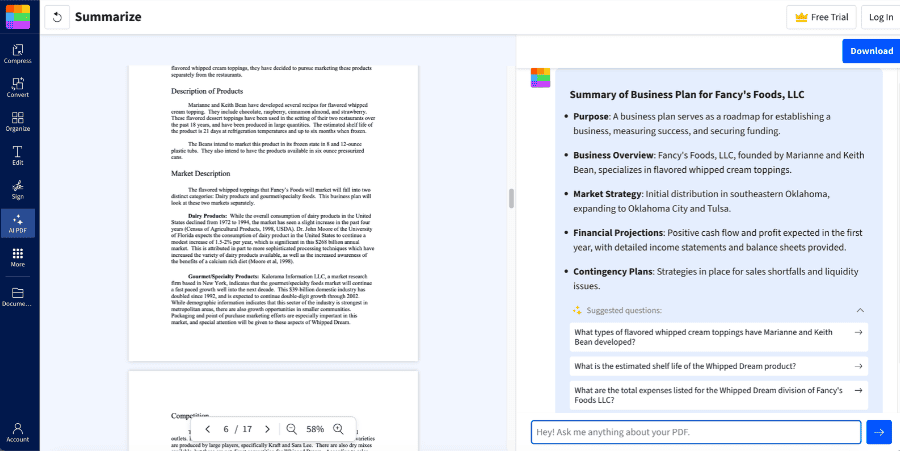
Smallpdf is a handy alternative to Acrobat for quick, occasional summaries, particularly when you don’t need the full range of PDF editing and document management tools.
Smallpdf’s online summarizer accepts PDFs along with Word, Excel, PowerPoint, and image files. It can create a summary and lets you ask follow-up questions, with clickable page references to help locate source information. Smallpdf says the tool can also handle scanned PDFs.
The appeal is convenience: there’s no software to install, and Smallpdf says you can start without registering. I see it as a handy option for lower-risk, occasional work. For confidential contracts, customer records, or internal financial documents, first check whether the service and account meet company policy.
Best for: Quick summaries of non-sensitive documents when you don’t need a broader team workspace.
ChatPDF: best for simple question-and-answer sessions
ChatPDF keeps the interaction straightforward: upload a PDF and ask questions about it. Its API documentation describes page references in answers, which can help with checking where a response came from.
While Smallpdf is handy for quick summaries across different file types, ChatPDF focuses on conversational Q&A with PDFs. It’s a simpler option than a full document suite like Acrobat when you want to find specific information, clarify a point, or explore a document through follow-up questions.
For ongoing business work, check the current product’s account controls, usage limits, and data terms before uploading internal material. It’s also important to verify whether references are available in the version and workflow you plan to use.
Best for: Individuals who want to ask targeted questions about a PDF without setting up a larger document project.
Frequently Asked Questions
What is the best AI PDF summarizer for business?
Adobe Acrobat AI Assistant is our top pick for businesses that regularly work with PDFs. It provides summaries with citations linking back to the source documents, alongside tools for editing, comparing, and signing PDFs. Foxit AI may be better for local processing, while Gemini Notebook is a good option for research across multiple sources.
Can I check where an AI PDF summary came from?
Yes, several AI PDF summarizers provide source references. Adobe Acrobat AI Assistant includes clickable citations that take you to relevant passages in the original PDF, while PDF Spaces supports citations across multiple documents. Always check important information against the source before relying on an AI-generated summary for business decisions.
Is it safe to upload confidential documents to an AI PDF summarizer?
Whether an AI PDF summarizer is suitable for confidential documents depends on the provider, account type, and your company’s policies. Before uploading contracts, financial records, or customer information, check the service’s data retention, security, and AI training policies. For sensitive business documents, use an approved service with appropriate data protections.
Disclosure: This article contains affiliate links. We may earn a commission at no cost to you; our testing is independent.