How to Password Protect Files on Android Using Google Files
Keeping confidential documents, photos, or videos safe on your Android device is essential. Thankfully, the Google Files app offers a built-in feature called “Safe folder” that lets you password-protect your sensitive files using a PIN. Here’s how to use it.
Step 1: The Files app is pre-installed on most Android devices. If not, you can download it from the Google Play Store.
Step 2: Once installed, open the Files app on your Android device. Scroll down to the Collections section, and tap on Safe Folder.

Step 3: Choose your preferred lock method: PIN or Pattern. Based on your selection, set up password protection.
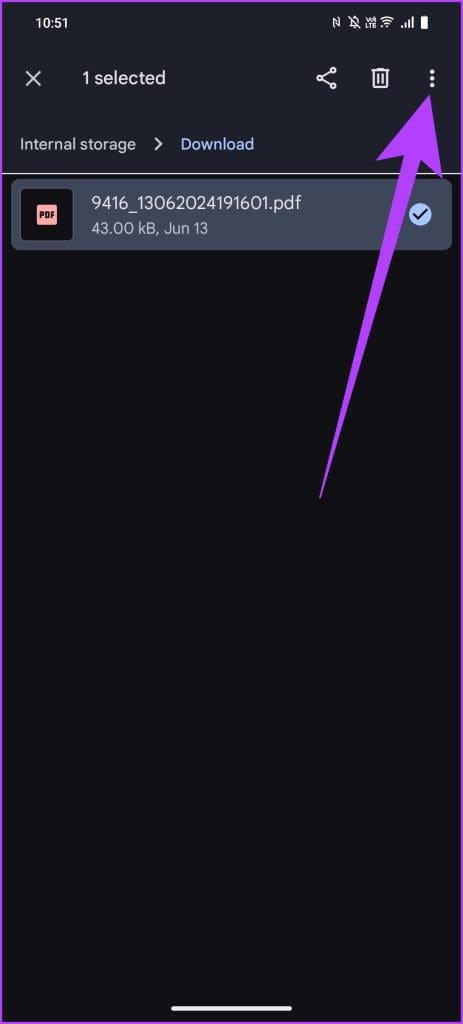
Step 4: Once you’ve set up your Safe folder, go back to the main screen of Google Files. Browse to the files you want to protect. Long press to select the files, then tap on the three-dot menu and select Move to Safe Folder.
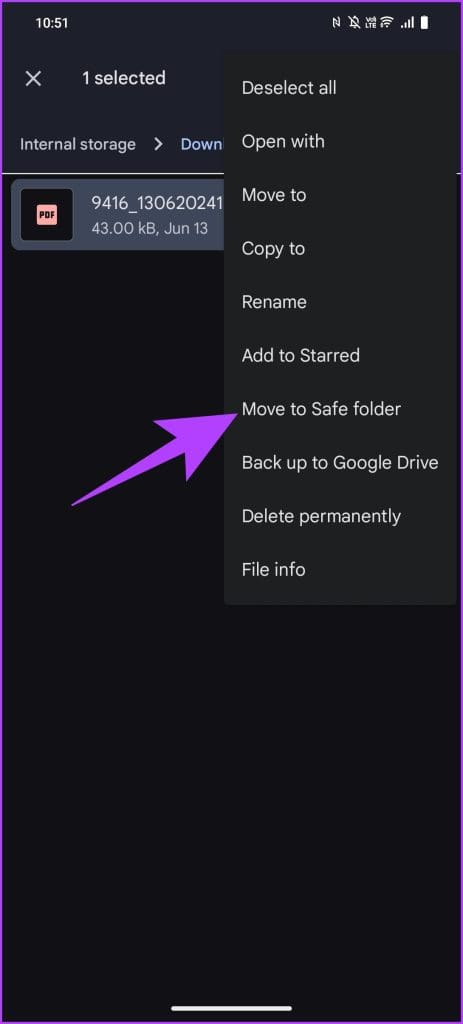
Step 5: You’ll be prompted to enter the PIN or pattern you set up earlier.
And that’s it. After entering it, your files will be moved to the Safe Folder.
FAQs
Yes, you can change your PIN or pattern by going to the Safe Folder settings within the Google Files app. Tap on the three-dot menu, select “Change PIN” or “Change Pattern,” and follow the instructions.
Unfortunately, no. There’s no built-in method to recover forgotten credentials. As such, it’s important to ensure you choose a memorable PIN or pattern.
No, moving files to the Safe Folder does not affect their quality. The files remain in their original format and quality, just protected by a PIN or pattern lock.
Was this helpful?
Last updated on 28 August, 2024
Read Next
 2 Ways to Password Protect OneDrive Links Before Sharing
Method 1: Add Password Protection Using Microsoft 365 One of the most requested OneDrive features was finally added by Microsoft.
2 Ways to Password Protect OneDrive Links Before Sharing
Method 1: Add Password Protection Using Microsoft 365 One of the most requested OneDrive features was finally added by Microsoft.
 How to Password Protect a Folder on Windows 11
How to Lock a Folder on Windows 11 Using Built-in Encryption Function Note: The steps to encrypt files on Windows 11 are the same as those for encrypting folders. Step
How to Password Protect a Folder on Windows 11
How to Lock a Folder on Windows 11 Using Built-in Encryption Function Note: The steps to encrypt files on Windows 11 are the same as those for encrypting folders. Step
 3 Easy Ways to Password Protect a ZIP File on Windows
Have you ever wanted to keep your sensitive files and documents safe and secure?
3 Easy Ways to Password Protect a ZIP File on Windows
Have you ever wanted to keep your sensitive files and documents safe and secure?
 4 Ways to Fix “We Restrict Certain Activity to Protect Our Community” on Instagram
Basic Fixes Check if Instagram is down: Check if Instagram is facing downtime.
4 Ways to Fix “We Restrict Certain Activity to Protect Our Community” on Instagram
Basic Fixes Check if Instagram is down: Check if Instagram is facing downtime.
 6 Samsung Galaxy Z Fold 6 Cases to Protect Your New Foldable
After splurging close to $2,000 on a phone, you would obviously want to protect it to maintain its shine.
6 Samsung Galaxy Z Fold 6 Cases to Protect Your New Foldable
After splurging close to $2,000 on a phone, you would obviously want to protect it to maintain its shine.
 Samsung My Files vs Google Files: Which File Manager Is Better on Galaxy Phones
Samsung apps are bundled to replace the official Google Apps in the One UI.
Samsung My Files vs Google Files: Which File Manager Is Better on Galaxy Phones
Samsung apps are bundled to replace the official Google Apps in the One UI.
 4 Ways to Fix Password Autofill Not Working on Android
Basic Fixes App developers have disabled autofill: While most Android apps support password auto-filling, some developers skip the function due to privacy reasons.
4 Ways to Fix Password Autofill Not Working on Android
Basic Fixes App developers have disabled autofill: While most Android apps support password auto-filling, some developers skip the function due to privacy reasons.
 3 Ways to Manually Add New Passwords to Google Password Manager
Method 1: Using the Google App The Google Password Manager is nested in the Google app on your device.
3 Ways to Manually Add New Passwords to Google Password Manager
Method 1: Using the Google App The Google Password Manager is nested in the Google app on your device.
The article above may contain affiliate links which help support Guiding Tech. The content remains unbiased and authentic and will never affect our editorial integrity.