What Does Telegram Check Mark or Read Receipt Mean?
Telegram’s read receipts let you know whether the other user has read your message. This is where the check marks and eye icon come in. You can use this feature in individual chats, groups, and channels to know who or how many users have read your message. For more details, here’s a step-by-step look.
One Check Mark
Step 1: Open Telegram and tap on the relevant user or group.
Step 2: Check for a single check mark in front of your message.

If you see it, your message has been sent to the other user or group but has yet to be seen. Once the other user opens the message, it will turn into two check marks.
Two Check Mark
Step 1: Open Telegram and tap on the relevant user or group.
Step 2: Here, check the message for two check marks.
Tip: In Telegram groups, tap on the message with two check marks to see who has read it in the group.

Eye Icon
Note: This is only visible when using Telegram channels.
Step 1: Open Telegram and tap on the relevant channel.
Step 2: Here, go to the selected message and check the eye icon.
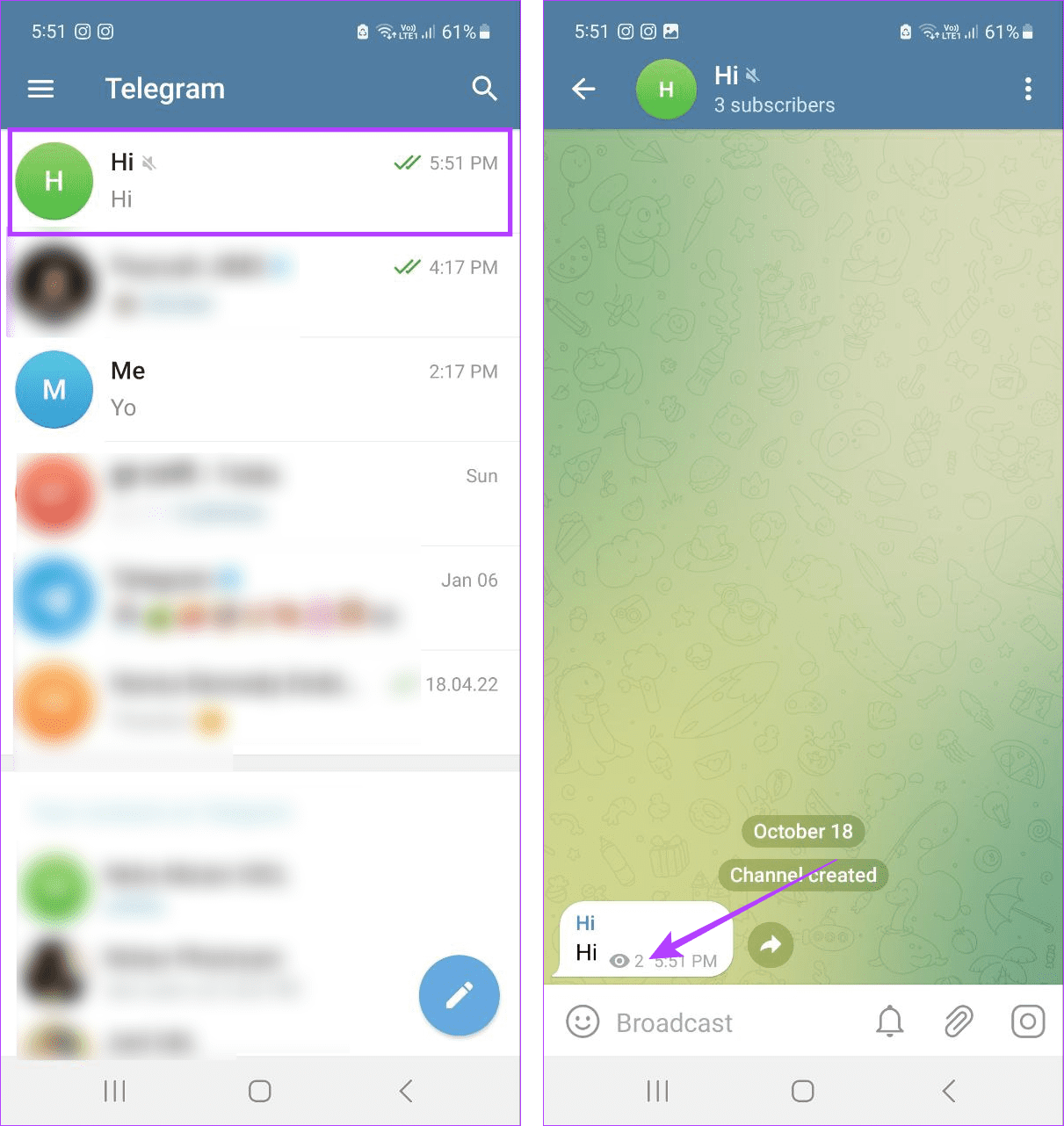
The number in front of the eye icon signifies the number of people who have seen the message in the channel. However, you can’t see who has seen the message.
Also Read: How to search for Telegram groups and channels
Can You Turn off Read Receipts on Telegram?
Unfortunately, there is no option to turn off read receipts on Telegram as of now. This means it will display two check marks as long as you open the chat window. In Telegram channels, the number of views for the read messages will increase accordingly.
How to Read a Message on Telegram Without Sending Read Receipts
While Telegram will immediately add the second check mark or increase the view count to messages that have been seen, there are some workarounds to prevent this. This can help you read a message without notifying the other user, though it might be temporary for some methods.
Method 1: Using Telegram in Airplane Mode
Airplane mode helps turn off all communications for your device. This means Wi-Fi will automatically turn off once you turn on Airplane mode, preventing Telegram from notifying the other user.

You can now check the message without informing the other users. However, this is a temporary solution, as Telegram will display the second check mark once you disable Airplane mode on your device.
Method 2: Checking Messages From the Notification Panel
New messages are usually visible in the notification panel. To use this method, open the notification panel and see the recent Telegram messages without sending read receipts. However, you might only see a limited number of messages. Additionally, they might disappear if you dismiss the notification.
Method 3: Using Snoop and Look
The Snoop and Look feature ensures you can see messages in a chat without opening the message in the Telegram app. Here’s how to use it.
Step 1: Open Telegram and go to the relevant chat. Long-press the chat profile picture or icon.
Step 2: Now, scroll through this window to see recent messages.
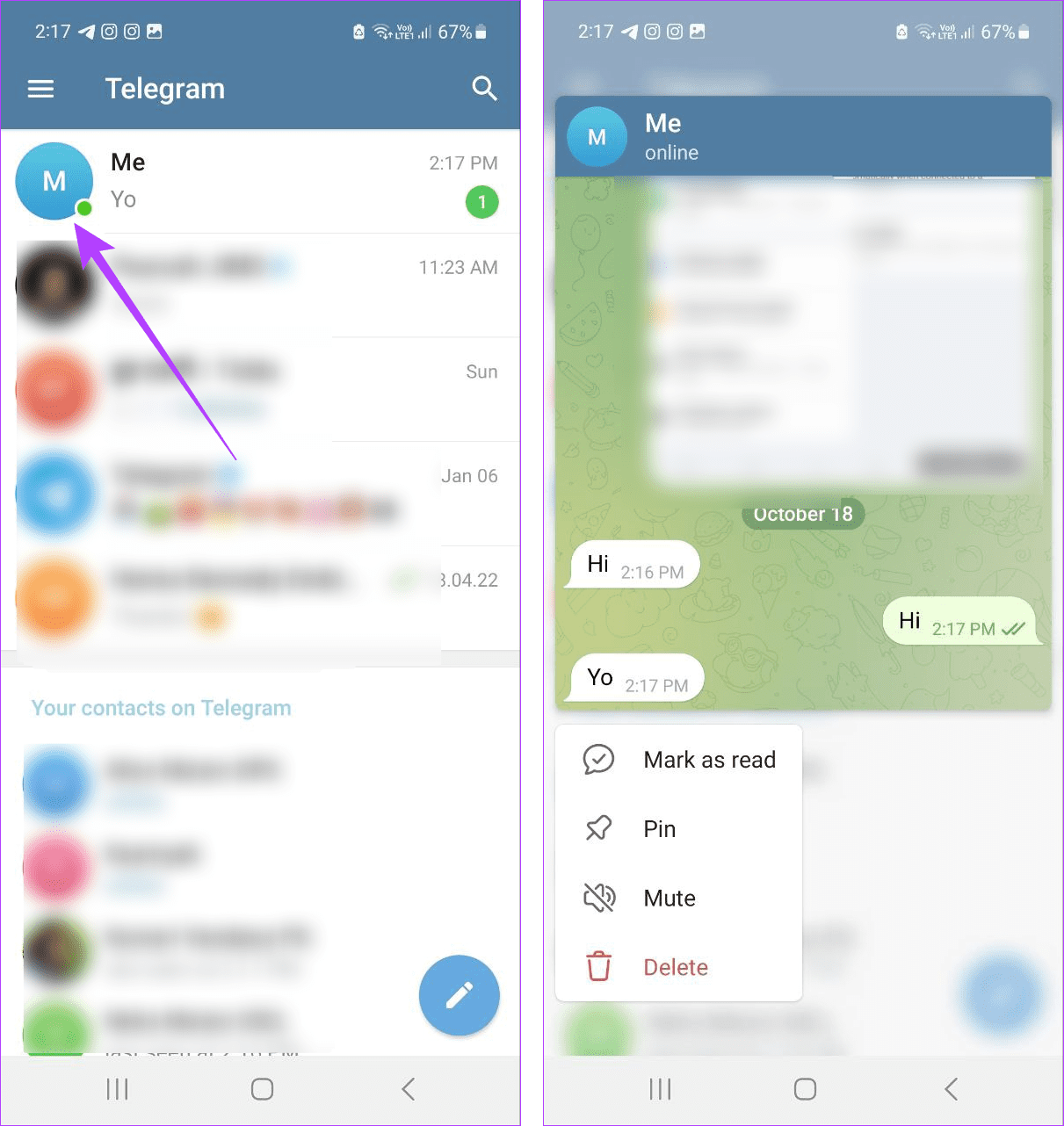
While this will allow you to see more messages than the other methods, you can’t see all the messages sent or received within the chat on the Telegram mobile app.
Method 4: Using Google Assistant or Siri to Read the Message
If you’re using an Android device, you can activate Google Assistant to read the newly received Telegram message without letting the other user know. iPhone users can set up and personalize Siri’s response to make it read aloud your recent Telegram messages without any read receipts.
FAQs for Understanding Telegram Read Receipts
Turning off notifications will only stop Telegram from notifying you about your messages. The other user will still get the read receipt once the message is opened on Telegram, even if the notification settings have been disabled.
Last seen lets you know if the other user is currently online and, if not when they were last online on Telegram. On the other hand, read receipts notify you if the other user sees your message. This means that the other user can be online but not see your message or use any of the above ways to read your message without read receipts. Additionally, you can hide your last seen on Telegram, unlike read receipts.
If you want full access to your Telegram messages without leaving read receipts, you can use certain third-party apps like Unseen – No Last Read. However, note that most third-party apps will also access your personal Telegram account data. So, be cautious and double-check the data-sharing requirements before proceeding.
Was this helpful?
Last updated on 27 June, 2024
Read Next
 Does Bumble Have Read Receipts and How to Tell if Someone Read Your Message
Does Bumble Show Read Receipts?
Does Bumble Have Read Receipts and How to Tell if Someone Read Your Message
Does Bumble Show Read Receipts?
 What Is Read Receipts in WhatsApp and Should You Turn Them Off
What Are Read Receipts in WhatsApp WhatsApp uses three types of checkmarks in chats: a single grey checkmark indicates your message has been sent, two grey checkmarks mean it was
What Is Read Receipts in WhatsApp and Should You Turn Them Off
What Are Read Receipts in WhatsApp WhatsApp uses three types of checkmarks in chats: a single grey checkmark indicates your message has been sent, two grey checkmarks mean it was
 How to Turn Off Read Receipts for Apple Watch Only
How Does Apple Watch Mark Texts as Read?
How to Turn Off Read Receipts for Apple Watch Only
How Does Apple Watch Mark Texts as Read?
 2 Fixes for Read Receipts Not Working on WhatsApp
Basic Fixes Force quit and relaunch: This will give the app a fresh start and should make the feature work.
2 Fixes for Read Receipts Not Working on WhatsApp
Basic Fixes Force quit and relaunch: This will give the app a fresh start and should make the feature work.
 How to Turn off Contact Joined Notifications on Telegram
How to Disable Notifications for New Contacts on Telegram On iPhone Open the Telegram app and go to the Settings tab.
How to Turn off Contact Joined Notifications on Telegram
How to Disable Notifications for New Contacts on Telegram On iPhone Open the Telegram app and go to the Settings tab.
 How to Mark All Emails As Read in Gmail
Method 1: Mark All Email as Read in Gmail Web Google doesn’t offer a direct option to mark all emails as read, so we must use special search prompts to
How to Mark All Emails As Read in Gmail
Method 1: Mark All Email as Read in Gmail Web Google doesn’t offer a direct option to mark all emails as read, so we must use special search prompts to
 How to Use the Read Aloud Feature in Microsoft Edge
Use Read Aloud in Microsoft Edge on Desktop Microsoft Edge’s Read Aloud feature is simple to use and does not require any setup.
How to Use the Read Aloud Feature in Microsoft Edge
Use Read Aloud in Microsoft Edge on Desktop Microsoft Edge’s Read Aloud feature is simple to use and does not require any setup.
 How to Read WhatsApp Messages Without Sender Knowing
Method 1: Dive Into Notification History (Android) You can read WhatsApp messages without letting the sender know by accessing the Notification History on your Android smartphone.
How to Read WhatsApp Messages Without Sender Knowing
Method 1: Dive Into Notification History (Android) You can read WhatsApp messages without letting the sender know by accessing the Notification History on your Android smartphone.
The article above may contain affiliate links which help support Guiding Tech. The content remains unbiased and authentic and will never affect our editorial integrity.