


Basic Fixes
- Update your web browser: Ensure that you use the latest version of your preferred web browser.
- Reset Zoom levels: Many have reset the zoom levels on their preferred browser to stop Facebook from scrolling automatically. It’s worth a try.
Fix 1: Disable Smooth Scrolling and Uninstall Extensions
Depending on your web browser, you can disable the feature of smooth scrolling. We are using Google Chrome to show you the steps.
Step 1: Open the web browser on your desktop > go to Settings.
In the case of Google Chrome, type chrome://flags and press Enter/Return.
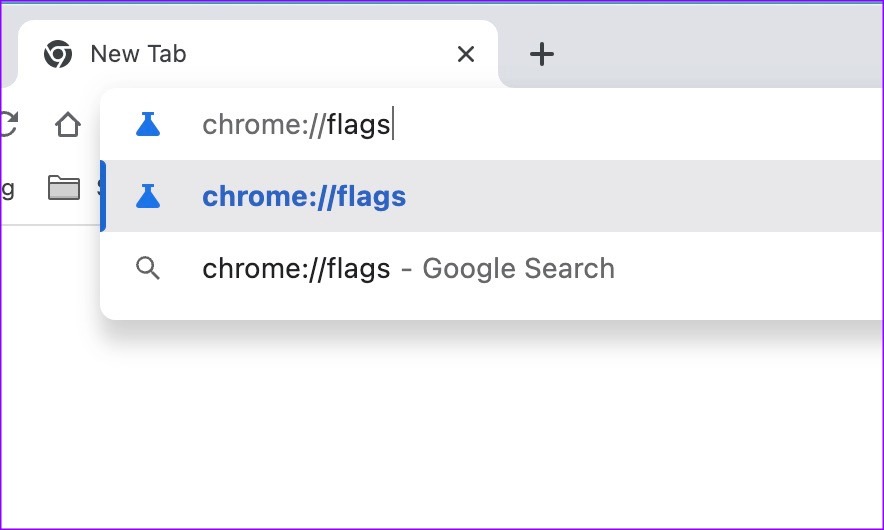
Step 2: Search for Smooth Scrolling and ensure it is disabled.

Step 3: Go back and uninstall a couple of extensions that you don’t use frequently.
Step 4: Once done, restart your browser.
Fix 2: Check Scrolling Intensity on Mac and Windows
If the scrolling intensity is high on your desktop system, you may face scrolling problems on websites like Facebook. Let’s dial down the scrolling intensity on Windows and Mac.
On Mac
Step 1: Click the Apple logo at the top-left corner of the Menu bar and select System Settings.
Step 2: From the System Settings window, click on Mouse from the left sidebar
Step 3: Use the sliders next to Tracking speed and Scrolling Speed to move them to the slowest settings.

On Windows
Step 1: Press the Windows + I keyboard shortcut to open the Settings app.
Step 2: Select Bluetooth & devices from the sidebar and select Mouse on the right.
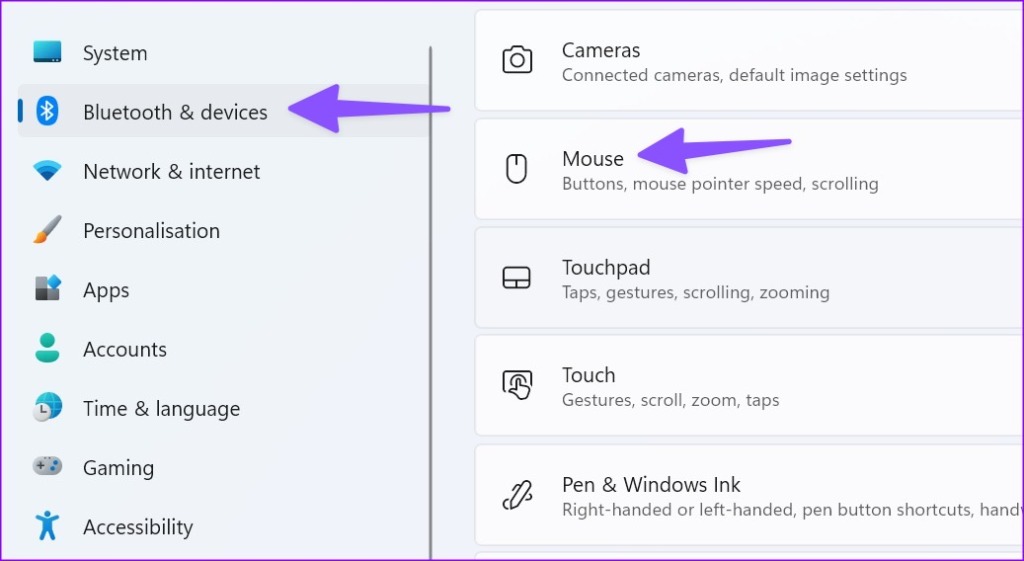
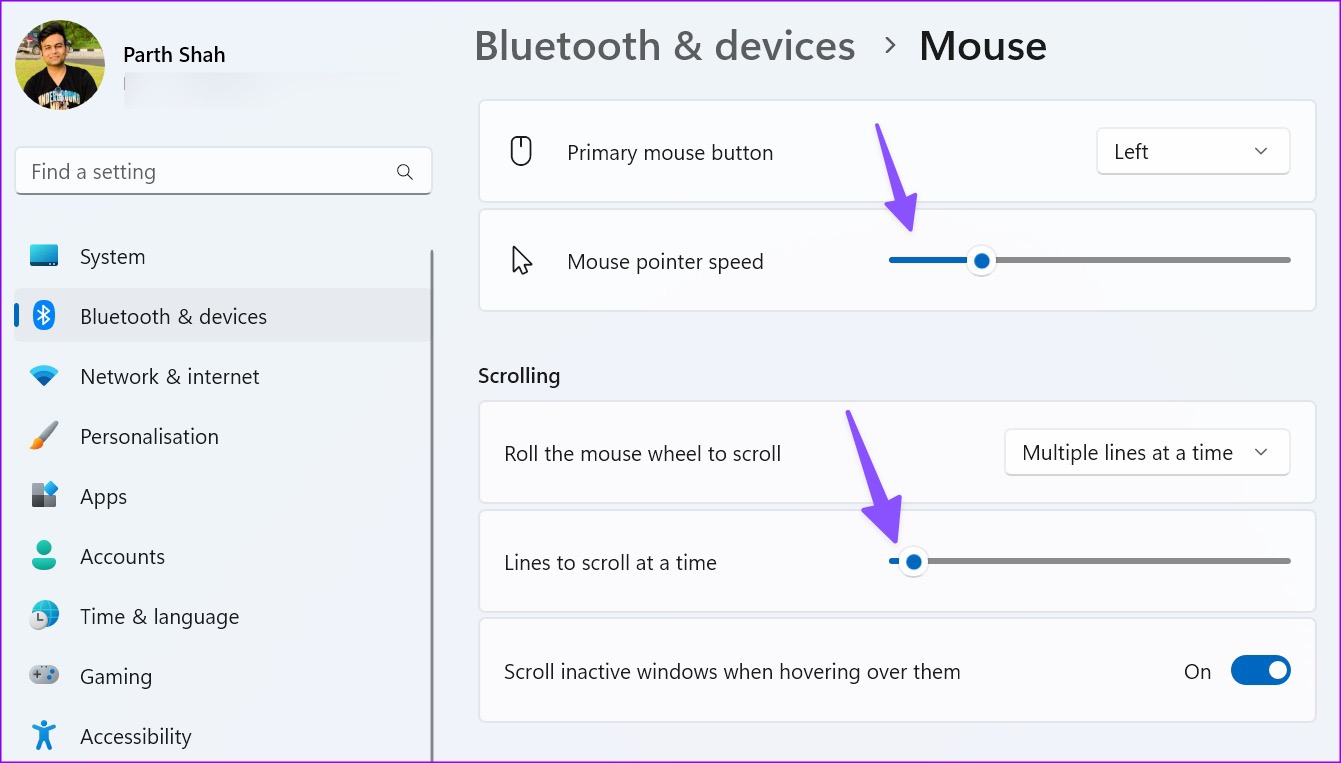
Step 3: Use the slider next to the Mouse pointer speed option to reduce the pointer speed.
Step 4: Turn down the slider for Lines to scroll at a time to the left.
Was this helpful?
Last updated on 06 June, 2024
3 Comments
Leave a Reply
Read Next
 3 Ways to Fix Mouse Keeps Scrolling Automatically Windows 10 and Windows 11
https://youtu.be/1UZ3PWNr-lE Try Basic Fixes Disconnect and reconnect the mouse: Unplug your mouse cable or wireless adapter from your computer and reconnect it to a different port.
3 Ways to Fix Mouse Keeps Scrolling Automatically Windows 10 and Windows 11
https://youtu.be/1UZ3PWNr-lE Try Basic Fixes Disconnect and reconnect the mouse: Unplug your mouse cable or wireless adapter from your computer and reconnect it to a different port.
 2 Ways to Stop Downloads From Opening Automatically in Chrome
Method 1: Uncheck Always Open This File Option Chrome lets you automatically launch certain file types as soon as they've finished downloading locally.
2 Ways to Stop Downloads From Opening Automatically in Chrome
Method 1: Uncheck Always Open This File Option Chrome lets you automatically launch certain file types as soon as they've finished downloading locally.
 3 Ways to Stop Instagram From Automatically Following Accounts
Fix 1: Unlink Third-Party Apps and Websites Third-party apps and services linked to your Instagram account may auto-follow specific accounts in the background.
3 Ways to Stop Instagram From Automatically Following Accounts
Fix 1: Unlink Third-Party Apps and Websites Third-party apps and services linked to your Instagram account may auto-follow specific accounts in the background.
 How to Stop iPhone From Automatically Downloading Apps
Why Is iPhone Downloading Apps Automatically?
How to Stop iPhone From Automatically Downloading Apps
Why Is iPhone Downloading Apps Automatically?
 Top 3 Ways to Stop Microsoft Teams From Starting Automatically on Windows 10
Microsoft Teams app is great for team management and communication.
Top 3 Ways to Stop Microsoft Teams From Starting Automatically on Windows 10
Microsoft Teams app is great for team management and communication.
 How to Stop Music From Automatically Playing in Apple CarPlay and Android Auto
How to Stop Apple CarPlay From Automatically Playing Music Unfortunately, there’s no toggle or option by default to stop Apple Music auto-play on iPhone.
How to Stop Music From Automatically Playing in Apple CarPlay and Android Auto
How to Stop Apple CarPlay From Automatically Playing Music Unfortunately, there’s no toggle or option by default to stop Apple Music auto-play on iPhone.
 How to Stop iPhone Camera From Switching to Macro Mode Automatically
Apple introduced a new Macro Mode in the camera app with the iPhone 13 Pro.
How to Stop iPhone Camera From Switching to Macro Mode Automatically
Apple introduced a new Macro Mode in the camera app with the iPhone 13 Pro.
 4 Ways to Stop Bluetooth From Turning on Automatically on iPhone
Why Does My iPhone’s Bluetooth Keep Turning On?
4 Ways to Stop Bluetooth From Turning on Automatically on iPhone
Why Does My iPhone’s Bluetooth Keep Turning On?
The article above may contain affiliate links which help support Guiding Tech. The content remains unbiased and authentic and will never affect our editorial integrity.
DISABLE SMOOTH SCROLLING does not work. Honestly, why can’t you people give an honest answer as to how to stop autoscrolling in facebook? Or do you purposely lie to deceive everyone because FB is paying you?
Current Situation: I cannot hold down the scroll button, near the bottom of the page, because it greys out, and it moves upward and scrolls, and it reloads an entirely new page. I DO NOT WANT THIS TO HAPPEN.
Solution: How to stop it. I want full control of scrolling my pages.
This should be easy to understand, but I understand that you GenZs have problems with discernment and problem-solving, but try.
Nonsense explanation with a lot of nonsense settings. It’s not Chrome or Windows related. It’s just Facebook.
I agree. I shouldn’t have to change my general settings in my browser because Facebook is the ONLY site that does this. It’d be nice if someone could post a solution here.