

What Happens to Your Followers When You Merge Two Instagram Accounts
- When you change your username, it will be updated throughout the platform. Your new username will be displayed on your profile, in search results, and in any comments or tags you receive.
- Instagram assigns a URL to each account based on the username. If you merge accounts and change your username, your profile URL will also change accordingly. However, Instagram automatically redirects your old URL to your new one, so anyone who visits your old URL will be redirected to your updated profile.
- If others have tagged or mentioned your old username in their posts or comments, those mentions will not automatically update your new username.
- This won’t affect your direct message conversations with your followers. Your previous messages and conversations will remain intact, and your followers can still contact you through the same chat thread.
It’s important to note that while your followers will not be lost when you change your username, it may take some time for them to adjust to your new name and update their tagging or mentioning habits.
How to Combine Two Instagram Accounts
Method 1: Redirect Username to Merge Two Instagram Accounts
In this method, you only have to transfer the username from your secondary account to your main account. This way, whenever someone searches for your account, they will land on your new Instagram account without any hindrance. Follow the steps.
Step 1: Launch the Instagram app on an iPhone or Android and navigate to the profile page.
Step 2: Considering this account is your secondary, choose Edit profile and tap on Username.
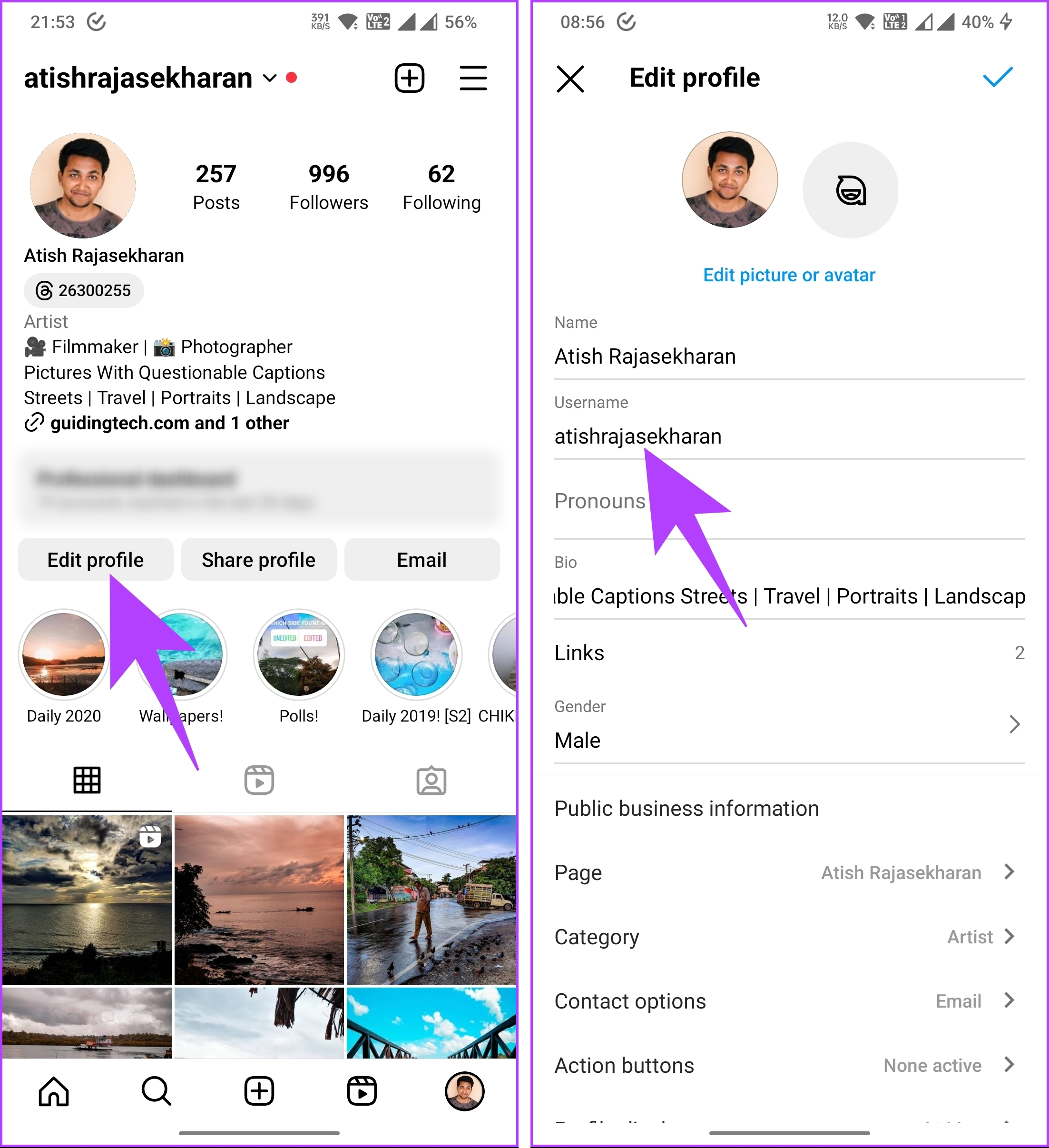
Step 3: Type any random username and tap on the tick mark in the top right corner.
Step 4: You will be taken to the Edit profile screen; tap the tick mark to save the changes.
Now that you have changed your secondary profile’s username, it is time to move it to your main account.

Step 5: Long-press the profile icon and choose your main account.

Step 6: Choose Edit profile, and on the next screen, tap on Username.
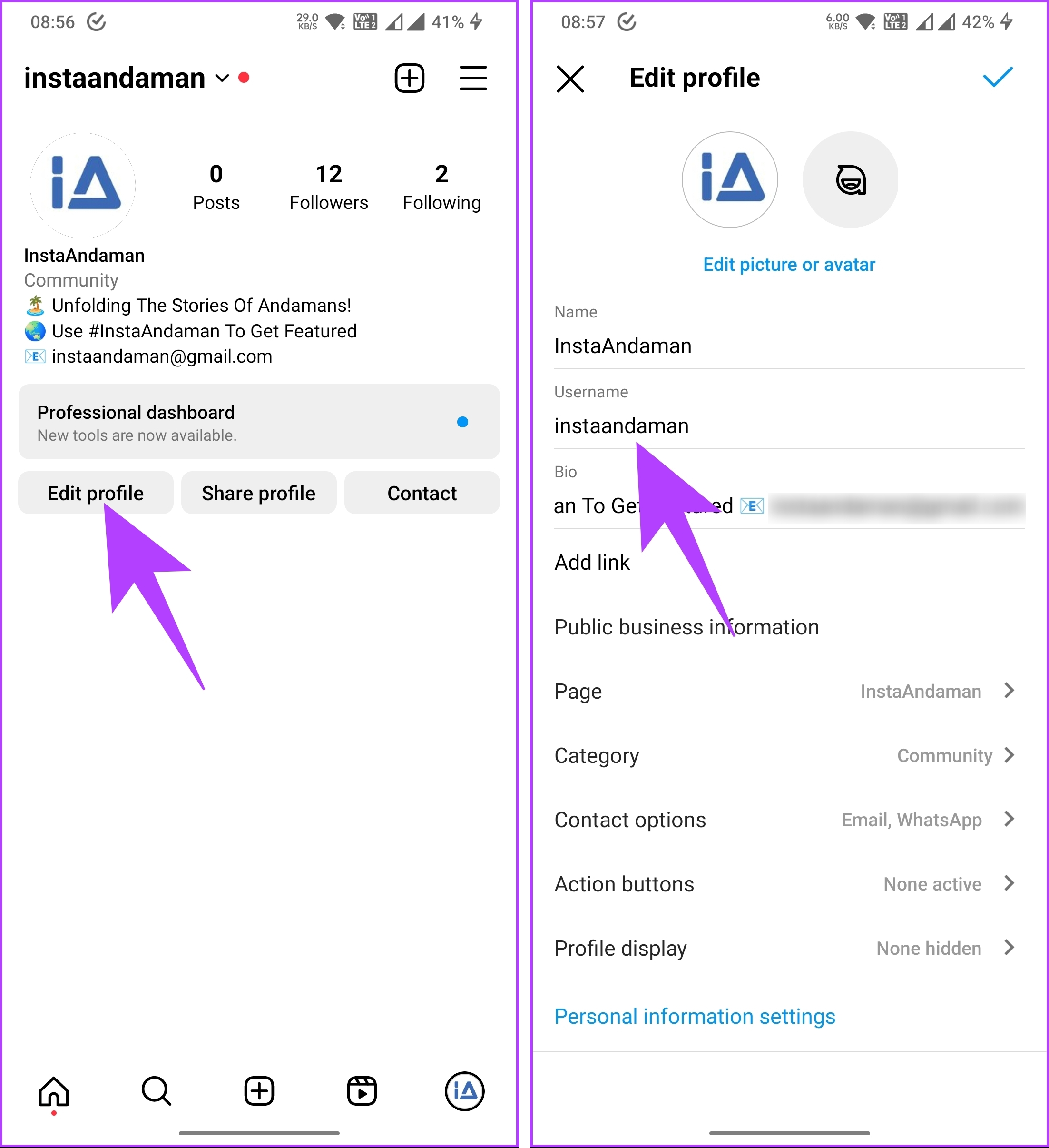
Step 7: Type the username of the secondary account you changed, and tap on the tick mark.
Step 8: Now, tap the tick mark in the top right corner to save the changes.
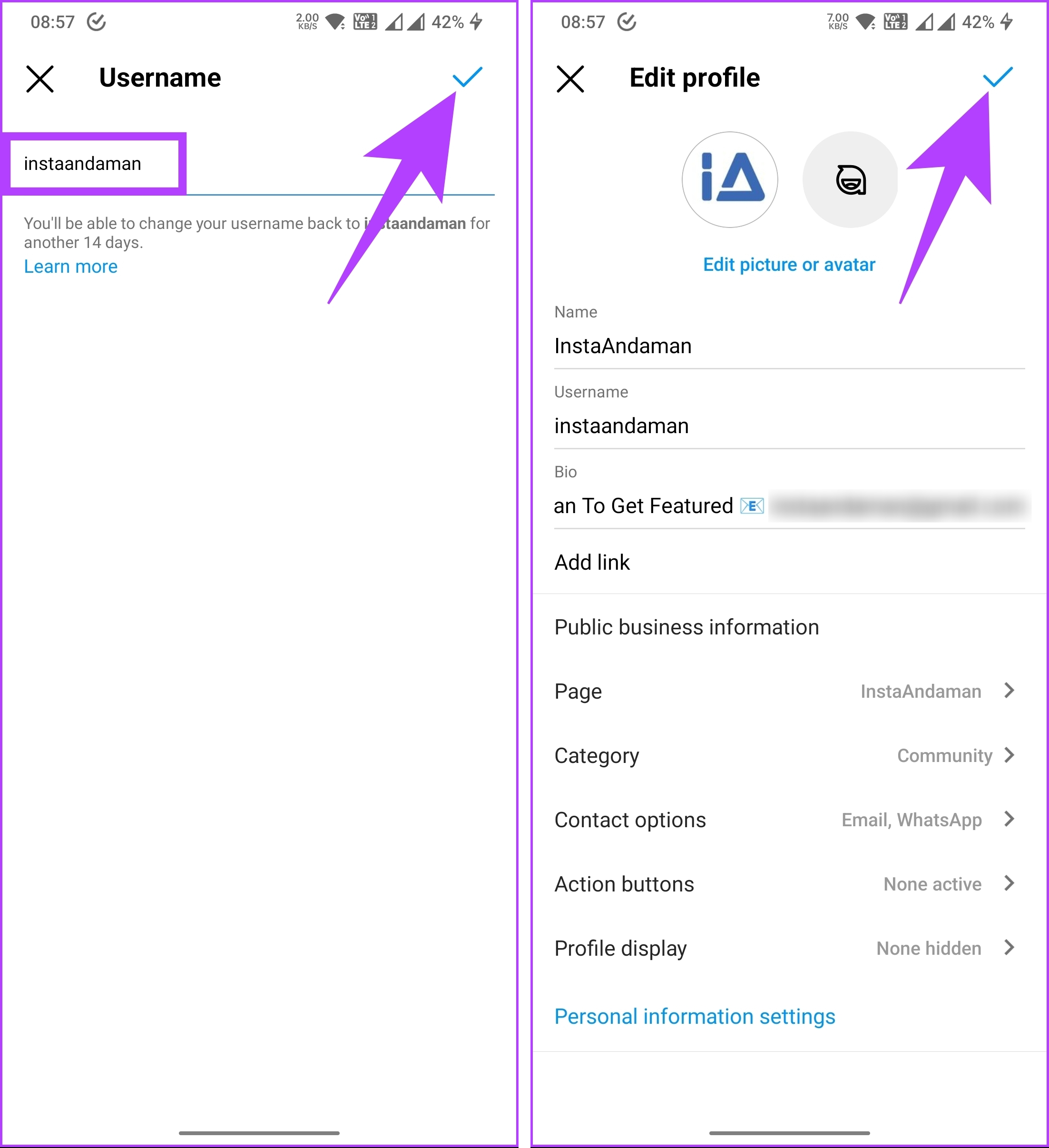
That’s about it. You have successfully moved your username from one Instagram account to another. Do note that when you change the username and assign it to your other account, do not delay, as someone can snatch up a popular username in a split second.
If this method is too much for you to execute, check out the next method.
Also Read: How to share Instagram posts to Snapchat Story.
Method 2: Create a New Main Account and Delete the Others
Creating a new main account is another way to merge your Instagram account. When you create a new account, you can start from scratch and evolve the account the way you want. You cannot migrate your old followers directly to your new account. You must post about the new account on your old Instagram account and ask your followers to follow you there.
When it comes to the posts you made on your old Instagram account, you can download them all and repost them on your new account. Follow the instructions below.
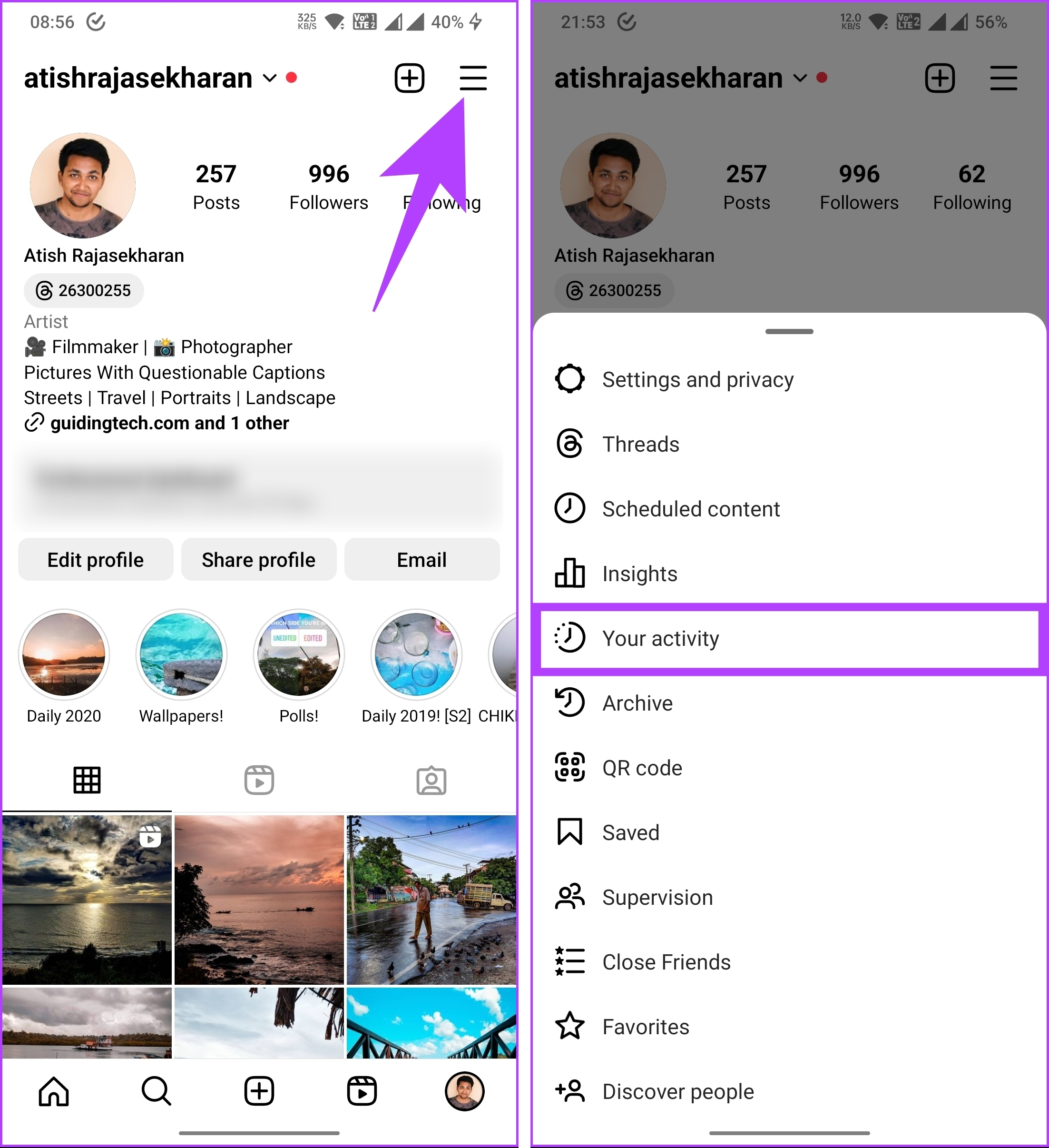
Step 1: Open the Instagram app and go to the profile from the bottom navigation bar.
Step 2: Tap the three horizontal bars icon and choose Your activity.
Step 3: Scroll down and under Information you shared with Instagram, choose Download your information, and tap Request a download.
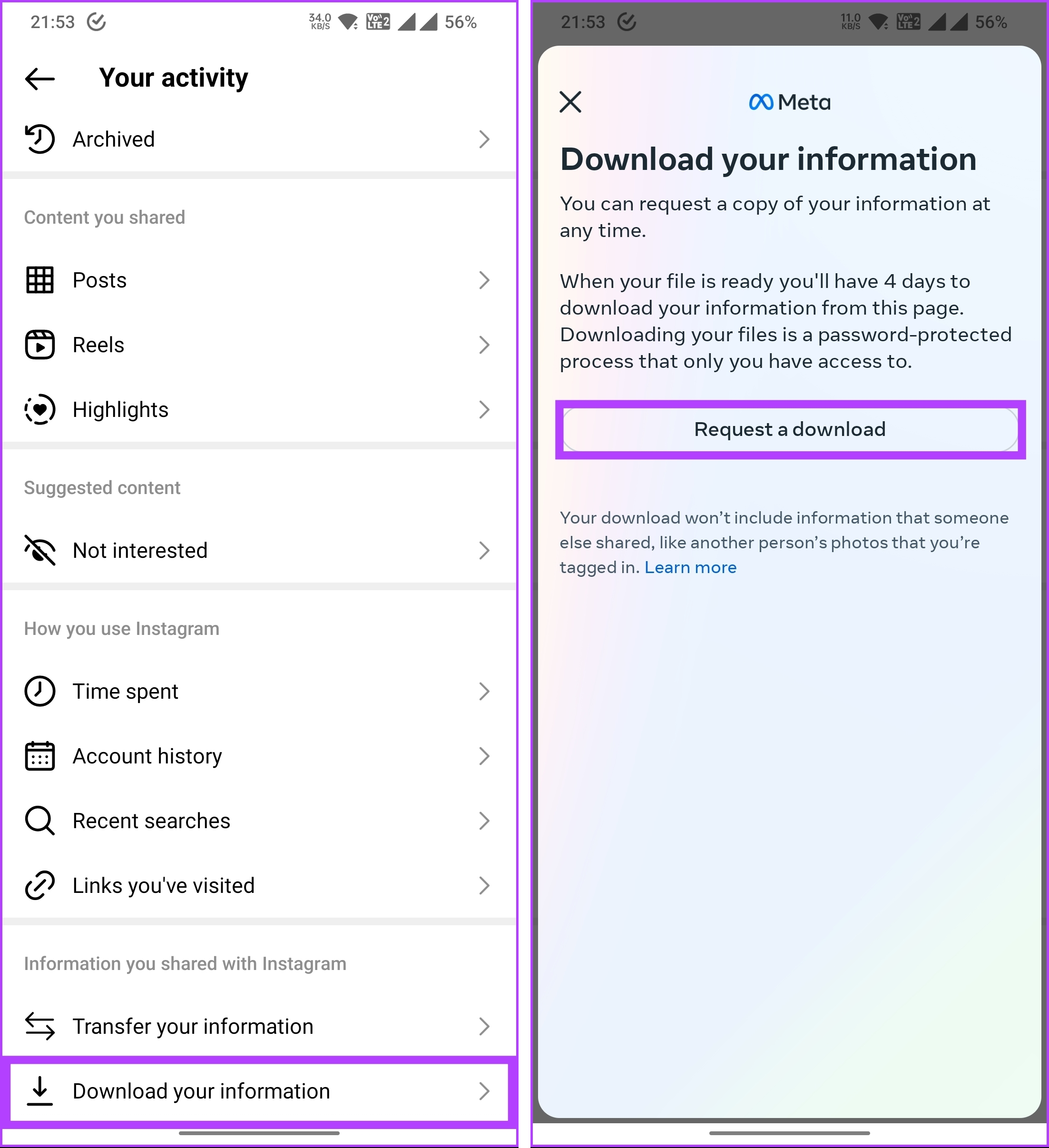
Step 4: Now, choose your secondary Instagram account and tap Next. Under Select information, choose Complete copy.
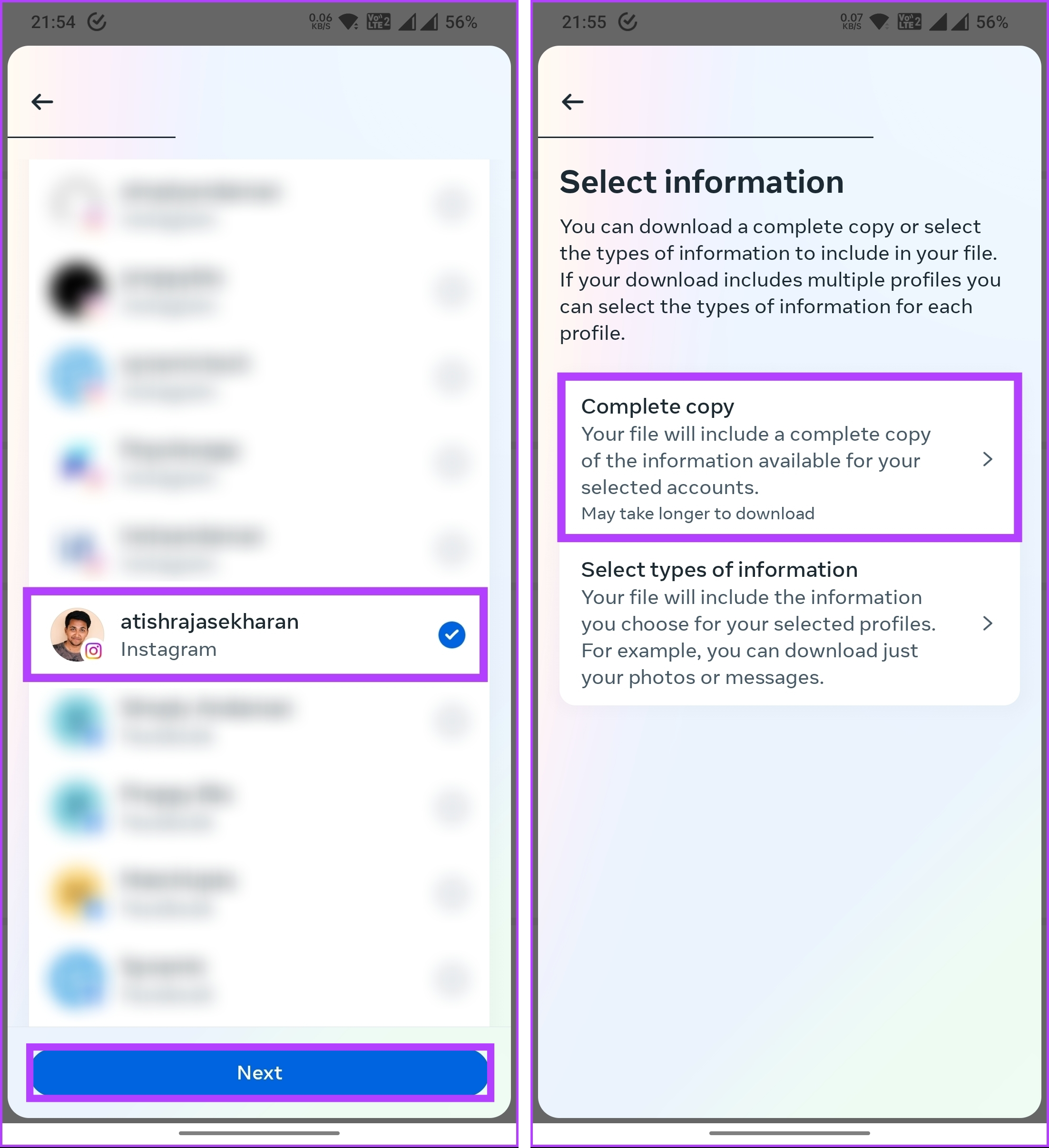
Step 5: Choose Format, Media quality, Date range, and tap Submit request.
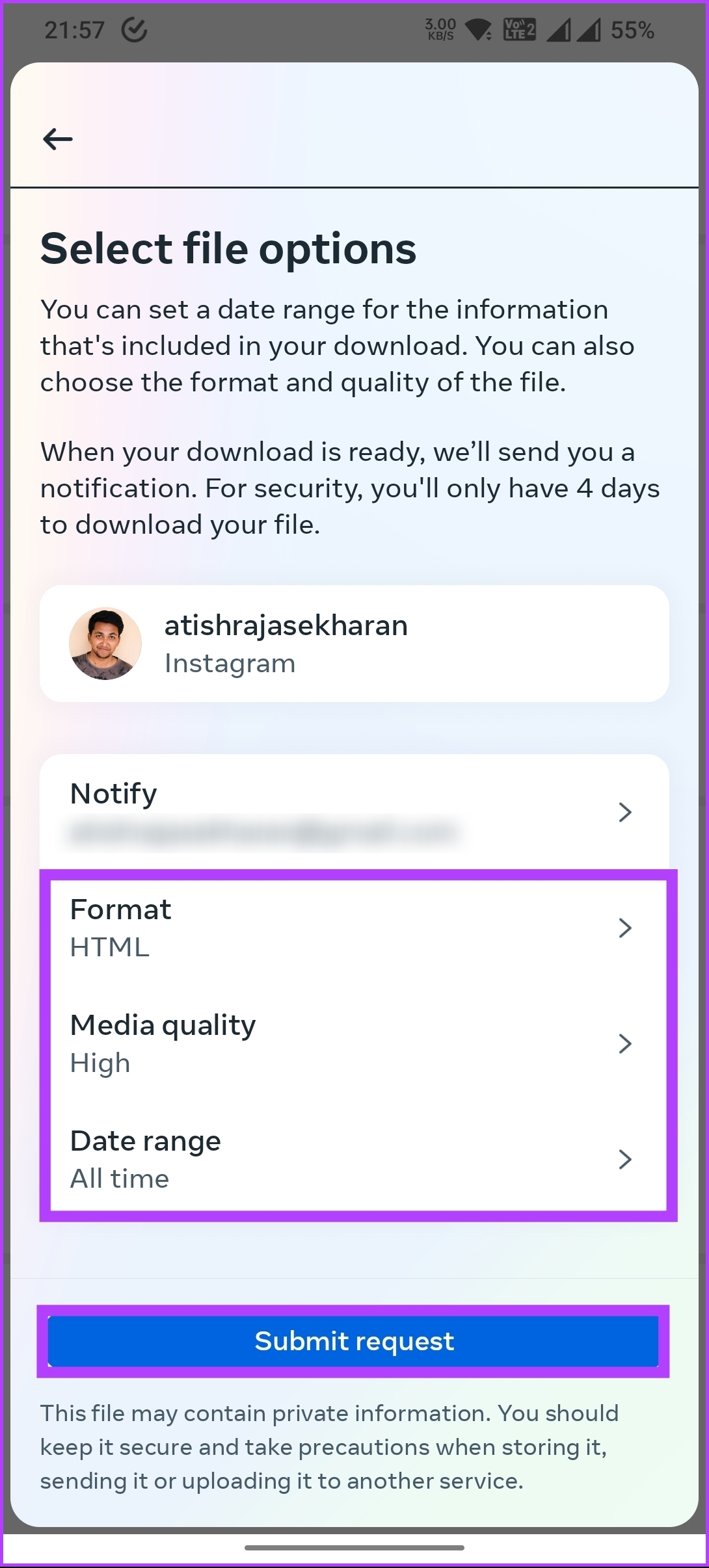
This will take some time (typically a few hours) to process, and you will receive an email when the information is ready to download. Once you download the content, post it to your main account, and if you want, you can delete your secondary account.
If you have any queries, check out the FAQ section below.
FAQs on Merging Two Instagram Accounts
Instagram does not provide a built-in feature to merge or combine the content from two separate accounts into one. Each Instagram account functions as an independent entity with its set of followers, posts, and interactions. You will have to follow the methods mentioned in this article if you are looking to merge two Instagram accounts.
Instagram does not provide a direct way to determine if the accounts are interlinked. However, if you suspect a potential link between two Instagram accounts, you can look for indicators such as similar usernames or handles, mutual followers, and shared content or tags. Do note that these indicators are only general and do not serve as definitive proof of a connection.
Knowing how to merge Instagram accounts can be a game-changer. So, ensure you clearly understand your objectives and their impact on your audience before proceeding.
Was this helpful?
Last updated on 23 August, 2024
4 Comments
Leave a Reply
Read Next
 3 Ways to Stop Instagram From Automatically Following Accounts
Fix 1: Unlink Third-Party Apps and Websites Third-party apps and services linked to your Instagram account may auto-follow specific accounts in the background.
3 Ways to Stop Instagram From Automatically Following Accounts
Fix 1: Unlink Third-Party Apps and Websites Third-party apps and services linked to your Instagram account may auto-follow specific accounts in the background.
 How to Remove Remembered Instagram Accounts
How to Remove a Remembered Instagram Account on Mobile Once you log out of the app, Instagram saves your accounts and remembers them for easy login.
How to Remove Remembered Instagram Accounts
How to Remove a Remembered Instagram Account on Mobile Once you log out of the app, Instagram saves your accounts and remembers them for easy login.
 7 Fixes for “Disabled Accounts Can’t Be Contacted” on Instagram
Instagram is a vibrant platform where connections are forged, creativity flourishes, and stories unfold.
7 Fixes for “Disabled Accounts Can’t Be Contacted” on Instagram
Instagram is a vibrant platform where connections are forged, creativity flourishes, and stories unfold.
 How to Merge Two Images in Paint 3D on Windows 10
Paint 3D is a redefined and upgraded version of Microsoft Paint.
How to Merge Two Images in Paint 3D on Windows 10
Paint 3D is a redefined and upgraded version of Microsoft Paint.
 How to Merge and Remove Duplicate Contacts on iPhone
How to Merge Duplicate Contacts Automatically With iOS 16, Apple introduced a feature that automatically merges duplicate contacts on your iPhone.
How to Merge and Remove Duplicate Contacts on iPhone
How to Merge Duplicate Contacts Automatically With iOS 16, Apple introduced a feature that automatically merges duplicate contacts on your iPhone.
 How to Create or Merge Disk Partitions in Windows 11
How to Create Hard Drive Partitions on Windows 11 Windows offers the Disk Management utility to undertake any storage-related tasks on your Windows PC.
How to Create or Merge Disk Partitions in Windows 11
How to Create Hard Drive Partitions on Windows 11 Windows offers the Disk Management utility to undertake any storage-related tasks on your Windows PC.
 How to Remove Linked Accounts From Google Home
How to Remove Linked Accounts From Your Google Home Method 1: Remove Additional Linked Accounts Step 1: Open the Google Home app > tap on the profile picture icon at
How to Remove Linked Accounts From Google Home
How to Remove Linked Accounts From Your Google Home Method 1: Remove Additional Linked Accounts Step 1: Open the Google Home app > tap on the profile picture icon at
 How to Use Two WhatsApp Accounts on iPhone
Setting up the First WhatsApp Account If you're not using WhatsApp on your iPhone already, the first thing is to set up an account with your primary phone number.
How to Use Two WhatsApp Accounts on iPhone
Setting up the First WhatsApp Account If you're not using WhatsApp on your iPhone already, the first thing is to set up an account with your primary phone number.
The article above may contain affiliate links which help support Guiding Tech. The content remains unbiased and authentic and will never affect our editorial integrity.

Hi there. I tried method one to merge accounts, and it didn’t work. I changed the username of my secondary account (that I want to make my primary) and saved it, then followed the steps to change my current primary name to the name I had just changed and it told me the name was not available. Luckily I was able to change my secondary BACK to the name I wanted to move to my primary, but there doesn’t seem to be an option to actually swap them. Did I miss a step?
Hey Lin,
I think you and I may have the same objective.
I want my secondary account B NAME to move to the primary account A NAME.
I am afraid if I move it, I will lose the actual user B NAME that I want (and that it will say it is unavailable on the primary account).
Did you have any luck or receive any response?
Thank you :).
This is exactly what happened to me. I have two username accounts linked. I just need to swap my preferred username that became available everything else stays the same.
Did anyone get the first method to work? I don’t understand why i have to change the name of the secondary account. Any thoughts?