Basic Fixes
- Update macOS: This issue can be caused by the current version of macOS. You can install the software update based on your Mac model.
Fix 1: Ensure Battery Indicator Is Enabled
The Control Center on your Mac lets you quickly access different features and settings, such as keyboard brightness, wireless connections, volume levels, etc. Your Mac can show the battery icon in the Control Center or the top Menu Bar. So, if the battery icon is missing on your Mac, we recommend checking the Control Center settings.
Open Settings > Control Center > Battery > click the toggle next to Show in Menu Bar or Show in Control Center > enable Battery Indicator.

Fix 2: Use SMC Reset (For Intel Chip-Powered Macs)
If you use a Mac with an Intel processor and still face the issue, opt for an SMC reset. The SMC, or System Management Controller, is a chip that stores critical details related to your Mac’s power and temperature. Since we are talking about the battery icon, which shows your Mac’s energy usage, it’s a good option to use an SMC reset.
Note: This feature is not applicable to Macs with M-series chips. For them, a simple restart equals an SMC reset.
Step 1: Shut Down your Mac.
Step 2: Wait for a few seconds. Then, press and hold the Shift + Left Option + Left Control keyboard shortcut. Press and hold the Power Button as well.
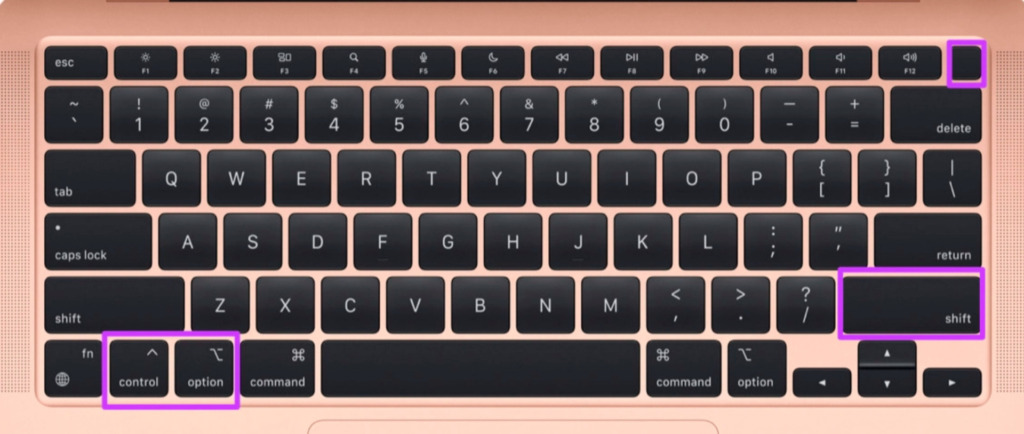
Keep pressing the four keys for another 7 seconds. If your Mac turns on, it will play the default startup chime again while you hold down the keys.
Step 3: Release all four keys and press the Power button to restart your Mac.
Fix 3: Check Battery Health
If none of the solutions work, check the System Information menu and look for the Battery Status. Your Mac’s battery may be damaged or not getting charged at all. Here’s how to check it.
Step 1: Press Command + Spacebar keyboard shortcut to open Spotlight Search > type System Information > press Return.
Step 2: Click on Power from the left sidebar and check the condition of the battery.

If it doesn’t say Normal, we suggest visiting your nearest Apple Store and getting the battery repaired.
We recommend always charging your MacBook using the official Apple-certified charger.
Tip: Learn more about the best ways to limit battery charge on your MacBook to improve its battery life.
Alternative: Enable Battery Widget
You can enable the Battery Widget on the home screen of your Mac. It will also show the battery level of devices connected to your Mac.
Right-click on the home screen > select Edit Widgets > Batteries > select the Battery widget > click on Done.

Was this helpful?
Last updated on 29 July, 2024
Read Next
 4 Fixes for Google Search Suggestions Not Showing in Safari on Mac
Basic Fixes Force quit and relaunch Safari: Click the Apple logo > Force Quit > Select Safari > Force Quit.
4 Fixes for Google Search Suggestions Not Showing in Safari on Mac
Basic Fixes Force quit and relaunch Safari: Click the Apple logo > Force Quit > Select Safari > Force Quit.
 3 Ways to Fix Windows 11 Laptop Showing Wrong Battery Percentage
https://youtu.be/5XEdrPhBF9s Try Basic Fixes Install Windows updates: If you have disabled automatic updates on your device, you might need to look for newer updates manually.
3 Ways to Fix Windows 11 Laptop Showing Wrong Battery Percentage
https://youtu.be/5XEdrPhBF9s Try Basic Fixes Install Windows updates: If you have disabled automatic updates on your device, you might need to look for newer updates manually.
 7 Fixes for Wi-Fi Login Page Not Showing Up on Mac and Windows
https://youtu.be/ZVvbLZKKXKk Fix 1: Forget the Network and Reconnect to It Try forgetting the network so you can reconnect to it.
7 Fixes for Wi-Fi Login Page Not Showing Up on Mac and Windows
https://youtu.be/ZVvbLZKKXKk Fix 1: Forget the Network and Reconnect to It Try forgetting the network so you can reconnect to it.
 Top 3 Ways to Check iPhone Battery Cycles in Windows and Mac
If your iPhone has iOS 11.3 or later installed, you can easily check battery health with a brief dive into the Battery section of the Settings app.
Top 3 Ways to Check iPhone Battery Cycles in Windows and Mac
If your iPhone has iOS 11.3 or later installed, you can easily check battery health with a brief dive into the Battery section of the Settings app.
 What Is the Cycle Count (Battery) on Mac and How to Check It
What Is the Cycle Count on My MacBook A Cycle Count on your Mac is when you use 100% of its battery’s power, regardless of the number of times you
What Is the Cycle Count (Battery) on Mac and How to Check It
What Is the Cycle Count on My MacBook A Cycle Count on your Mac is when you use 100% of its battery’s power, regardless of the number of times you
 3 Fixes for iMessage Photos Not Showing in Photos App
Basic Fixes Force quit and relaunch Messages app: You can force quit and relaunch the Messages app to give it a fresh start on your iPhone.
3 Fixes for iMessage Photos Not Showing in Photos App
Basic Fixes Force quit and relaunch Messages app: You can force quit and relaunch the Messages app to give it a fresh start on your iPhone.
 Top 5 Fixes for Windows 10 Battery Low Notification Not Working
What would you do if your Windows 10 laptop shuts down abruptly without any warning or notification?
Top 5 Fixes for Windows 10 Battery Low Notification Not Working
What would you do if your Windows 10 laptop shuts down abruptly without any warning or notification?
 4 Ways to Fix Notifications Not Showing on Mac
Preliminary Fixes Keep apps open in the background: Unlike the iPhone, you must keep the apps open in the background to receive instant push notifications on Mac.
4 Ways to Fix Notifications Not Showing on Mac
Preliminary Fixes Keep apps open in the background: Unlike the iPhone, you must keep the apps open in the background to receive instant push notifications on Mac.
The article above may contain affiliate links which help support Guiding Tech. The content remains unbiased and authentic and will never affect our editorial integrity.