


A Wi-Fi 6 adapter is an excellent investment if you want to experience faster speeds, improved performance, and better coverage on your PC. Hence, we have listed the best Wi-Fi 6 Adapters for your PC.
TP-Link Archer TX20U Plus
- Interface: USB | Maximum Speed: 1800Mbps

TP-Link is one of the most reliable brands when it comes to network products. The company is behind a slew of inexpensive yet high-performing products, and the TP-Link Archer TX20U Plus is no different. It is a big adapter, and you can place it either on your PC cabinet or desk. It connects to your PC via a 1-meter USB cable.
Apart from supporting Wi-Fi 6 AX1800 standards, it has a handful of extra features. You get support for MU-MIMO and Beamforming technologies, allowing you to get faster speeds despite congestion in your network. The signal strength is decent, if not excellent. If your house doesn’t have thick brick walls, you should be in the clear. It connects easily. However, you must ensure that you run it in USB 2.0 mode.
What We Like
What We Don’t Like
QGOO AX1800 USB 3.0 WiFi Dongle
- Interface: USB | Maximum Speed: 1800Mbps
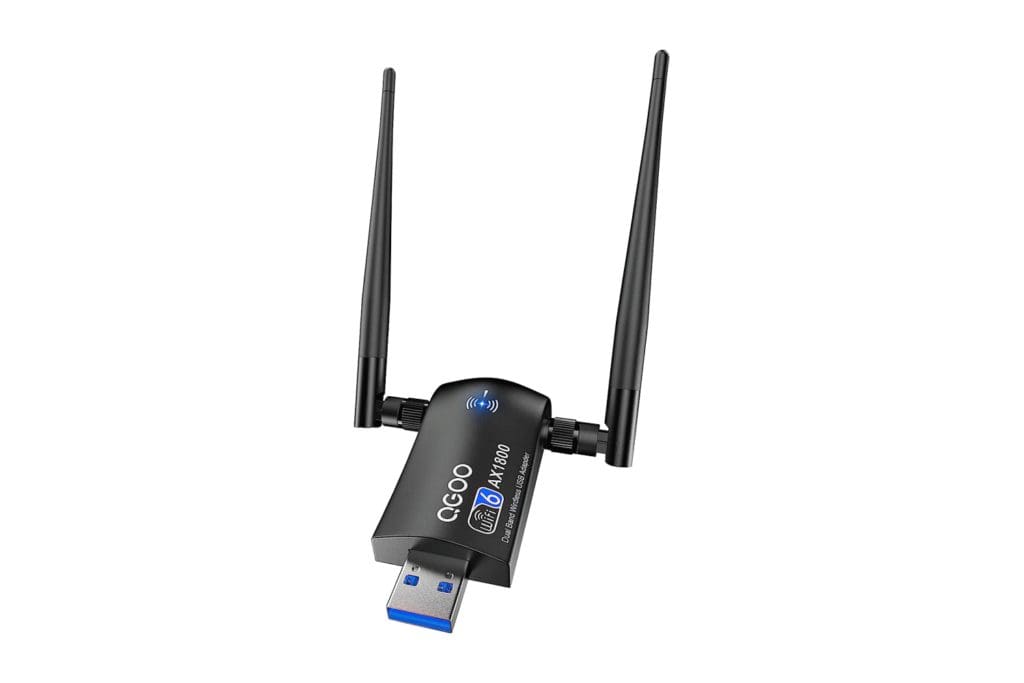
The QGOO Wi-Fi 6 dongle has many good things going for it. For one, it offers the latest generation technologies. Secondly, this dongle supports older versions of Windows, such as Windows 7, and it is one of the major USPs of this product.
The company includes the drivers inside the package on a USB drive and a mini CD. However, if you face any driver installation issues, you can download the Realtek 8832AU drivers from DriverHub. Also, compared to the Linccras adapter, the QGOO Wi-Fi 6 USB Adapter features superior 5dBi antennas. As such, you should get even better signal reception and faster speeds.
What We Like
What We Don’t Like
Cudy Wi-Fi 6E PCIe Card
- Interface: PCIe | Maximum Speed: 5400Mbps

If you’re a performance absolutist, the Cudy Wi-Fi 6E PCIe card is right up your alley. The unit supports the latest Wi-Fi 6E standards, which are a notch above the Wi-Fi 6 protocols. With it, you can connect to the 2.4GHz and 5GHz bands and also to the 6GHz band. So, if you have multiple Wi-Fi connections in range, you can connect to the 6GHz band to avoid interference.
The PCIe adapter also supports Bluetooth 5.2. For the adapter to work properly, you must keep aside a spare PCIe x4 slot on the PC’s motherboard. Additionally, if you wish to use Bluetooth functionality, keep an F_USB header free on your board.
What We Like
What We Don’t Like
TP-Link Archer TX3000E
- Interface: PCIe | Maximum Speed: 3000Mbps

If you want dependable Wi-Fi 6 performance on your PC, TP-Link has just the product for you. The TP-Link Archer TX3000E is hands-down one of the best Wi-Fi 6 Adapters for PC users. Be it gaming, 4K streaming, or transferring big files wirelessly over your network, the TP-Link Archer TX3000E can do it all, and the folks over at Digital Citizen seem to agree.
The Archer TX3000E offers excellent performance. It has two multi-directional antennas with a magnetized base that connects to the PCIe card. Interestingly, you can place the antenna dock at a distance for better signal reception. It also uses OFDMA technology, which essentially improves wireless efficiency and reduces ping in games. Also, similar to the Cudy card, you get the added benefit of Bluetooth 5.2 connectivity. In addition, there’s support for WPA3 encryption for secure connections.
What We Like
What We Don’t Like
ASUS USB-AX56
- Interface: USB | Maximum Speed: 1800Mbps

The ASUS USB-AX56 Wi-Fi Adapter brings the best of both worlds. The unit offers a stable connection like what you’d get with a PCIe adapter. At the same time, the device brings portability and ease of use. It’s a simple plug-and-play device, and you can plug it into the USB port of your PC or laptop. And yes, it comes with an external antenna and cradle.
In terms of performance, the unit consistently delivers on its maximum rated speed of 1800Mbps. Additionally, PCWorld’s review highlighted that the Wi-Fi 6 USB adapter has a very high TCP throughput, which is great for transferring large data bits over the network. Moreover, you get the latest technologies, such as OFDMA, MU-MIMO, BSS Coloring, and WPA3 security.
What We Like
What We Don’t Like
FAQs
Yes, Wi-Fi 6 adapters are backward compatible with older Wi-Fi standards. This means that you can use a Wi-Fi 6 adapter to connect to older Wi-Fi networks that use previous Wi-Fi standards.
There are two main types of Wi-Fi 6 adapters for PC: USB adapters and PCIe (Peripheral Component Interconnect Express) cards. USB adapters are small and portable, while PCIe cards offer better performance and are ideal for desktop PCs. Depending on your needs and use case, you might prefer one over the other.
Technically, yes. You can use a USB Wi-Fi 6 adapter on older USB 2.0 ports as well. However, you will not benefit from the fast speeds of the Wi-Fi 6 standard, since USB 2.0 does not have enough bandwidth for it.
Was this helpful?
Last updated on 31 May, 2024
Read Next
 7 Best Bluetooth USB Adapters for PC Gaming
With the world going wireless, it's painful to find out that your PC lacks Bluetooth connectivity.
7 Best Bluetooth USB Adapters for PC Gaming
With the world going wireless, it's painful to find out that your PC lacks Bluetooth connectivity.
 6 Best SATA to USB Adapters For External Hard Drives
Whether you are a PC enthusiast or just someone who owns a PC, owning the best SATA to USB adapters is a must.
6 Best SATA to USB Adapters For External Hard Drives
Whether you are a PC enthusiast or just someone who owns a PC, owning the best SATA to USB adapters is a must.
 7 Best USB to Ethernet Adapters for Laptops and MacBooks
Ethernet is the most reliable way to connect to the internet.
7 Best USB to Ethernet Adapters for Laptops and MacBooks
Ethernet is the most reliable way to connect to the internet.
 6 Best USB-C to Headphone Jack (3.5mm) Adapters in 2024
In recent years, USB-C has become the standard connector for many devices, including smartphones, laptops, and tablets.
6 Best USB-C to Headphone Jack (3.5mm) Adapters in 2024
In recent years, USB-C has become the standard connector for many devices, including smartphones, laptops, and tablets.
 6 Best USB-C (USB 3) Cables for iPhone 15 Pro and iPhone 15 Pro Max
The iPhone 15 Pro series has received significant enhancements.
6 Best USB-C (USB 3) Cables for iPhone 15 Pro and iPhone 15 Pro Max
The iPhone 15 Pro series has received significant enhancements.
 6 Best Budget Graphics Cards Under $300
It's true that PCs remain one of the best ways to game on a budget.
6 Best Budget Graphics Cards Under $300
It's true that PCs remain one of the best ways to game on a budget.
 5 Best SD Cards for Dash Cams
Although the top dash cams come with an SD card, companies mostly offer a 64GB variant in the box.
5 Best SD Cards for Dash Cams
Although the top dash cams come with an SD card, companies mostly offer a 64GB variant in the box.
 4 Ways to Fix “Windows Could Not Find a Driver for Your Network Adapter” Error
Fix 1: Enable Network Adapter Windows may fail to communicate with the network adapter if you've previously disabled it.
4 Ways to Fix “Windows Could Not Find a Driver for Your Network Adapter” Error
Fix 1: Enable Network Adapter Windows may fail to communicate with the network adapter if you've previously disabled it.
The article above may contain affiliate links which help support Guiding Tech. The content remains unbiased and authentic and will never affect our editorial integrity.

