Hooking up your MacBook Pro to a monitor will up your productivity levels. The versatile USB-C Thunderbolt connection ensures that you can connect either a USB-C monitor or a Thunderbolt monitor. However, standard monitors are large and it’s a challenge to move them around. That’s when portable monitors for MacBook Pro come into the picture.
Lenovo Thinkvision M14
- Resolution: 1920 x 1080 | Panel: IPS
- Size: 14-inch | Weight: 1.26 pounds

The Lenovo Thinkvision M14 is an affordable mobile monitor for your MacBook Pro. The highlight of this monitor is its clever design and high-quality panel. The latter is responsible for sharp and rich colors on the screen. Like the one above, it’s a USB-C monitor. At 14-inch, the screen is a little on the smaller side.
One of the main advantages is that you can tilt the screen as per your comfort. The base connects to the monitor separately, and you can tilt it anywhere between -5 to 90 degrees. Apart from this, the Thinkvision also comes with a dedicated power button and a duo of USB-C ports. There’s a handy Kensington cable lock as well.
What We Like
What We Don’t Like
HP EliteDisplay S14
- Resolution: 1920 x 1080 | Panel: IPS
- Size: 14-inch | Weight: 2.20 pounds
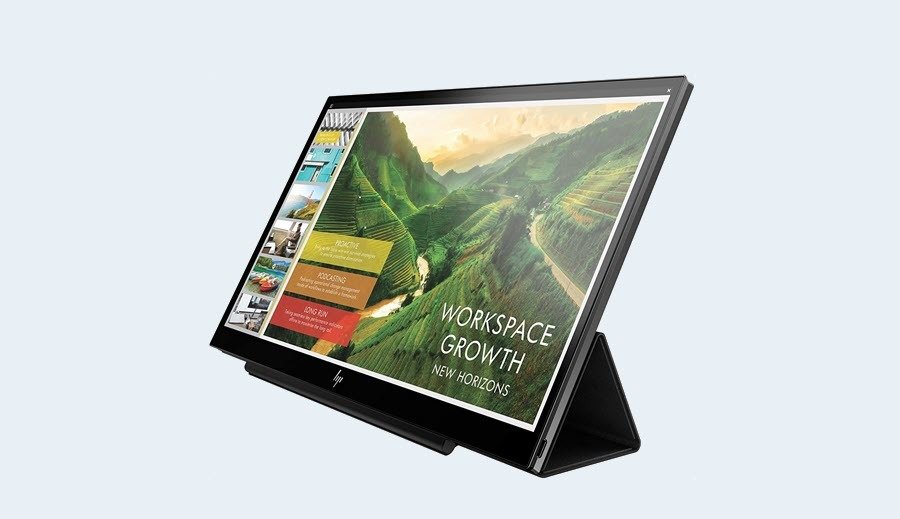
The HP EliteDisplay S14 is a close competitor of the Lenovo Thinkvision and shares quite similar features. However, at 2.2 lbs, this portable monitor for MacBook is slightly on the heavier side. It has a cover that folds back to form the stand. And while you can tilt the screen up to a certain extent, it’s not as flexible as the Lenovo Thinkvision monitor above.
It has an anti-glare finish that certainly helps view the content on screen. However, the screen is not overly bright, and it can be an issue, especially if you work outdoors. On the upside, the IPS screen offers great viewing angles.
What We Like
What We Don’t Like
Asus ZenScreen Portable Monitor (MB16AHP)
- Resolution: 1920 x 1080 | Panel: IPS
- Size: 15.6-inch | Weight: 1.9 pounds
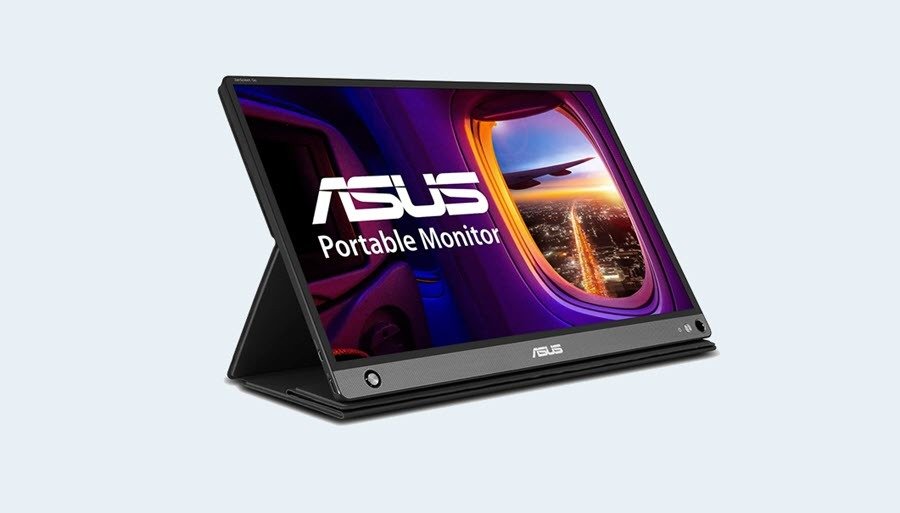
The ASUS Zenscreen Go MB16AHP brings several interesting features to the table. For one, it’s one of the few screens powered by a built-in rechargeable battery. Naturally, this allows you to extend the display without worrying about the power source. Secondly, it has a clever design and can stand on its own via a simple ink pen. And yes, the company ships the pen along with the monitor.
Like the one above, the OSD options are quite flexible, and you can play with the contrast or brightness of the screen. The display is bright and colorful. It’s not the most color-accurate monitor out there but can display around 72% of the sRGB color gamut.
What We Like
What We Don’t Like
Virzen UHD OLED Portable Monitor
- Resolution: 3840 x 2160 | Panel: IPS
- Size: 15.6-inch | Weight: 2.16 pounds

If you want higher resolution on your portable monitor, you should check out the Virzen UHD monitor. It is similar to its predecessor in many respects, including size and design. The highlight of this monitor is its color accuracy which makes way for impressive visuals and picture quality. More importantly, the USB-C port supports Power Delivery and you can use the secondary USB-C port to connect peripherals like keyboards and mice.
The folks at Virzen advertise 100% coverage of the DCI-P3 color gamut. A 10,000mAh battery powers it, and you can use it to its full advantage when you do not want cable clutter on your desk. Plus, there are ample ports (USB-C, HDMI, mini-HDMI) for a portable monitor.
What We Like
What We Don’t Like
SideTrak Attachable Portable Monitor
- Resolution: 1920×1080 | Panel: IPS
- Size: 14-inch | Weight: 1.5 pounds
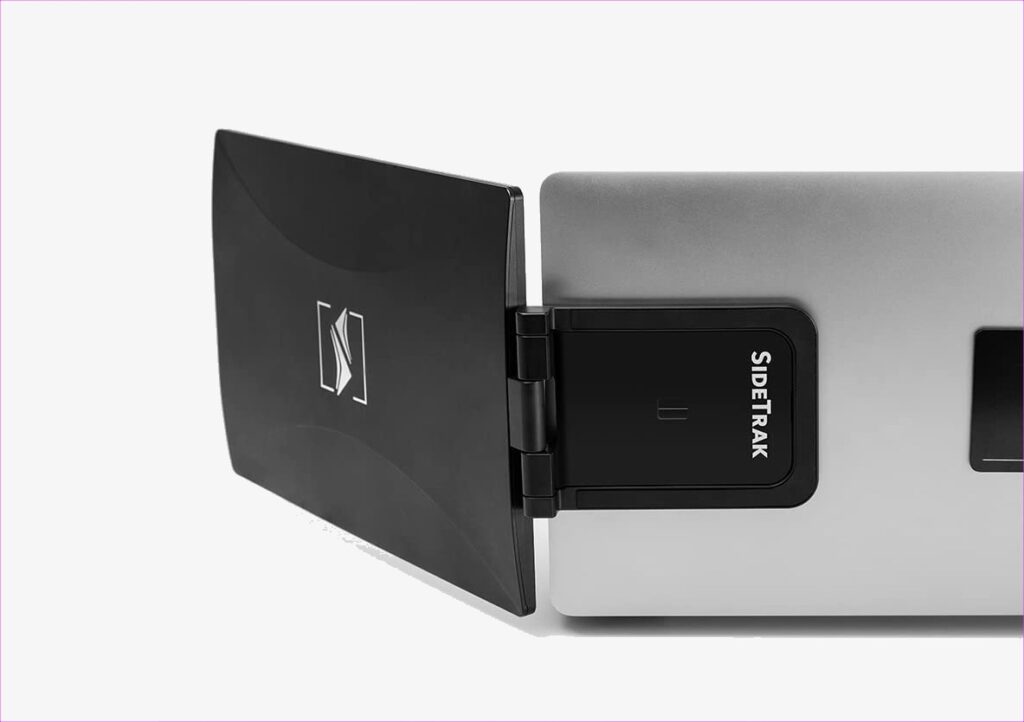
Last but not least, we have the SideTrak Attachable Portable Monitor. This one pushes the concept of portable monitors up by several notches and lets you attach the monitor to your MacBook’s lid. This setup comes into the picture if you travel often. You will need to attach a metal plate to your laptop to attach the monitor. But if you are uncomfortable with having a metal plate on your laptop’s lid, you may want to skip this.
It’s a simple 14-inch FHD IPS screen. While the brightness may not be as per the monitors above, text and graphics appear normally. The monitor is ergonomic, and you can swivel and rotate it to an extent. Plus, it works well with MacBook Pro laptops.
What We Like
What We Don’t Like
Was this helpful?
Last updated on 06 August, 2024
Read Next
 Top 4 Portable Sliding Monitors for Laptops
The compact nature of laptops turns out to be a bottleneck if your desk or work setup can't afford a traditional external monitor.
Top 4 Portable Sliding Monitors for Laptops
The compact nature of laptops turns out to be a bottleneck if your desk or work setup can't afford a traditional external monitor.
 How to Pair Samsung Galaxy Buds Pro to iPhone, Laptop, and MacBook
How to Pair Samsung Galaxy Buds Pro to Other Devices With iPhone Step 1: If you've paired the earphones with another device already, it's best to reset the earphones before
How to Pair Samsung Galaxy Buds Pro to iPhone, Laptop, and MacBook
How to Pair Samsung Galaxy Buds Pro to Other Devices With iPhone Step 1: If you've paired the earphones with another device already, it's best to reset the earphones before
 5 Best Portable Chargers and Power Banks for iPad Pro
The entry-level iPad and iPad Air are quite popular among consumers.
5 Best Portable Chargers and Power Banks for iPad Pro
The entry-level iPad and iPad Air are quite popular among consumers.
 6 Best Laptop Bags for 16-inch MacBook Pro
Laptop bags are some of the most basic but important laptop accessories, especially for laptops like the 16-inch MacBook Pro.
6 Best Laptop Bags for 16-inch MacBook Pro
Laptop bags are some of the most basic but important laptop accessories, especially for laptops like the 16-inch MacBook Pro.
 6 Best Cases for 14-inch M3 MacBook Pro
It's no secret that the 14-inch Apple M3 MacBook Pro laptops are built strong and can last you several years.
6 Best Cases for 14-inch M3 MacBook Pro
It's no secret that the 14-inch Apple M3 MacBook Pro laptops are built strong and can last you several years.
 5 Best External Monitors for iPad Pro
The iPad Pro's power is restricted only by its small screen size.
5 Best External Monitors for iPad Pro
The iPad Pro's power is restricted only by its small screen size.
 Apple iPhone 15 vs iPhone 14 Pro: A Pro in Disguise?
As highlighted in our iPhone 15 review, this year's non-Pro iPhones bring massive upgrades to the table.
Apple iPhone 15 vs iPhone 14 Pro: A Pro in Disguise?
As highlighted in our iPhone 15 review, this year's non-Pro iPhones bring massive upgrades to the table.
 5 Best Portable Apple CarPlay Units For Your Vehicle
Apple CarPlay head units allow users to access their playlists and podcasts seamlessly.
5 Best Portable Apple CarPlay Units For Your Vehicle
Apple CarPlay head units allow users to access their playlists and podcasts seamlessly.
The article above may contain affiliate links which help support Guiding Tech. The content remains unbiased and authentic and will never affect our editorial integrity.