

Don’t we all dread the sight of our phones not unlocking when we enter the password? With biometric authentication on all iPhones, all you have to do is rest your thumb or swipe up on the lock screen to unlock. But, when Touch ID or Face ID doesn’t work, you need to punch in your code. If you’ve forgotten it, it’s time to reset your iPhone password.
However, the process isn’t so straightforward. Apple doesn’t give you the option to reset your passcode without resetting your iPhone. Don’t worry though, as we’ll guide you through every single step and tell you what to do if you forgot your iPhone password, and even help you reset the iPhone without losing the data.
Prerequisites to Reset Your iPhone When You Forgot Your Passcode
To unlock your iPhone without a passcode, the only solution is a complete factory reset. There are a few ways in which you can reset your iPhone when it’s locked. We will discuss all the methods later on but before we get to that, here are some prerequisites.
- If your iPhone isn’t connected to the internet, you will need a Mac/PC and a lightning cable.
- You will need access to your Apple account, i.e. your Apple ID email/phone number and password. If you don’t remember your Apple ID or password, you can reset it by going to the Recover Your Apple ID website.
- Since your data will be wiped, you will need to restore a backup after resetting your iPhone. If you don’t have one already, we’ll show how you can take a backup in the subsequent section.
How to Backup iPhone if You Forgot Password
It’s always a good idea to take an iPhone backup periodically. This way, you can ensure your data isn’t lost in situations like these. If you already have an iCloud backup or if you’ve backed up your iPhone to your Mac/PC previously, you can skip this step.
If you don’t have a prior backup and you forgot your iPhone passcode, you may or may not be able to take a backup depending on whether or not your iPhone trusts your computer. Here’s how to check it.
Note: We will perform the steps using Finder on Mac but the procedure remains the same for iTunes on Windows.
Step 1: Connect your iPhone to your Mac or PC using a lightning cable.
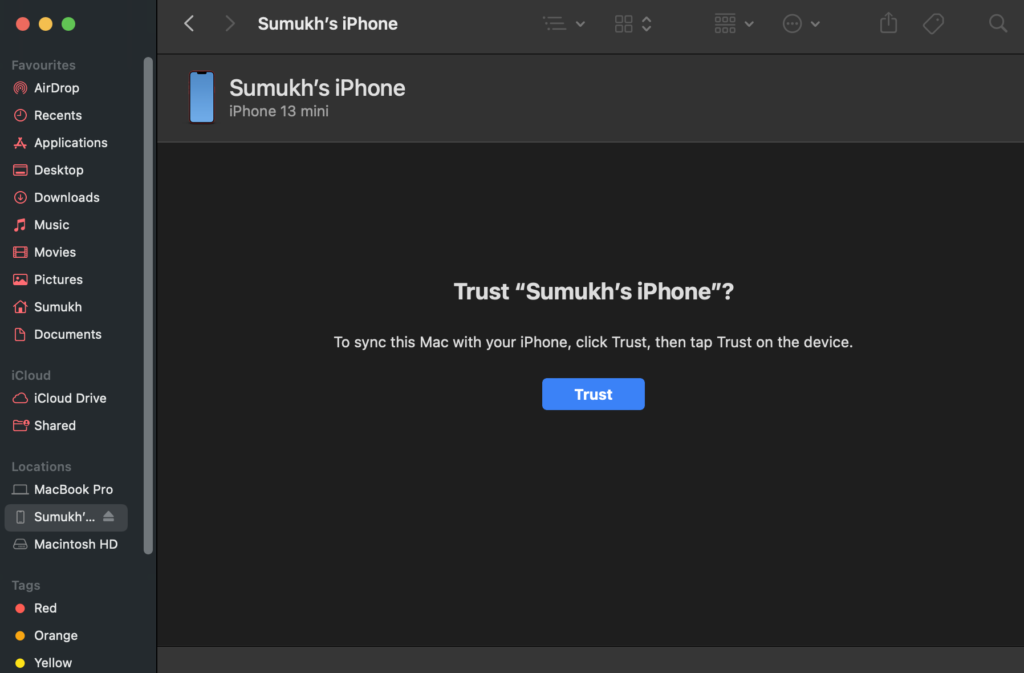
Step 2: Access the iPhone via the sidebar on Finder if you have a Mac. If you’re using iTunes, open the app and click on your iPhone.

Step 3: If you see a screen that asks you to hit the Trust button, you’re out of luck. You cannot take a backup of your iPhone and you will lose all your data.
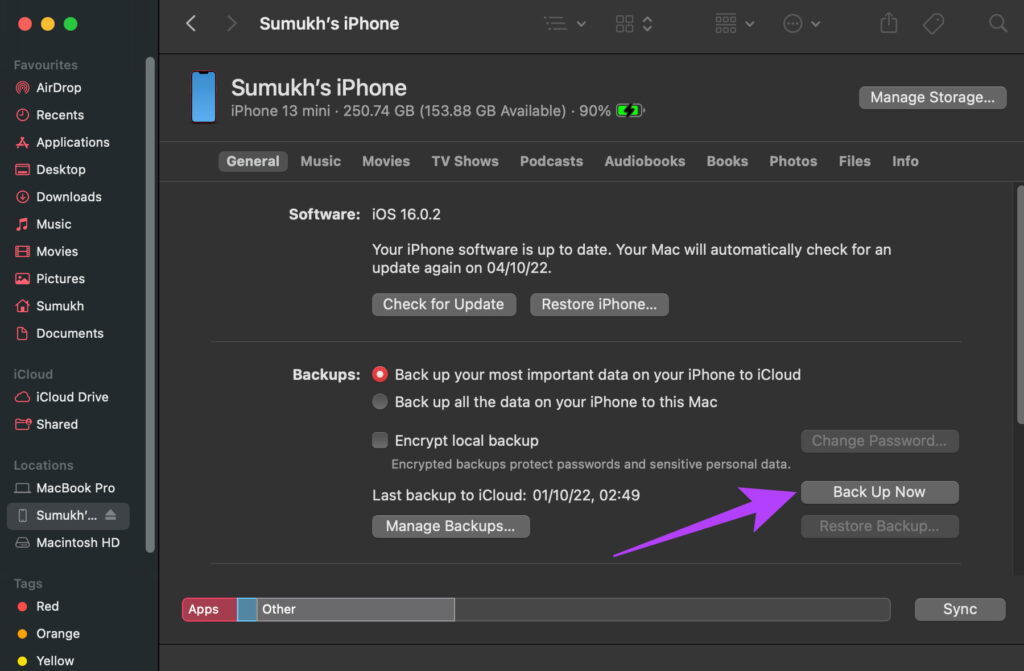
On the other hand, if you see a screen displaying info about your iPhone, you’re in luck! Click on ‘Back Up Now’ to start backing up your iPhone to your computer.
How to Reset Your iPhone Without Password
There are 3 ways to reset your iPhone when you’re locked out. You can use the method most convenient to you.
1. Reset Locked iPhone on iOS 15.2 and Above – The Easiest Way
With iOS 15.2, Apple introduced the ability to reset your iPhone directly from the lock screen after multiple failed attempts. This is the easiest way to reset your iPhone without the password. However, if you haven’t enabled Find My, updated your iPhone to iOS 15.2, or don’t have internet conenctivity, this method won’t work. If you meet the prerequisites, follow along:
Step 1: Try entering your passcode on the lock screen. You will see the Security Lockout message after a few wrong attempts. Once you’ve input the wrong passcode several times, the option to reset your iPhone will appear.
Step 2: Select the Erase iPhone option in the bottom-right corner of your screen.
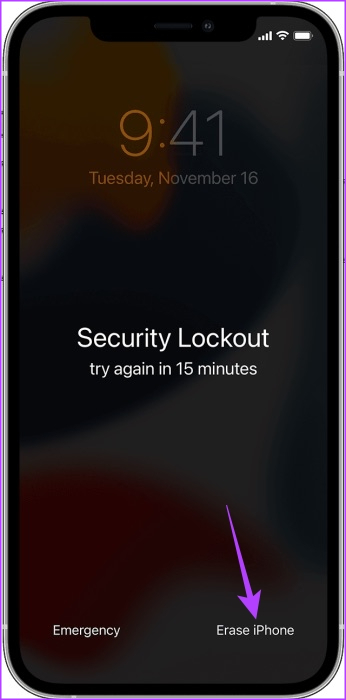
Now, enter your Apple ID and password to reset your iPhone.
2. Reset iPhone Without Password Using Find My
Find My is a tool that is generally used for tracking your lost or stolen iPhone. However, you can also use it to reset your iPhone remotely without entering the passcode. Note that for this method to work, your iPhone must be connected to the internet either via Wi-Fi or mobile data.
Step 1: Head over to the Find My website on another device. Log in with the same Apple ID as the one used on the locked iPhone.
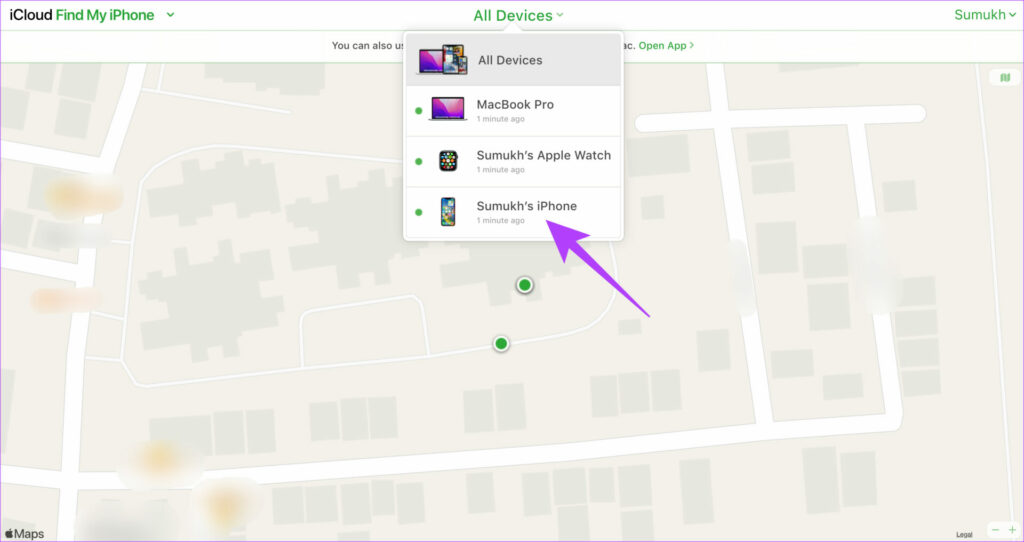
Step 2: Click on All Devices on the top and select your iPhone from there.
Step 3: Now, select Erase iPhone.
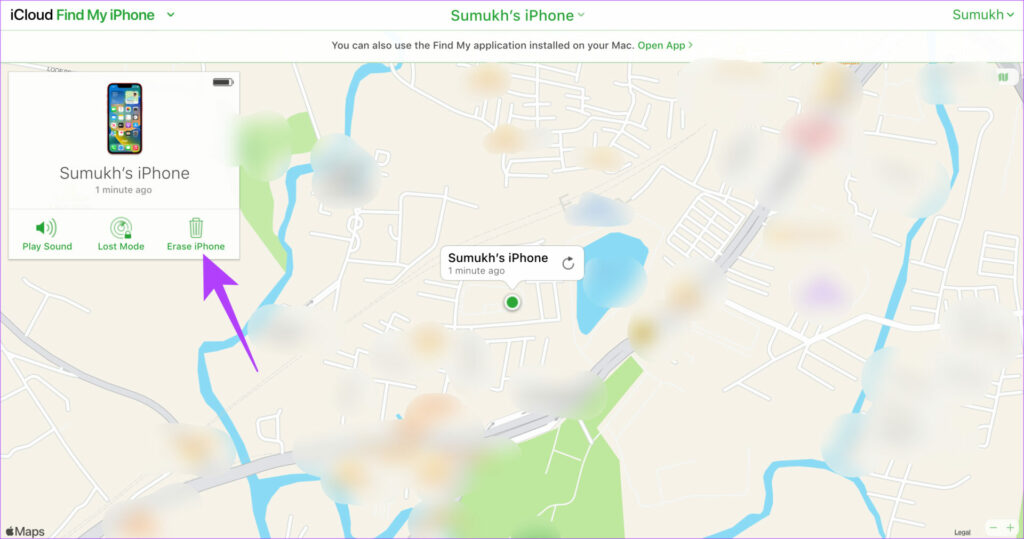
If your iPhone is connected to the internet, it will reset.
3. Reset iPhone Without Passcode Using iTunes or Finder
If the other 2 solutions didn’t work for you, you will have to reset your iPhone using iTunes on Windows or Finder on Mac. Here’s how to do that.
Step 1: Connect your iPhone to your Mac or PC using a lightning cable.
Step 2: Enter the recovery mode on your iPhone by following these instructions:
- For iPhone 8 and later: Press and release the volume up button, then press and release the volume down button. Now, quickly press and hold the side button until you see the recovery mode screen.
- For iPhone 7 and 7 Plus: Press and hold the volume down button and the power button until you see the recovery mode screen.
- For iPhone 6S and earlier: Press and hold the home button and power button until you see the recovery mode screen.
Step 3: Access the iPhone via the sidebar on Finder if you have a Mac. If you’re using iTunes, open the app and click on your iPhone.
Step 4: You will now see a prompt that says there’s something wrong with the iPhone and it needs to be updated or restored. Select the Restore option.
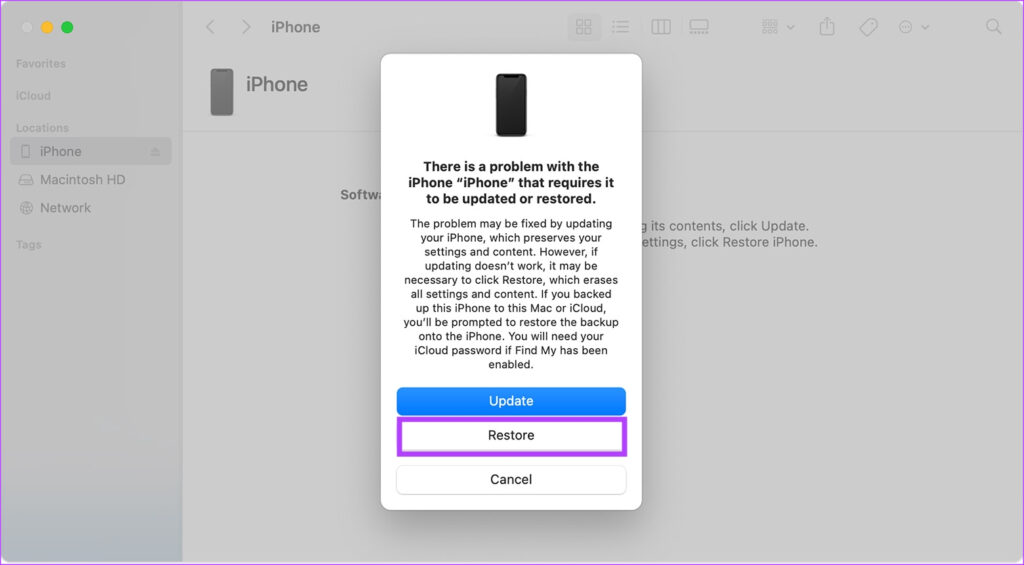
Your computer will now download the relevant iOS software and begin the restore process. Wait for the process to complete and your iPhone will reset without the password.
If your iPhone exits the recovery mode before the restore process starts, disconnect your iPhone from the computer, let the download complete, and connect it back.
How to Restore Backup After Resetting the iPhone
After your iPhone resets, it’s time to set it up and restore your backup. If you weren’t able to take a backup or you don’t have a prior backup, you can skip this step. Go through the setup process normally and enter the password to the Apple ID that you used previously. After that, you can use your iPhone without any passcode.
If you have a backup, though, here’s how you can restore it.
Step 1: Go through the initial setup process on the iPhone. Log in to the same Apple ID that you used to take the backup before resetting the iPhone.
Step 2: When you reach the Apps & Data section, select which type of backup you want to restore. If you have an iCloud backup, select ‘Restore from iCloud Backup’. If you backed up your iPhone to your Mac or PC, select the second option.
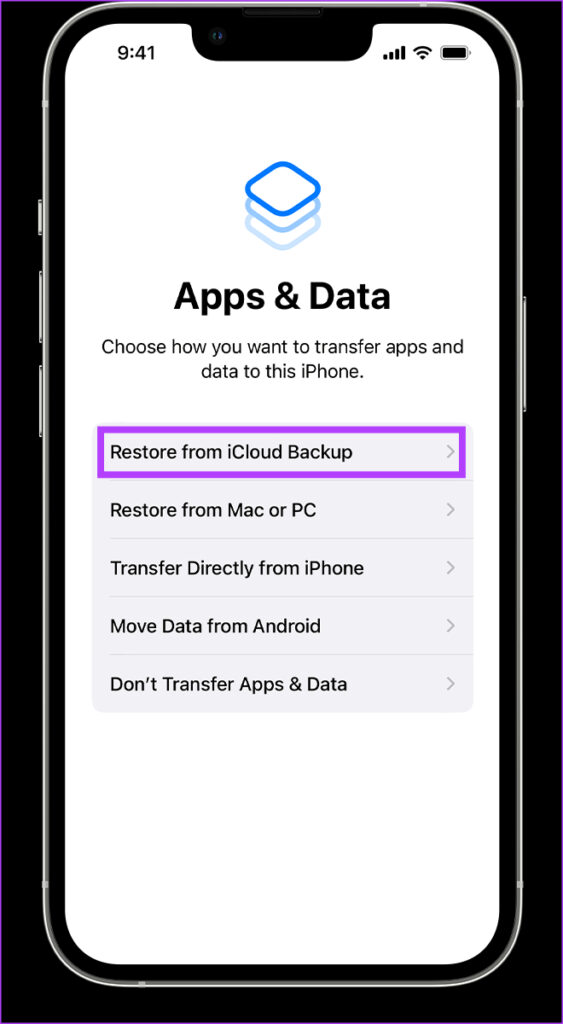
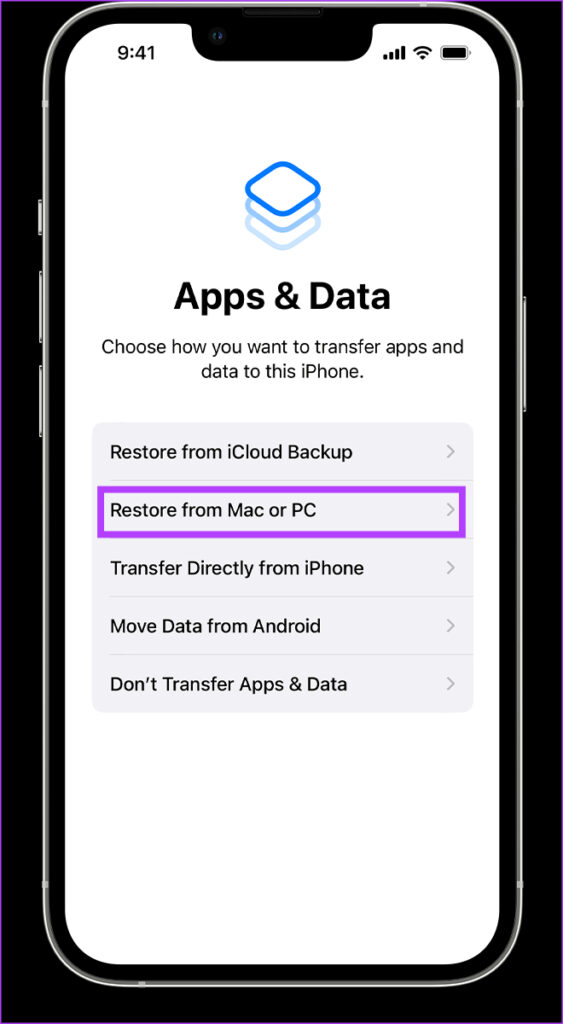
Step 3: If it’s an iCloud backup, it should start restoring automatically. If it’s a backup on your computer, plug in your iPhone via a lighting cable and select the Restore Backup option.
How to Change Your iPhone Passcode
Now that you’ve set up your iPhone, here’s how you can change the password to something that’s not too simple to guess but easy to remember.
Step 1: Open the Settings app on your iPhone. Navigate to the Face ID & Passcode section.

Step 2: Scroll down and select Change Passcode.
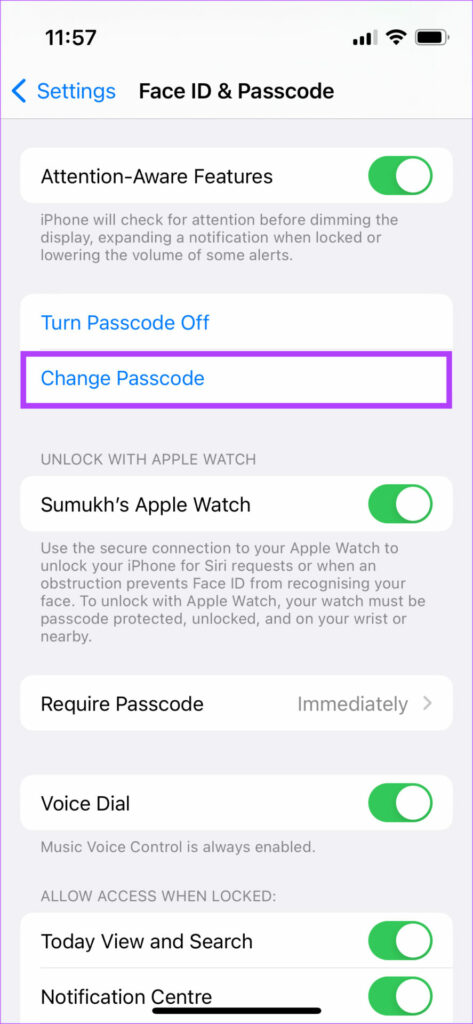
Enter your current password and then enter the new password you want to set. You’ve successfully changed your iPhone’s passcode.
FAQs About Resetting iPhone
No, Even if you take your iPhone to Apple, they will reset it if you forgot your passcode.
Yes, you can use a different Apple ID with your iPhone. However, you will first have to enter the password to your old Apple ID to verify your identity before signing in with a new Apple ID.
That’s not possible. Resetting your iPhone will erase the data. However, if you have a backup, you can restore it and all your data will be intact.
Revive Your Locked iPhone
As you can see, if you forgot your iPhone password, it’s not the end of the world! You can always reset your iPhone password using one of the abovementioned methods and bring your locked iPhone back to life. If you’ve regularly backed up your iPhone, you can even restore the entire data so you don’t lose out on your photos, files, and apps.
Was this helpful?
Last updated on 06 October, 2022
2 Comments
Leave a Reply
Read Next
 How to Send Pictures From Android to iPhone (Without Losing Quality)
Method 1.
How to Send Pictures From Android to iPhone (Without Losing Quality)
Method 1.
 Forgot Your Discord Password: 4 Ways to Change or Reset It
How to Change Discord Password For Mobile Note: The steps to change your Discord password are the same for Android phones and iPhones.
Forgot Your Discord Password: 4 Ways to Change or Reset It
How to Change Discord Password For Mobile Note: The steps to change your Discord password are the same for Android phones and iPhones.
 How to Remove or Reset a Forgotten Screen Time Passcode on iPhone and Mac
Screen Time settings are a useful addition to the iPhone, iPad, and Mac.
How to Remove or Reset a Forgotten Screen Time Passcode on iPhone and Mac
Screen Time settings are a useful addition to the iPhone, iPad, and Mac.
 4 Ways to Fix iPhone Keeps Losing Network Connection
https://youtu.be/cl362Rq-6IU Basic Fixes: Ensure you have an active mobile plan: Did you forget to pay the postpaid bill?
4 Ways to Fix iPhone Keeps Losing Network Connection
https://youtu.be/cl362Rq-6IU Basic Fixes: Ensure you have an active mobile plan: Did you forget to pay the postpaid bill?
 Forgot Samsung PIN or Pattern? Here is How to Unlock the Device
Factory Reset Your Samsung Device If you forget the PIN or pattern on your Samsung device, a factory reset is the only solution.
Forgot Samsung PIN or Pattern? Here is How to Unlock the Device
Factory Reset Your Samsung Device If you forget the PIN or pattern on your Samsung device, a factory reset is the only solution.
 4 Ways to Fix Android Phone Keeps Losing Network Connection
Basic Fixes Check network connection: Ensure there's enough signal strength, or move to different surroundings.
4 Ways to Fix Android Phone Keeps Losing Network Connection
Basic Fixes Check network connection: Ensure there's enough signal strength, or move to different surroundings.
 How to Reset iPhone and What Happens When You Reset iPhone
https://youtu.be/VPnZOK4EqVQ How to Reset iPhone to Factory Settings Before we move on to erasing data or settings on the iPhone, check out the section below to ensure your data or
How to Reset iPhone and What Happens When You Reset iPhone
https://youtu.be/VPnZOK4EqVQ How to Reset iPhone to Factory Settings Before we move on to erasing data or settings on the iPhone, check out the section below to ensure your data or
 How to Secure iPhone Using Screen Time Passcode
What Is Screen Time on iPhone?
How to Secure iPhone Using Screen Time Passcode
What Is Screen Time on iPhone?
The article above may contain affiliate links which help support Guiding Tech. The content remains unbiased and authentic and will never affect our editorial integrity.
Are there any way to unlock my iPhone if I don’t want to factory reset iPhone without passcode. Thank you.
In general, there is no way to remove your passcode without resetting the device.
The method introduced in this article is very comprehensive, thank you very much.
Speaking of which, some third-party software like Joyoshare iPasscode Unlocker can even remove passcode without Apple ID.